1
VISION TOUCHSCREEN
Toll free: 1 866 362 0445
T: 905 569 1605
E: [email protected]
USER MANUAL
2/6
Basic Operating steps
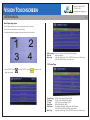
This D3 Media Touchscreen has a push button switch on the rear
to change from touchscreen to normal mode.
The selected mode will appear on the top left corner of the screen.
OSD Language Options Chinese and English (Default: English)
Defaults
Reset to defaults
Main Page
Highlight “Main Page”, Press “ENTER” and return to Main Page,
press UP / DOWN key to move the cursor
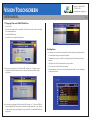
1.2 Video Page
1. Press "STOP" button
Main menu page.
and then "SETUP” button
to enter into the
Video Output
TV Display
TV Type
Resolution
JPG Rotate
Main Page
RGB or YPbPr output (Default: RGB)
4:3 PS / 4:3LB / Wide (Default: Wide)
NTSC / PAL / Auto (Default: NTSC)
480P / 480I (Default: 480P)
No Rotation / Rotation 90 / Rotation 180 / Rotation
270/ HOR Flip / VER Flip (Default: No Rotation)
Highlight “Main Page”, Press “ENTER” and return to Main Page
©2013 McRae Imaging Inc.