1
Library Operation
Using Online Repair
Using Online Repair
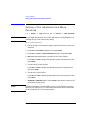
1 2 ➞ ADMIN* ➞ PSWD 000 000 000 ➞ ONLINE REPAIR
Online repair is a feature that allows:
•
Authorized service representatives to replace a faulty drive while the
library is active.
•
Users to clear a drive cleaning error when the tape in the drive may be
damaged.
Under normal conditions, this option should only be used by an HP qualified
authorized service representative. However if an older, frequently-used tape
causes a drive cleaning message to be displayed more than once and the
administrator suspect the tape is damaged, the Online Repair option can be
used to clear the drive error message so the administrator can attempt to
recover data from the damaged tape.
The library drive mechanism(s) are inactive while this option is in use.
Library Operation
CAUTION
To use this option to clear a drive cleaning error:
1. With CLEAN DRV # displayed, press CANCEL until the drive status
displays. (# is the drive number containing the damaged tape.)
2. Press NEXT until ADMIN* displays, then press ENTER.
3. Enter the three-part numerical password (see “Entering the
Administration Menu Password” on page 4-7).
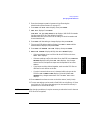
4. INFO* displays. Press NEXT or PREV until ONLINE REPAIR* displays,
then press ENTER. DRIVE POWER* displays.
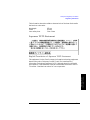
5. Press NEXT or PREV until DRIVE STATUS displays, then press ENTER. DRV
1 ON GOOD displays.
•
If the damaged tape is in drive 1, press ENTER.
•
If the damaged tape is in drive 2, press NEXT until DRV 2 ON GOOD
displays, then press ENTER.
DRV # ON GOOD displays, where “#” is the drive number and ON GOOD
is flashing.
4-35