1
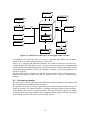
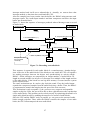
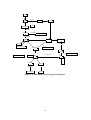
Digital Sound Recorder
Record a message
Playback message
Delete message
User
Set alarm time
Set clock time
Watch time
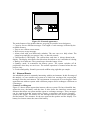
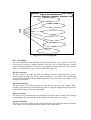
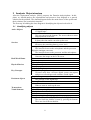
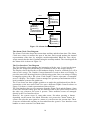
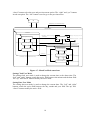
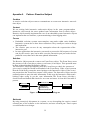
Figure 2.3: Use Case diagram
2.2 Use Cases
Use cases describe the functionality of the system from the user’s point of view. The
user may be a person or another machine. Each use case is a different way to use the
system and the completion of each use case produces a different result. In our system
there are six different use cases, represented in the Figure 2.3.
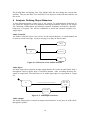
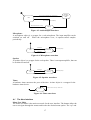
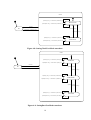
Record a message
The user selects a message slot from the message directory and presses the ‘record’
button. If the message slot already stores a message, it is deleted. The system starts
recording the sound from the microphone until the user presses the ‘stop’ button, or the
memory is exhausted.
Playback a message
The user selects a recorded message slot and then presses the ‘play’ button. If th
message slot contains a recorded message then it is played trough the speaker until its
end or until the user presses the stop button.
Delete a message
The user selects a used message slot and then presses the ‘delete’ button. The message
is permanently deleted from the memory and its memory space is recycled.
Set the alarm time
The user can switch on and off the alarm and set the time when the alarm will sound.
This is done by selecting the different options of the alarm menu.
4