1
EMUL68™-PC
Chapter 2. Software User Interface
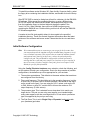
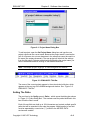
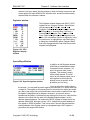
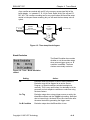
Source Windows
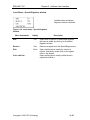
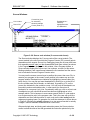
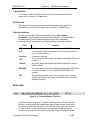
Line number
Source file
Current line (next
for execution)
shown by triangle
Cursor (under ‘m’)
Breakpoint set shown by
highlighted multiline statement
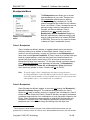
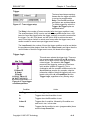
Figure 2–29. Source code window (C source code shown)
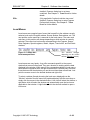
The Source window displays the C source code of the current module. The
current module is the one into which the Program Counter (PC) currently points.
Assemblers which support Source Line Debugging (many do not) may also have
their assembly source code (not the disassembled code from memory as shown
in the Program window) displayed in this window. Like a Program window, a
Source window displays the source text, line numbers, a cursor (in this case a
blinking underline), and a small arrow between the line numbers and the source
text to indicate the current Program Counter value.
You may use the mouse or arrow keys to position the cursor, then use <F4> to
execute your program to the current cursor position in the same way as in the
program window. Breakpoints are indicated by highlighting (reverse video) the
entire line(s). You may set and reset breakpoints by clicking on or to the left of
the line number near the left border, or alternately, by pressing <F2> on the
current line indicated by the underline cursor. You may only set breakpoints on
lines which produce executable code - in other words you cannot set a
breakpoint on a comment (only) line. Occasionally when you click on a line to set
a breakpoint you will notice that several lines become highlighted as in the
example above. This is because in some cases several lines of C code resolve
to a single execution point in the program code. This is the case with multi-line
statements and lines which produce no code, such as the label main() and the
subsequent opening brace. An example of a multi-line statement is shown above
in Figure 2–29 where the printf() statement is on two source lines but is actually
a single C source statement terminated with a semi-colon.
After each single step, and during each animation pause, the Source window
scrolls to show the source line that generated the instruction pointed to by the
Copyright © 1997 ICE Technology
• 2–39