1
BMC Bioinformatics 2007, 8:288
http://www.biomedcentral.com/1471-2105/8/288
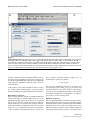
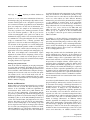
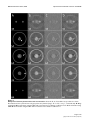
Figureinterface
TomoJ
1
TomoJ interface. A: ImageJ user interface as presented after launching TomoJ. Note that the toolbar differs from the standard ImageJ toolbar. The standard toolbar can be regained by using the "switch toolbar" button on the TomoJ interface. B:
TomoJ interface divided into four regions. Top: global menus. Bottom (left to right): the regions devoted to automatic alignment, tools that require point selections, and 3D reconstruction. C: Data set window. The header includes the tilt-series
name, the number of the visualized image in the total stack, the total number of images in the stack, the tilt angle corresponding to the visualized image, the image byte type, and the total memory occupied by the stack.
Saxton [36] models. If other acquisition models are used,
tilt angles can be provided by a text file. The tilt angles can
then be manually modified, if required, for any individual
image using the command "assign tilt angle" from the
menu of TomoJ.
A single image can be removed from the tilt series using
the "remove image" button (Figure 1). This operation
does not modify the tilt-angle assignment of other images.
Normalization of tilt series
Tilt-series images must be placed in a common numerical
framework in order to eliminate differences between the
individual dynamic ranges. These differences are mainly
due to the fact that the electron beam crosses different
sample thicknesses as a function of the tilt angle. Normalization also facilitates visualization of the tilt series. Each
image (8, 16, or 32 bits) from a tilt series is expanded to a
32-bit real number and normalized to have a mean of 0
and a constant standard deviation (equal to 1), as
described in [37] using the equation:
In = (Im - Îm)/σm
where In is the normalized pixel value of an image, Im is
the original pixel value, and Îm and σm are the average and
standard deviation of the pixels from the whole image,
respectively. The normalization procedure is launched by
the TomoJ "normalization" button (Figure 1). Output is
generated as a 32-bit real image stack.
Alignment of tilt series
Correct registration (shift and rotation correction) of the
images from the tilt series is necessary to produce a quality
tomogram. TomoJ enables automatic and semiautomatic
alignment. If the data set has a low signal-to-noise ratio,
shift and rotation corrections can be computed from filtered data ("band pass filter" button in the TomoJ inter-
Page 3 of 9
(page number not for citation purposes)