1
Harrison R&D
281-751-8836
Houston, TX
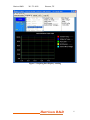
Logging Data to Disk
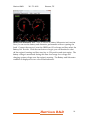
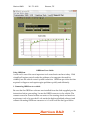
This function allo s the saving of selected data, um to 6 marameters, to disk using
the data log control. Simmly turn ON or OFF the data log before starting the
gramhing dismlay. More information on data logging is found in the Dog 6X
function descrimtion.
Data Logger with Triggers and 6X CAN speed.
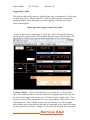
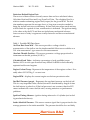
You get to this screen by clicking the “Log X6” tab. The Lox X6 has two behaviors,
one for vehicles equipped with CAN bus and the other for legacy OBD-II vehicles. All
data displayed in this screen can be presented in the Metric or U.S. system units.
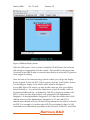
CAN Bus Vehicles l In the screen shot above, you notice the CAN 6X Datae
label. This indicates that the vehicle connected is equimmed ith CAN bus and
the Dog 6X data logger ill use the ne CAN bus only 6X sammle mode. This
lets the scan tool access 6 marameters at once, giving efective data rates of over
100 sammles/sec. The CAN bus function al ays defaults to six data sammles.
ach sammle can be selected from the data set summorted by the vehicle by using
the drom do n box selection. Sammle #1 is sho n ith the drom do n activated.
Harrison R&D
7