1
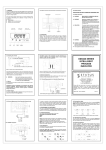
INTRODUCTION TROUBLE SHOOTING System Description If the UPS failed to operate properly, please review the following checks firstly. If the problem remains, please consult sales agent for service. The product is line interactive UPS with the newest technology and powerful function. The Line Interactive UPS is with AVR function allows input voltage range from 75% to 125%, including on line voltage boost-up & buck down. Ideal protection equipment for critical connected loads. In addition, This UPS provides advanced single telephone line or modem surge suppression through the modular connectors on the back panel. The Line Interactive UPS and iMate monitoring software makes our computer operate intelligent and provides you with the ability of perfect protection of Is the Master power switched on? Is the UPS plugged into a correctly working outlet? Is the line voltage within the rating specified? Is the fuse on the rear panel blown? Is the UPS over loaded? Is battery not fully charged? Dead battery? Charger failure? Please provide the following information when call for service. 1. Model number, serial number. 2. Date of the problem occurred, date of purchase. 3. Full description of the problem including load, LCD, and alarm status, installation condition, working environment, etc. your critical devices. Trouble-Shooting Chart Problem Features Possible Cause Front panel switch ¾ Line interactive design. ¾ User-friendly LCD display. No light, and no alarm ¾ Provide boost and buck AVR to stabilize input voltage. (UPS not on) ¾ Provides lightning, surge, overload, and short-circuit protection. ¾ Built-in CCCV battery charger and battery over drain protection. ¾ No load auto shutdown (Dip switch setup). ¾ Load level and Battery level display. ¾ Buzzer alarm auto-reset (Dip switch setup). ¾ Auto restart when AC recovery. ¾ Cold start function (Dip switch setup). ¾ Tel / Modem / Fax / Internet surge suppression. ¾ Bundle software:Automatically save your valuable files before auto in off position. Rear panel fuse burnout. No “Line-on Caution To Take Turn on switch. Replace fuse restart UPS. Power cord lose Check input power. LCD” Power cord lose Check input power. light, and alarm beeps every few seconds. AC Fuse burnout. Replace fuse, if problem remains, call for service. Recharge the battery for at Backup time is less Battery is not fully least 6 hours, re-test the than the rating. charger failure. backup time. If problem remains, call for service. shutdown. -2- 15-