1
OVERVIEW
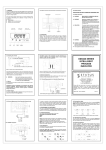
Front Panel
SPECIFICATIONS
1250VA
1750VA
Modem/Phone Protection
RJ-11/RJ-45
Lightning/Surge
480joules
Protection
AVR
Function
(Auto.
Voltage
Boost/Buck
Regulation)
DC Start Function
Yes
Auto. Restart UPS
Yes
Over/Under
Yes
Voltage
1.
2.
3.
Master Power Switch: Turn on / off the UPS.
Line-On: AC Normal.
AVR Protection LCD: When AVR is working under protection mode, the
light will turn on.
4. Back-Up: Battery in back-up
5. Over Load: If the UPS is overloaded, the light will turn on and the alarm will
sound continuously.
6. UPS Cut-Off: Overload or Cut-off
7. Battery Level: A bar graph showing how much of the UPS battery is being
used.
8. Load Level: A bar graph showing how much of the UPS power is being
used.
9. Hot swap battery
10. UPS Test Switch: When UPS is working under AC mode, it also activates
the UPS’s self-test by press the bottom.
Protection
CE (EN50091-1,EN62040-1-1)
Safety Standard
FCC Part 15 Class B,CE
EMC Standard
(EN50091-2,EN55011,EN61000-3-2,EN61000-3-3)
Environment
Operating Temperature
0 ~ 40℃ / 32 ~ 104℉
Relative Humidity
5.
< 40dB at 1M
Dimension
19”*2U*18.31 in. / 19”*2U*465 mm
(D*W*H)in./mm
Net Weight
1.
2.
3.
4.
0 ~ 95%, non-condensing
Audible Noise
Physical
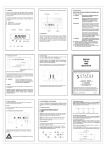
Rear Panel
34.17lbs / 15.5kg
6.
7.
8.
Outlets
AC Input
AC Fuse
Tel / Modem Spike Projection Port: Telecom transfer ports provide users
to extend the applications.
Communication Interface Port: This socket combines relay contact
signals and RS-232 signals (Option) on DB9 connector.
UPS Function Set up
Communication Interface Port: USB Port
Surge Protection Only
55.12lbs / 25kg
9. External Battery Connector
*Specifications may change at any time without notice.
*All trade marks belong to their respected owners.
-12-
-5-