1
NVR8/16 Embedded
Quick Installation Guide
Network Video Recorder
Schedule Recording
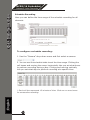
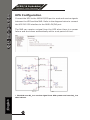
Here you can define the time range of the schedule recording for all
channels.
To configure a schedule recording:
1. Use the “Camera” drop-down menu and first select a camera.
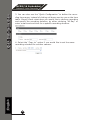
2. You can use the schedule table to set the time range. Clicking the
cell boxes and moving the curser horizontally lets you set what hours
to perform recording during a day. Clicking and moving vertically
lets you set what days to perform recording at a specific time.
English
* Each cell box represents 15 minutes of time. Click one or more boxes
consecutive recording.
21