1
DropSense Integration Manual
v0.9
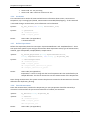
dropplate, type etc of the sample is defined. The columns may be random order: the Experiment
Definition Settings file defines the meaning of the column (see next section).
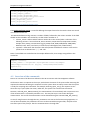
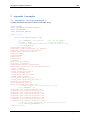
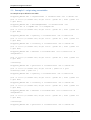
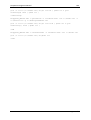
An example of a sample definition string is shown in table 1:
DropFrame
DropFrame
DropFrame
DropFrame
DropFrame
DropFrame
DropFrame
DropFrame
DropFrame
DropFrame
DropFrame
DropFrame
DropFrame
DropFrame
DropFrame
DropFrame
1,A1,blank,DropFrame 1,A1
1,B1,sample1,DropFrame 1,A1
1,C1,sample2,DropFrame 1,A1
1,D1,sample3,DropFrame 1,A1
1,E1,sample4,DropFrame 1,A1
1,F1,sample5,DropFrame 1,A1
1,G1,sample6,DropFrame 1,A1
1,H1,sample7,DropFrame 1,A1
1,A2,sample8,DropFrame 1,A1
1,B2,sample9,DropFrame 1,A1
1,C2,sample10,DropFrame 1,A1
1,D2,sample11,DropFrame 1,A1
1,E2,sample12,DropFrame 1,A1
1,F2,ample13,DropFrame 1,A1
1,G2,sample14,DropFrame 1,A1
1,H2,sample15,DropFrame 1,A1
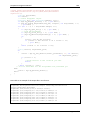
Table 1 : example Sample Definition String with16 samples on one plate, all samples using A1 as blank reference.
Note an experiment may contain multiple plates : all samples of the plates defined in the experiment
are collected in one (large) sample definition string. After definition of the experiment, an array with
the DropFrame_ID’s defined in the sample definition string is returned. If the script tries to measure
more plates than defined in the sample definition string, or if the script asks the DropQuant to send
the results without having measured all plates defined in the Sample Definition File, then an error
message is returned.
!
It is the responsibility of the script programmer to offer the exact number of plates
to the DropSense instrument as defined in the sample definition string.
After defining an experiment, the DropQuant software returns an array with
names of the plates defined (cfr paragraph 4.3.7). This can be used in the script to
make sure the plate inserted to the DropSense instrument are the ones that are
expected by the DropQuant software.
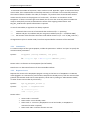
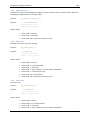
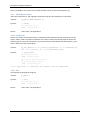
Experiment Definition String contains 2 sections: [Experiment definition] and [Import samples]. The
[Experiment definition]section describes the general settings of the experiment. The [Import
samples] section describes the format of the sample definition file. Next fields must be in the
[Experiment definition] section:
•
•
•
•
3
Experiment name : user defined name3
Experiment description : user defined text
Sample type : “Nucleic Acids” or “Purified Proteins”
Material : the material name. Note the name must be defined in the material database of the
DropQuant program (installed at the host PC). Names that are defined standard are:
o in case of Nucleic Acids : “dsDNA”, “ssDNA”, “RNA”, “Oligo”,
If the string contains whitespaces, then add a “ before and after the string.
Page 17 of 28