1
F.10 v.2 OPERATING MANUAL
INTERACTIVE CONTROL CONSOLE
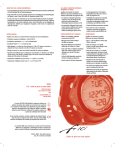
The Interactive Control Console consists of four Control Buttons that allow you to select mode options and access specific information. They are also
used to enter Settings, operate the Backlight, and access additional screens of information.
Throughout this manual they will be referred to as the M, S, L, and A buttons.
•
•
•
•
Upper/Left - Mode (M) button
Upper/Right - Select (S) button
Lower/Right - Light (L) button
Lower/Left - Advance (A) button
M
S
A
L
OPERATING MODE STRUCTURE
Unless it is operating in Free Dive mode, the F10 will be On in the default Watch Main Time (home time) mode (Fig. 1), like a standard Watch, until
the mode is changed.
The M button is used to access 4 other modes that include Alternate Time, Countdown Timer, Chronograph (stop watch/run timer), and Daily Alarm. It
is also used to revert to the Local Default Time display and access Free Surface Mode.
The screens of the Main Modes and Sub Modes will remain on display until a button is pressed to access another screen or mode, activate a sequence, or for 2 minutes if no button is pressed. The Chronograph remains on display unless turned Off or another mode is accessed.
Fig. 1 - MAIN TIME
When operating in Free Mode, the F10 will enter Dive Mode upon descent to the DSD (Dive Start Depth) previously set which can be 2, 4, or 6 FT
(feet) or 0.6, 1.2, or 1.8 M (meters) for 1 second. See page ?? for Set DSD.
Main Sequence
(while at home)
Main Time
Alternate Time
Countdown Timer
Chronograph
Daily Alarm
WARNING: The F10 must be in Free Surface Mode in order for it to activate Dive Mode. Commencing a dive while in
Watch modes will not activate Dive Mode.
OPERATION AS A DIVING GAUGE
Entering Settings relating to diving activities is only available in Free Surface Mode which also allows access to a Countdown Timer (separate from the
Watch CDT), Log, and History Modes.
PC INTERFACE
Interface with a PC, to allow uploading settings and downloading data, is accomplished by connecting the F10 to a PC USB Port using the special ACI
(AERIS Computer Interface) USB Interface Cable.
The software program together with the USB Driver required is on the ACI CD, as can be downloaded from the AERIS web site. The program's HELP
serves as the user manual which can be printed for personal use.
Alternate Sequence
(at a travel location)
Alternate Time
Main Time (home)
Countdown Timer
Chronograph
Daily Alarm
The Settings Upload portion of the ACI program can be used to set/change the Main Time, Date, Set A group (Alarms), and Set U group (Utilities)
using the same Interface System.
Information available for retrieval (Download) from the F10 to the PC Download portion of the program includes dive number, surface interval time,
start depth, end depth, maximum depth, elapsed dive time, start date, start time, lowest temperature under water, sampling rate, dive profile, and Set
Points.
The ACI program also allows update of select versions of the F10's firmware (operating system software).
• Refer to page 24 for more details relating to PC Interface.
ALPHA NUMERIC MESSAGES
The upper line of digits on the LCD screen is used to convey alpha numeric graphic Messages such as Day of the Week, Mode of Operation, items
being Set, and Alarm identification. At times, the lower line is also used to display graphics such as On/Off, Set, and Seconds.
AUDIBLE ALARM
A LED Warning Light, located on the left side of the housing, is synchronized with the Audible Alarm. It will flash as the Audible Alarm sounds. It will
turn off when the Audible shuts off. The Audible and LED will not be active if the Alarm is set OFF, a group A setting which completely disables it.
When Alarms strike, the Backlight will come On if Off and remain On until you turn it Off by pressing/releasing the L button or automatically after 10
seconds.
Situation that will sound (2) 2 second beeps • EDT (Repeating Elapsed Dive Time) Alarm, if set On.
Situations that will sound 3 sets of (3) 1 second beeps • Watch Daily Alarm (surface only), if set On.
• Watch Countdown Timer reaches 0:00 (hr:min), if set On.
• Free Mode Countdown Timer reaches 0:00 (min:sec), if set On.
• SRT (Surface Recovery Time) Alert, if set On.
• RDI (Repeating Depth Interval) Alarm, if set On.
Situation that will sound (3) sets of (3) .125 second beeps • Descending Depth Alarms DD 1, DD 2, and DD 3, if set On.
© 2002 Design, 2011
6
Doc. No. 12-7260-r01 (4/19/11)