1
AWK-4131
Web Console Configuration
Web Browser Configuration
Moxa AWK-4131’s web browser interface provides a convenient way to modify its configuration and access the
built-in monitoring and network administration functions. The recommended web browser is Microsoft®
Internet Explorer 7.0 or 8.0 with JVM (Java Virtual Machine) installed.
NOTE
To use the AWK-4131’s management and monitoring functions from a PC host connected to the same LAN as
the AWK-4131, you must make sure that the PC host and the AWK-4131 are on the same logical subnet.
Similarly, if the AWK-4131 is configured for other VLAN settings, you must make sure your PC host is on the
management VLAN.
The Moxa AWK-4131’s default IP is 192.168.127.253.
Follow these steps to access the AWK-4131’s web-based console management interface.
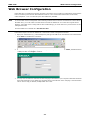
1. Open your web browser (e.g., Internet Explorer) and type the AWK-4131’s IP address in the address field.
Press Enter to establish the connection.
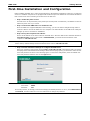
2. The Web Console Login page will open. Enter the password (default Username = admin; default Password
= root) and then click Login to continue.
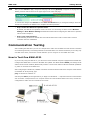
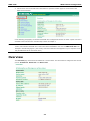
3. You may need to wait a few moments for the web page to download to your computer. Note that the Model
name and IP address of your AWK-4131 are both shown in the title bar of the web page. This information
can be used to help you identify multiple AWK-4131 units.
3-2