1
Installation
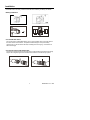
Install the batteries into the instrument body, charge the monitor battery, connect the camera
and flexible tube to the body, insert the micro SD card. Install any accessory as needed.
Battery Installation
Connect Monitor Power
The monitor has a rechargeable battery. Plug in the AC adaptor and connect the cable to
the DC5V socket on the monitor. The power indicator will light in red (or the battery
capacity icon on LCD of monitor will blink, indicating that it is charging - and will turn off
after a full charge)
Connect the camera and flexible tube
Connect the camera tube to the instrument body; ensure that the keyed ends are properly
aligned. Once aligned, tighten the knurled knob to hold the connection firmly in place.
4
BR200-BR250 V4.3 8/09