1
S E C T I O N
6
System Programming
• • • • • • • • • • • • • • • • • • • • • • • • • • • • • • • • • • • • • • • • • • • • • • • • •
General
The system can be programmed using either of two methods:
• Directly, through the keypad.
• Remotely, through the PC downloading software.
Keypad programming can be performed after completing the PROGRAMMING
WORKSHEET in Appendix D of this manual. There are 36 total programming questions
numbered 00-35 plus seven descriptor Questions for Zones 1 through 7. Within each of the
first 36 Questions (except 01, 02, and 03 which contain 16 locations), there are 4 Locations
labeled L1 – L4 for data entry. Questions 36-42 contain 12 locations labeled L1-L12.
The system is shipped from the factory with SPECIFIC DEFAULT VALUES, which were
selected for a typical installation. If the default values are suitable for your installation, then
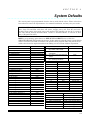
programming can be simplified. The default values are listed with each programming question and in Section 8: System Defaults.
FACTORY DEFAULT VALUES: To reload, remove all power from the system (AC and
DC). Next, short JP1 and JP2. With short still in place, reapply power (AC, then
DC) and wait 8 seconds. Then, remove short with power still applied. The installer
can also do a System or User Code Default through Installer Mode 1 (refer to the
"Installer Modes" list in Section 9: Summary of Keypad Functions).
NOTE: A DEFAULT LOCKOUT programming option exists within the
EZMATE/COMPASS PC Downloader. If this option is selected, then a system default will not
overwrite the CSID or installer code portion of the program. This will prevent an installer
other than the original installer from taking over an account without cooperation.
Programming Questions
Programming questions and their values are described below. First, completely fill in the
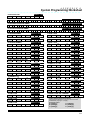
XL-2T SYSTEM PLANNING WORKSHEET in Appendix C. Next, complete the SYSTEM
PROGRAMMING WORKSHEET in Appendix D. Then enter the data as explained in
Section 7: Data Entry via Keypads. DO NOT ATTEMPT TO ENTER DATA BEFORE
COMPLETELY FILLING OUT THE PROGRAMMING WORKSHEET.
QUESTION 00
INSTALLER CODE.....................................................................................DEFAULT = 2468
The Installer Code is a 4-digit code reserved for installation company use. This is
the only code that can be used to enter the Program mode from the keypad. This
code cannot be used to arm or disarm the security system.
There are 4 locations (L1-L4) in this question. Enter any 4-digit installer code desired. This
code is used to ENTER the system programming mode via the keypad. Typically, each installing company uses a unique installer code in order to prevent unauthorized persons from
gaining access to their panels.
NOTE: The factory default value for the installer code is 2468 in Locations L1-L4, respectively. This question is accessed only through the direct access mode by selecting Question
00. BEFORE EXITING PROGRAMMING, VERIFY INSTALLER CODE.
SUGGESTION: Each installing company should use a unique installer code in order to pr event unauthorized persons from gaining access to their panels.
6–1