1
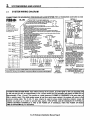
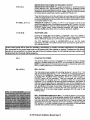
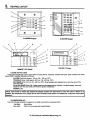
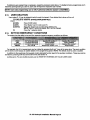
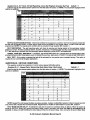
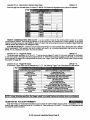
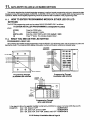
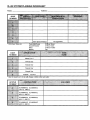
QUESTIONNUMBERS= ZONE LEDS:Thereare22total questions, with multiple data entry locations.
Zone LEDS 1 through 5 display the current QUESTION NUMBER (not the specific location within each question) as follows:
In the diagram shown on the following page, the question number is the total you get when you ADD the values of all
LEDS that afi ON.
EXAMPLES:
Zone 1 ON, Zones 2-5 OFF
= QUESTION 01
Zone 1 ON, Zone 2 ON, Zones 3-5 OFF
= QUESTION03
Zone 2 ON, Zone 3 ON, Zone 4 ON, Zones 1 and 5 OFF = QUESTION 14
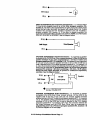
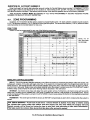
LOCATION CONTENTS = SYSTEM STATUS LEDS
The remaining status LEDS (ARM,STAY,lNSTANT,AC/LB) display the DATA that resides in EACH location within the
current question. As per the diagram which follows and explanation above, the value located next to each LED must be
ADDED to calculate the total data, for each location.
EXAMPLES:
Arm ON, Stay,lnstant,and AC/LB OFF
Arm ON, Stay ON, Instant and AC/LB OFF
=3
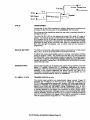
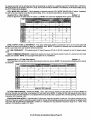
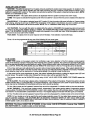
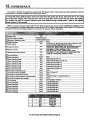
The following chart displays binary values that you will see on these LEDS for the letters A-F which may be entered in
some locations of the program sheet.
10 Stay &AC/LB = ON
A
11
B
Arrn,Stay, &AC/LB= ON
12
Instant, & AC/LB= ON
c
13
D
Arrn,lnstant, & AC/LB= ON
14
E
Stay,lnstant, & AC/LB= ON
15
F
Arm, Stay,lnstant, & AC/LB = ON
11.3.
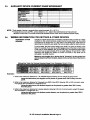
WHAT YOU SEE ON THE LCD KEYPAD
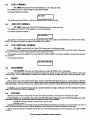
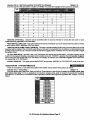
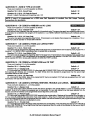
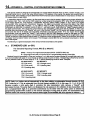
Upon entering the installer keypad programming following display will appear
EEcl
The display shows the current question number (QUES), the location within the question (L:) and the current value within
that location (DATA =). This corresponds to the programming worksheet.
11.4.
HOW TO ENTER DATA
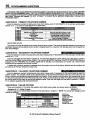
This section of the manual describes the physical keystrokes to enter the data written on the program sheet.
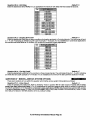
MOVEMENT BETWEEN QUESTIONS
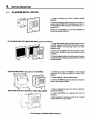
System program mode starts with question 1 displayed. RANDOM JUMPS TO
ANY QUESTION CAN BE MADE BY PRESSING THE* (ASTERISK) BUTTON
AND THE 2 DIGIT QUESTION NUMBER.
Questions can be accessed randomly or sequentially.
Example: Jump to question 07= Press* 07
MOVEMENT WITHIN QUESTIONS
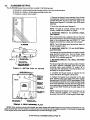
The proper question number will be displayed by the zone LEDS and the other
status LEDS will display the contents of the FIRST location in that question.
The zone LEDS display the question number and the other status LEDS display
the contents (data) within each location. MOVEMENT FROM LOCATION L1
TO THE NEXT LOCATION WITHIN ANY QUESTION CAN BE PERFORMED
BY PRESSING THE # (POUND) BUTTON.
The other status LEDS will display the contents of each location as this button
is pressed.
DATA ENTRY
To alter the value in any location , enter the desired DIGIT from the program
sheet, and press the # button.
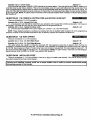
NOTE: THE # BUITON MUST BE PRESSED AFTER THE ENTRY OF the DESIRED DIGIT. THE SYSTEM WILL
MOT PROGRAM THE DIGIT UNTIL THE POUND (#) BUTI’ON IS PRESSED, THEREFORE IF A MISTAKE IS MADE
T CAN BE CHANGED.
XL-2G Hookup&
Installation
Manual Page 40