1
1.1.4
Loading the Camera Database File into DigiTools
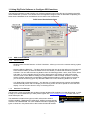
Having downloading the latest file from Pocket GPS World in the DigiDash (*.cam) format, the file must be
loaded into the DigiTools software. To do this, click on the “Load from Disk” button and select the file to be
loaded. The Pocket GPS World and DigiDash file versions will be displayed along with the number of camera
locations in the database.
1.1.5
Uploading the Camera database to the DD2-Lite
The database must now be uploaded or written to the DigiDash Display. With the DigiDash switched on and
connected to your laptop, clock on the “Write to DigiDash” button and the database file will be uploaded. The
information box in the DigiTools will show the progress of the upload and verification of the data.
Should you wish to check the current version of the DD2 database or verify that the file has been uploaded
correctly you can click on the “Dash Memory Check” button.
1.1.6
Configuring GPS Display Screens
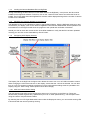
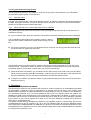
The Display Tab in the DigiTools Configure menu allows the user to turn on or off LCD information screens.
When changing the LCD screens shown on the display, ensure that the “Lite” tab is selected. You can then
turn on or off LCD screens according to preference. Once configured the settings must be uploaded to the
Display using the “Write Config” button (bottom left of above image).
1.1.6.1 AUX Lite Camera Alarm Setting
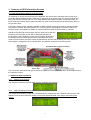
The AUX warning light LED can be configured to show one of 3 functions on the DD2 Lite. These are:
Neutral Gear (for bike engined cars); Speed Alarm (for over or under speed warning – set the speed value
using the “Alarms” tab) and Camera Alarm.
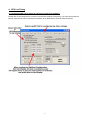
By selecting the Aux LED Light Mode radio button under the Display tab menu, you can set this warning LED
to illuminate with the camera proximity warning.
3