1
4.2 Using the GPS Lap Timing System
The GPS lap timing system is very simple to use and it will only take a few minutes for you to familiarise
yourself with using the system for the first time.
4.2.1
Hardware Setup
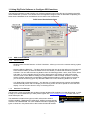
Included in the GPS package is the manual lap timing button “C” harness. This button should be plugged into
the DD2 “lap trigger” connector on the main harness. Once connected, this button is used to store the GPS
positions of the start line and 3 intermediate splits.
4.2.2
Setting the Start Line / Intermediate Split Time Co-ordinates
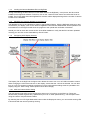
The system requires the user to drive round the circuit, pressing the manual button C to store the GPS coordinates to memory:
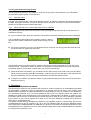
a) As you cross the start / finish line, press the manual button C and the following screen will be displayed.
The co-ordinates of this location will be stored in memory, and the
next time this position is passed the system begins timing your first
lap.
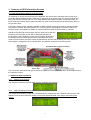
b) As you drive round the circuit you can divide the lap into 4 sectors. You simply press the button C to set
the GPS location to trigger each split timer:
The DD2 will indicate your performance in relation to previously recorded split times as you lap the circuit.
First the first lap, +9.99s will be shown as there are no previously recorded split times, but your second lap
will indicate whether you as faster or slower than your previous (or best) lap.
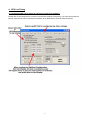
c) When the session has finished, you can select the LST / BST screen on the LCD to see your best (BST)
lap time, and by pressing button B on the display, cycle through your recorded laps. These lap times will
be stored indefinitely until you hold down button B for 2 seconds and reset the timers.
d) To begin a new session at a different location, simply repeat the above process to commit the new GPS
locations to memory.
5. Disclaimer
SPEED CAMERA WARNING DATABASE:
ETB Instruments Limited do not guarantee that all fixed or mobile cameras are in the database pre-loaded
on the DigiDash. Therefore we give no representation or warranty as to the accuracy of the content of the
database either expressed or implied and assume no responsibility for errors or omissions. The database is
for informational purposes only. It must be understood that by the ever changing nature the medium, the
database will always have discrepancies. ETB Instruments Limited disclaim all liability in respect of such
information and its provision. ETB Instruments Limited shall not be liable for any loss or damages, speeding
fines or points on your licence suffered as a result of any use of the database, including but not limited to
direct loss or consequential loss.
The Speed Camera Warning Database pre-loaded on the DigiDash system is issued under licence from
PocketGPSWorld.com and is provided on an "as is" and "as available" basis. By using the DigiDash system
which utilises the PocketGPSWorld.com database you agree to be bound by the terms and conditions of the
PocketGPSWorld.com database set out on their website. Please refer to the PocketGPSWorld.com website
for full terms and conditions of use.
7