1
3. Summary of GPS Information Screens
3.1 Traffic Enforcement Camera Proximity Alert
On switching on ignition and powering up the DigiDash, the GPS receiver will begin scanning the sky to
locate the nearest satellite positions. Note that on powering up for the first time, the receiver module may
take a few minutes to locate and lock on to these satellites and obtain its position. Subsequent warm up
times will be much faster and this period will take only a few seconds unless the vehicle has been left for a
long period of time.
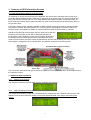
If the traffic camera system has been enabled the DD2 will begin scanning the area for speed and traffic
enforcement cameras. By pressing button A to cycle through the LCD display information screens, the
following screen will indicate the number of cameras within an radius of approximately 1 kilometre.
Should the vehicle enter an area within which a camera is located, the
following LCD information screen will be displayed and speed is
forced onto the red LED display. These screens will be displayed for
the duration that the vehicle remains with the specified area of the
camera. These screens will revert to their original settings upon the vehicle leaving the area. If the AUX
warning light is configured to show camera alarm, this will also illuminate for the same period:
The LCD screen will indicate the type of camera, the distance to the camera in metres, and the speed limit of
the camera’s location.
3.2 Additional GPS information
3.2.1
Latitude and Longitude
This shows the vehicles current location in terms of latitude and longitude:
3.2.2
Speed, Heading and Altitude
The screen shown below provides your compass bearing, compass direction, speed in miles per hour and
altitude in metres above sea level. Please note that the speed indicated is the actual, true speed of the
vehicle.
5