1
Temperature
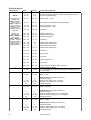
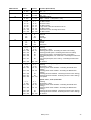
IN FO / TE M P provides readouts of the head and base temperature in Celsius and Fahrenheit.
Firmware version
IN FO / VE R displays the version number of the installed firmware. The firmware version is also displayed
briefly at startup.
DMX
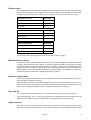
The D M XL menu shows the DMX start code (S T CO ) and DMX values received for each effect.
Service messages
The Service LED on the control panel lights under conditions that require fixture service, and there is a
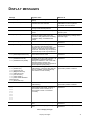
message describing the service required. To display the message, select S M S G in the main menu. This
item is available only when the LED is lit. There are two service messages.
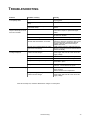
Re pl a ce l am p is displayed when the lamp counter exceeds 750 hours, which is the rated average life
for the HMI 1200 W/S lamp. The maximum service life is 125% of the average life, or 940 hours.
F i x t u r e o v e r h e a t i n g is displayed when the head temperature exceeds 120° C (248° F).
Overheating is typically caused by dirty air filters, fans, or air vents; incorrect power supply settings, or a
defective fan.
Service utilities
Important! Enter must be held for several seconds to access the utilities menu.
Test sequences
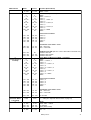
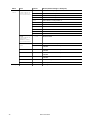
T S E Q provides a general test of all effects that can be run without a controller. U T I L / P C B t provides
routines for circuit board testing that are for service use only.
Feedback toggles
An on-the-fly position correction system monitors the color wheels. If a position error is detected, the shutter
closes while the effect resets. This feature can be disabled by turning effects feedback (U TI L /E FF b ) off.
The automatic pan/tilt position correction system may be temporarily turned off under UT IL / FE bA . The
off setting, however, is not saved and the system will be re-enabled the next time the fixture starts. If the
system cannot correct the pan/tilt position within 10 seconds, feedback is automatically disabled.
Adjustment
The adjustment menu (U T I L / A d j ) provides manual control for making mechanical adjustments and is
used by Martin service technicians.
Calibration
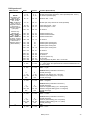
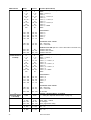
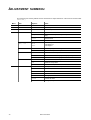
The calibration menu ( U T I L / CA L ) provides utilities to define offsets in software that are relative to the
mechanical reset or home positions. This allows you to fine tune optical alignment and achieve uniform
performance between fixtures. Dimmer and zoom are calibrated to defined points. The other effects are
calibrated relative to an arbitrary reference fixture.
Default offset settings may be restored by selecting default offsets (UT I L/ d FO F ).
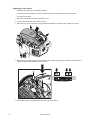
Calibrating effects
1
14
Apply power and strike the lamp.
MAC 2000 Wash