1
2
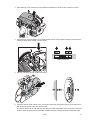
To calibrate the zoom, select U T IL /C A L/ Z OO F and press [Enter]. The default value of 128 can be
adjusted up or down to move the diffuser lens relatively forward or back. Make any necessary adjustments
and press [Enter] to save the setting.
3
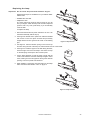
To calibrate the color wheels to an offset from their mechanically indexed position, select
UT IL / CA L /C 1O F and press [Enter]. The default value of 128 can be adjusted up or down to move the
color wheel relatively forward or back from its indexed position. Make any necessary adjustments and press
[Enter] to save the setting. Repeat this procedure if necessary for color wheel 2 (C2OF).
4
To calibrate the optional dimmer wheel to an offset from its mechanically indexed position, select
UT IL / CA L /D IM W and press [Enter]. The default value of 128 can be adjusted up or down to move the
dimmer wheel relatively forward or back from its indexed position. Make any necessary adjustments and
press [Enter] to save the setting.
5
Pan calibration is most useful when multiple fixtures are stacked vertically. To calibrate, set zoom, iris, and
tilt position for easy one-over-the-other comparison and set each fixture to the same pan DMX value. Select
one fixture to be the reference fixture. On the other fixtures, select U T IL /C A L/ P O F and press [Enter].
Adjust the offset as necessary to align the beam with the reference beam. Press [Enter] to save the setting.
6
Tilt calibration is most useful when multiple fixtures are arranged horizontally. To calibrate, set zoom, iris,
and pan position for easy side-by-side comparison and set each fixture to the same tilt DMX value. Select
one fixture to be the reference fixture. On the other fixtures, select U T IL /C A L/ T O F and press [Enter].
Adjust the offset as necessary to align the beam with the reference beam. Press [Enter] to save the setting.
7
To calibrate the dimmer, select UT IL / CA L/ D O F and press [Enter]. Hold a piece of paper over the
lens. Set the offset to 0 and then increase it until light is clearly projected onto the paper. Press [Enter] to
save the setting. Remove the paper.
8
To calibrate color mixing flags (cyan, magenta, yellow, and color temperature correction), project white
beams with no dimming and position them for easy comparison. On each fixture, including the reference,
select U TI L /C AL / C OF and press [Enter]. (This adds a defined amount of cyan.) Select one fixture to
be the reference. Adjust the offsets on the other fixtures to match the reference color. Press [Enter] to save
the setting. Repeat for M O F (magenta), Y O F (yellow), and CT O F (CTC).
Software upload
The software update mode is normally engaged automatically by the upload device. If this does not occur,
see “Firmware installation” on page 27.
Control panel
15