1
(,
next
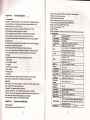
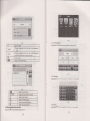
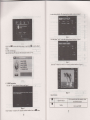
Video folder
name
Video name
Show next Dase
Video foldcr namc
Show video name
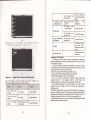
4.3 Video operation lnterface
This chapler inboduced how 10 use lhe CPS !idco playcr
{.3.llunctions and Lalures
L
Suppofr ASF. AVI. WMV, lCP. MP4 and FLV
2.
Supporl i'ull-scrccD playing, proSrcss choosing and lile sclecliinl
Ilclbrc usinll thc Vkleo playcr. plcasc copy your vidco lilc r,\Sf-. AVI. WMV,3CP
MP4and F'l-V) bany l-okler
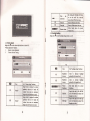
,{.3.2 ODcration:
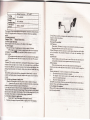
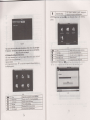
Silr!lc.:liek lhc \ i,le!
buttun H
to entcr thu
rrlro
fi
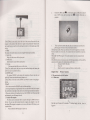
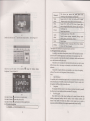
lc lisl Js rhr ntrrurc 4.<l
'flr
:i, e- .,
5t
:
I
rir
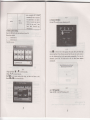
Closc
m
P1ay
Nexl
i{'
rg
File list
:E&
IIE
lI
Playing
Bflghbless
adjust
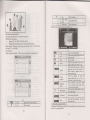
PIay interface
tit
Itr@
@m
4-6
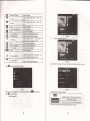
Closc
Sinqlc cliok to closc curcnt tilc
Last
Show last Dacc
.1.4
Pla! next video
Single click and shift to video file list,
and then choose vorrr favorite video
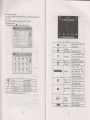
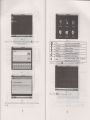
Srngle click volume. It shows volumc is
dccrcascd whcn it shift loward lcft.
Whilc volumc is incrcasc whcn it is
shiftcd loward riuht.
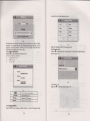
progrcss
?i
4.1
Click to closc thc vidco listt
It shows stop playing. Single click wil)
Adiusl thc progrcss
by
slrdc
thc
progress-displaying brr; go Iefi for
backwards. so richt for fomards:
Adiust brightncss *'ith stylus whilc
moving toward lcft and right. Tum
risht ileans 1um brishler.
Full screen play. Double click to relum
normal olav status.
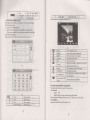
Show cunent Video name
Time
Show the time consumed 1 The total
ofthe video
time
Audio player operation interface
This chapter introduces how to use thc GPS vidoo player to play your lavorite nilsic
and lel it bc your personal MP3.
ll