1
SStteepp 77:: SSeettttiinngg uupp HHoottkkeeyyss
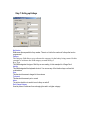
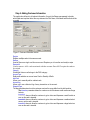
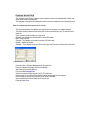
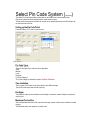
Figure 9: Detail of Individual Hotkey
KKeeyy NNuummbbeerr
References the sequential hot key number. There is no limit to the number of hotkeys that can be
programmed
CCaatteeggoorryy..
The category field allows us to reference the category for the hotkey being created. In this
example we reference the PAR category created in Step 5
Key Type
This field designates the type of Hot Key we are creating. In this example it’s a Range Card.
HHoott KKeeyy
This field designated the keyboard shortcut. You can use any of the function keys or alt and ctrl
combinations.
PPrricicee
This denotes the amount charged to the customer
TToo AAccccoouunntt
This denotes the amount put on a card
AAccttivivee
The active check box is used to turn a hotkey on and off
DDoonn’t’t CChhaannggee CCaatteeggoorryy
Used to prevent a customer from recharging the card to a higher category.