1
Connecting a Base Station/Coupler
Connecting Devices
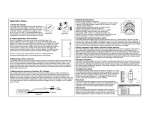
Connecting a USB Device
Some loggers require an optic USB base station/coupler to connect to
the computer. Consult the manual that came with the device for
specific information about required base stations/couplers.
You can connect most devices to the USB port by using an Onsetsupplied USB interface cable.
Steps
1. Open HOBOware.
HOBOware Pro: For instructions on connecting HOBO shuttles or using
the HOBO Waterproof Shuttle as a base station, refer to the shuttle’s
user guide.
2.
Important: Make sure the base station/coupler is the correct
model for the logger you want to use. Consult the logger/device
user manual if you are unsure.
Steps
1. Open HOBOware.
2.
Plug the large end of the USB interface cable into a USB port on
the computer.
3.
Plug the small end of the USB interface cable into the port on the
device. Refer to the diagram and instructions that came with the
device if you need help finding the port.
3.
Attach the logger to the base station/coupler as described in the
in the logger/device manual, paying close attention to proper
alignment.
Windows: If the base station/coupler or logger has never been
connected to the computer before, it may take several seconds for the
computer to detect the new hardware and report that it has
connected successfully. A message may display indicating that you
need to reboot before you can use the device. This is optional; you do
not need to reboot at this time.
Windows: If the device has never been connected to the computer
before, it may take several seconds to detect the new hardware and
report that it has connected successfully. One or more messages will
appear indicating that new hardware has been found. You may also
hear a chime. A message may display indicating that you need to
reboot before you can use the device. This is optional; you do not
need to reboot at this time.
The status bar at the bottom of the HOBOware window will update to
reflect that the logger is connected. At this point, you can begin using
the device.
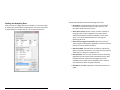
Once the device is recognized by HOBOware, the device name will
appear in the status bar at the bottom of the HOBOware window as
shown below. The status bar also lists the total number of devices
connected. At this point, you can access the device from HOBOware.
To disconnect the logger, simply unplug it from the base
station/coupler. Wait for the status bar to update the number of
devices before continuing.
To attach another logger via a base station/coupler, remove the
logger, leaving the base station/coupler connected, and then connect
the next logger.
To disconnect the device, unplug it from the USB cable.
Getting Started: Using HOBOware with HOBO Data Loggers
Plug the base station/coupler cable into a USB port on the
computer.
To disconnect the base station/coupler, unplug it from the USB port.
9
10
Getting Started: Using HOBOware with HOBO Data Loggers