1
5 Using the iDialog software
IMPORTANT :
We strongly recommend that you keep a copy of the initial parameter settings file (all
configuration change will « overwrite » the previous version when pressing the "save" button or
exiting the software (red cross)).
5.1
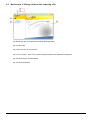
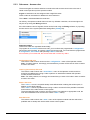
Home screen :
(1) Link to JAY Electronique website, « contact us » form
(2) Link to JAY Electronique website, « home»
(3) Link to JAY Electronique website, « On-line help»
(4) « About » button : giving general information concerning the current version of the iDialog software
(5) Choice of language for software interface
(6) « Save » button (inactive until importing a parameter settings file).
(7) « Import a file » button : see next chapter
(8) Version number of iDialog software
351910B-EN
5 / 17