1
1.4.3
CCD Control
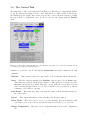
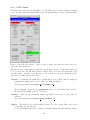
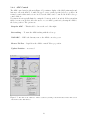
The CCD control window is shown in Figure 1.5. The CCD control works by sending commands
to the observatory standard AAO2 CCD controller system running on a pair of VMS machines.
Figure 1.5: The CCD Control window — This is obtained by clicking on the more button in the CCD section
of the main Control Task window
The upper section of the window specifies the exposure time, the type of run, and whether it is
to be recorded. Since the 2dF data reduction software relies on correct header information, it’s
very important to enter the correct run type; see the sections below for more information. The
options for recording data are as follows:
Normal — A standard run which will be permanently recorded. These runs are assigned a
sequential run number and recorded on the data disk, currently at :
/net/aatlxy/data/aatobs/OptDet data/YYMMDD/ccd N
The run naming convention follows DDmmmCnnnn.fits, e.g. 25oct10010.fits would be
the 0010 run from CCD1 on the 25th October.
Dummy — These are exposures taken during setup which do not need to be kept. They are
written to
/net/aatlxy/data/aatobs/OptDet dummy/YYMMDD/ccd N
Glance — The CCD is read out and displayed but not recorded on disk. These can be used
for checking exposure times etc.
See the Observing guide for more details about actually taking data and calibration frames.
10