1
1.4.5
AAOmega Spectrograph Control
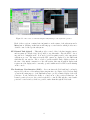
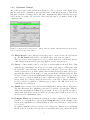
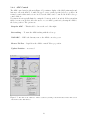
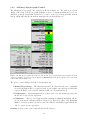
The AAOmega spectrograph control window is shown in Figure 1.8. The window provides a
display of the setup of the spectrograph (gratings, focus etc..). Status information (open doors,
dark-slide positions, temperature monitors etc.) can be viewed by selecting the Full Status
button, which will bring up the Status dialogue also shown in Figure 1.8.
Figure 1.8: The Spectrograph Control window (left) and the spectrograph status window (right). Both are
obtained by clicking on respective buttons (more and Full Status) in the Spectrograph section of the main
Control Task window (Figure 1.2).
The spectro control GUI provides the following functions:
• Manual slit exchange — The Observation Slit drop list allows the user to manually
select the slit that should be positioned in the spectrograph beam. Options are MOS slits
0 and 1, SPIRAL, or the long slit calibration unit (once it is implemented).
• Configuration — The Configuration drop list is used to modify AAOmega setup, and
should only be used by an expert user.
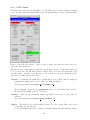
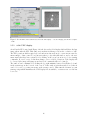
• Calibration — The two lower buttons marked Calibrate AAOmega Blue/Red arm are
used to bring up the calibration GUI (see Figure 1.9). This offers control of the Hartmann
shutters, for spectrograph focus, and access to the camera focus GUI(s). Again, this should
only be operated by an expert user.
Grating selection is auto-sensed, and indicated in the dialogue.
14