1
robotbasic in the classroom
7
functions and commands into a powerful interpreted programming language written
by Samuel Mishal. The combination is a versatile language that is easy to learn and
fun to use, even by those new to programming. RobotBASIC is not, however, just a
beginner’s language. With over 800 powerful commands and functions, experienced
programmers can use RobotBASIC to handle complex problems.
The RobotBASIC programming language has features that makes it easy to add
programming and robotics to almost any curriculum. RobotBASIC has been designed to be especially effective when implemented in a multi-year program. Legacystyle commands allow even 5th graders to quickly grasp programming concepts. As
student’s skills and maturity increase, more complex commands can be introduced
so more complicated problems can be explored. By high school, students can be
introduced to the C-style syntax used in many modern languages. This progression
allows students to grow without having to constantly relearn new programming environments while maintaining continuity between classes. Additionally, it prepares
students for the cryptic syntax associated with the languages like C and Java that
are often used in college classes.
When a comprehensive approach is utilized throughout an entire curriculum,
teachers of many disciplines, and at every grade level, can offer programming assignments that support standard coursework. When implemented properly, there is
no need to add separate programming courses or significantly alter current coursework. Instead, programming is used to augment what is already being done. This
allows the computer to be viewed as a powerful tool (as it is in industry) instead of a
subject in and of itself. RobotBASIC’s easy-to-use graphics and powerful functions
make it easy to create exciting and enlightening assignments for classes involving
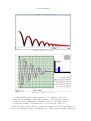
math, science, and physics. High school students can, for example, program a simulation of gravity (Figure 1) or the physics of a spring (Figure 2) to promote a more
complete understanding of the associated principles.
The RobotBASIC Simulator
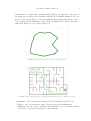
RobotBASIC’s integrated simulator allows robotic programming to be explored
at nearly any grade level, without the need for costly hardware—although hardware
can be easily added at any time. The simulator’s extensive sensory abilities can
be very motivational because they allow a wide-variety of meaningful projects to
be explored. RobotBASIC’s willingness to work with teachers to create customized
assignments along with teacher training and support materials can make adoption
and integration trouble-free for both faculty and staff.
RobotBASIC’s simulated robot has far more capabilities than most educational
robots, allowing RobotBASIC to handle projects that are more complex and far
more stimulating for students. The sensors available on the simulator are:
•
•
•
•
Ultrasonic rangers (rRange) to measure the distance to objects on the screen.
Infrared detectors (rFeel) to determine if any objects are close to the robot.
Bumper switches (rBumper) to determine if the robot bumps into an object.
A Compass (rCompass) to measure the angular orientation of the robot.