1
Coverage Planning
Placing your antennas for Tempest Seamless Roaming follows the same basic rules of any multi-BaseStation Tempest
wireless system with one exception. The antennas do not need to be located in the same physical location. For example,
let’s look at a two BaseStation system utilizing two Remote Transceivers:
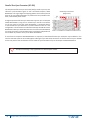
A venue has two large rooms separated by a hallway. Each room needs Tempest coverage and the ability for users to work
and move freely from room to room. Note: Up to 11 BaseStations can be utilized with Seamless Roaming providing 11 overlapping
coverage areas.
Placing one BaseStation’s Remote Transceiver in the center
of one room, and placing the second BaseStation’s Remote
Transceiver in the center of the other room will provide
coverage for both of those spaces.
By adjusting the location of the two Remote Transceivers
closer to one another, the area of overlapping coverage can
be increased. In this case, providing better coverage for the
hallway in between the two rooms.
Implementation
BaseStation Configuration
•
Verify ALL the BaseStations in the system configuration are properly connected to the same ZSync source, and
assure that source is receiving power. See the ZSync section of this manual for more information on ZSync
technology.
•
Verify ALL BaseStations have Network Numbers within the same Network Number group (i.e. 0,1,2,3...10 or 11, 12,
13, 14...20.) See the section on Network Number groups in this manual for more information.
•
Verify ALL BaseStations in a Roaming Group are set with the same Lockout Key
•
Verify ALL BaseStations in a Roaming Group are operating in the same operational mode: Normal, Shared or Split.
•
Verify ALL BaseStations have the same audio sources across all used channels (if desired); if the BaseStations are not
connected to an external hard wired system, assure that one BaseStation is in Master Mode. See the Master Mode
section of this manual for more information.
BeltStation Configuration
•
Using a pairing cable, pair all BeltStations to each BaseStation they are intended to roam with.
•
Set up each BeltStations Roaming Group (up to 16 BaseStations may be selected per BeltStation)
•
Enable Roaming on each BeltStation; when roaming is not enabled, a BeltStation will operate as normal on a single
BaseStation.
•
Adjust Roaming Bias setting (if needed). See the section on BeltStation Setup in this manual for more information
on adjusting Roaming Bias in Seamless Roaming.
69
Tempest®2400 2-Channel Wireless Intercom System