1
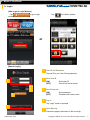
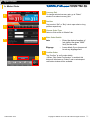
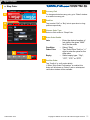
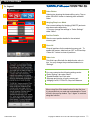
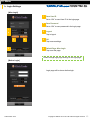
4. Open Order
h. IFD-OCO Order
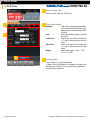
1
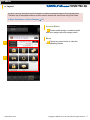
Currency Pair
To change selected currency pair, go to “Rates” window
to re-select currency pair.
2
2
Position
Tap to select “Sell” or “Buy” rate to open short or long
position respectively.
3
3
Choose Order Type
Select or flick screen to “IFD-OCO” tab.
4
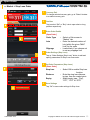
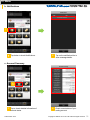
Enter Order Details
[Open Order]
4
Lots
:
Condition
:
Order Price
:
Expiry
:
5
1
Enter the desired number of lots
(within the given “MAX” limit) for
the order
Tap to switch between “Limit” or
“Stop”
Tap “Order Price” field or “+/-” sign
to enter the price for the selected
open order condition
Select expiry type - “Day”, “GTF”,
“GTC” or “GTD”
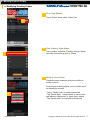
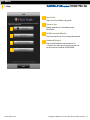
5
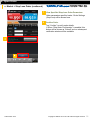
Go to Close Order
Tap “Go to Close Order” button to set parameters of
close order.
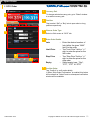
6
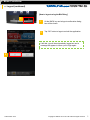
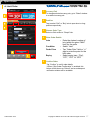
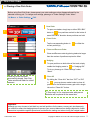
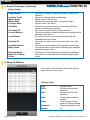
Enter Order Details
[Close Order]
Sell/Buy
:
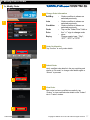
6
7
Lots
:
Limit Price
:
Stop Price
:
Expiry
:
This will be selected automatically
as the corresponding market
direction depending sell/buy type
specified for the Open Order above.
Enter the desired number of lots
(within the given “MAX” limit) for
the order
Tap “Limit Price” field or “+/-” sign
to enter the price for the limit order
Tap “Stop Price” field or “+/-” sign
to enter the price for the stop order
Select expiry type - “Day”, “GTF”,
“GTC” or “GTD”
Go to Open Order
Tap to modify the open order.
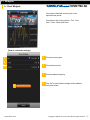
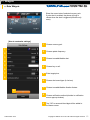
7
14 November 2015
8
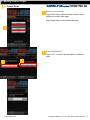
8
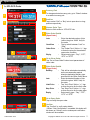
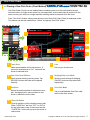
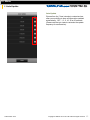
Confirm
Tap “Confirm” to verify order details.
※When “Omit Confirmation” is enabled, this button will
be shown as “Submit” and no subsequent verification
window will be available.
Copyright © GMO-Z.com Forex HK Limited All rights reserved.
21