Transcript
Vera3
Quick Start Guide
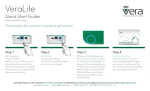
Setup is quick and easy.
Using the Vera3 along with your existing Wi-Fi router.
Step 1
Step 2
Step 3
Step 4
Use the supplied
network (Ethernet)
cable to connect to the WAN port of
your Vera3; then connect the other
end of the cable to an available
Ethernet port on your modem, Internet
gateway, router, or switch.
Connect
the Vera3 power
adapter into the 12V power receptcle,
and then plug into an AC electrical
outlet.
While your Controller powers up,
the Vera software will be updated to
the latest version. This process can
take up to 15 minutes depending on
the speed of your internet connection.
When the LED indicators for Power,
WAN, and Z-Wave are lit and not
blinking, your Controller is ready
for the next step.
Create an account at
http://home.getvera.com. Once
you’ve created and authenticated
your account, the software will ‘find’
your Vera3 automatically and take
you to the Vera3 Dashboard.
If you’d like to use Vera3 to provide your primary
Wi-FI network please go to http://www.getvera.com/setup/
for easy, step by step instructions on Wi-Fi setup.
Need Help? Please view the complete Owner’s Manual online for more
detailed setup instructions and additional technical resources at http://support.getvera.com
www.getvera.com
|
[email protected]
|
+1 (866) 966-2272
|
© 2008-2013 Vera Control, Ltd.