1
Layout, connections and installation
4.3
vacon • 11
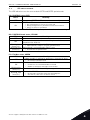
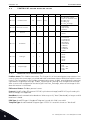
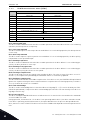
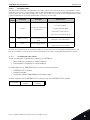
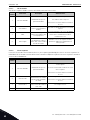
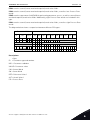
LED indications
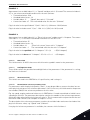
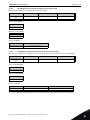
The LED indications are the same on both OPTE3 and OPTE5 option boards
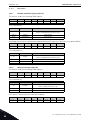
PS = PROFIBUS status, RED
LED is
OFF
Meaning:
PROFIBUS DP communicates normally
PROFIBUS DP communication is broken or not started
ON
• Bus cable broken or incorrectly connected
• Wrong configuration or parameterization data of Master
• Master is offline or shut down
The PS LED blinks in yellow, when the software is restarting
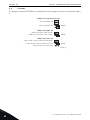
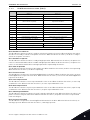
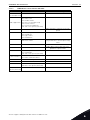
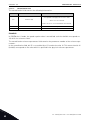
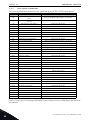
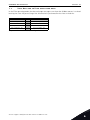
BS = PROFIBUS board status, YELLOW
LED is
Meaning:
OFF
Option board not activated
Option board in initialisation state waiting for activation comON
mand from the AC drive
Blinking fast Option board is activated and in RUN state
• Option board is ready for external communication
(once/1 s)
Blinking slow Option board is activated and in FAULT state
• Internal fault on option board
(once/5 s)
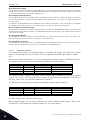
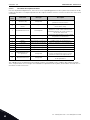
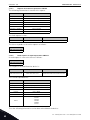
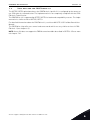
FS = Fieldbus status, GREEN
LED is
Meaning:
Fieldbus module is waiting for parameters from the AC drive
OFF
• No external communication
Fieldbus module is activated
ON
Blinking fast
(once/1 s)
Blinking slow
(once/5 s)
• Parameters received and module activated
• Module is waiting for messages from the bus
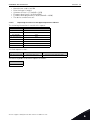
Module is activated and receiving messages from the bus
Module is in FAULT state
• No messages from Net within the watchdog time
• Bus broken, cable loose or Master offline
24-hour support +358 (0)201 212 575 • Email: [email protected]
4