1
Getting Started Using EMG-EZ™ sEMG Biofeedback System
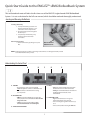
1. Connect the electrodes to the sensor
head and remove the backing paper.
• Read user manual for complete information and cautions.
• Do not connect inputs or outputs of the encoder or sensors to
line powered devices, except through the fiber optic cable.
Sensor Head
• To prevent voiding warranty by breaking connector pins,
Electrode
carefully align white guiding dot on sensor plug with slot on
sensor input.
• To avoid corrosion, remove single electrodes from sensor
snaps immediately after use.
• Use Chattanooga Group’s Dura-Stick® EMG electrodes
only.
• Apply conductive gel only to electrodes. Never put gel
directly to sensor snaps.
• Do not plug third party sensors directly into instrument
inputs. Plug only EMG-EZ sensor cable connectors into
instrument inputs. All EMG electrodes and third party
2. Place electrodes firmly onto the client,
and plug into the sensor input.
sensors must be connected to EMG-EZ sensors,
either directly or through an adapter.
• Remove batteries when the device is not being used
Sensor Input
for an extended period of time.
Earphones Input
• Sensors damaged by static electricity are not covered
under warranty. In dry climates, apply anti-static spray
on carpets each week and use a conductive floor mat
(available from computer stores). A humidifier may also
be used to prevent static environments by conditioning
hot, dry air.
ISO 13485 CERTIFIED
4717 Adams Road
P.O. Box 489
Hixson, TN 37343
1.423.870.2281
USA
1.423.592.7329
Canada
1.800.361.6661
Outside U.S.A.
1.423.870.7200
Fax
1.423.870.2046
www.chattgroup.com
© 2005 Encore Medical, L.P.
2
41008A