1
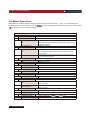
Chapter 1 Quick Reference
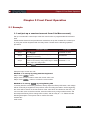
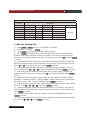
BUS
CONNECT MODE
MAXTIDLEXING
SEPARATE<DEF>
BAUDRATE SET
9600<DEFAULT>
9600
19200
38400
COMM. PARITY SET
Communication command trigger mode.
Setting baud rate.
Command parity setting.
NONE<DEFAULT>
EVEN
ODD
ADDRESS SET
Setting communication Flow mode
KEY LOCK SET
Setting keypad password.
EXIT
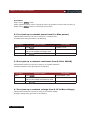
SYSTTEM SET
MAX CURRENT SET
MAX POWER SET
MAX VOLTAGE SET
VOLTAGE ONSET
VOLTAGE OFFSET
EXIT
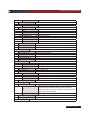
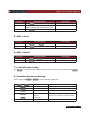
LIST SET
MODE SET
FIXED MODE
LIST MODE
CALL LIST FILE
EDIT LIST FILE
LIST STORE MODE
8 X 120 STEPS
4 X 250 STEPS
2 X 500 STEPS
1 X 1000 STEPS
EXIT
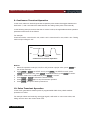
LOAD ON TIMER
TIMER STATE
ON
Setup the maximum current.
Setup the maximum power.
Setup the maximum voltage.
Setting operation mode.
Fixed mode.
Choosing List mode.
Recall list operation file.
Edit list operation file.
Users can choose 4 kind of memory space to save the list file.
Total 8 files and each file have120 list steps.
Total 4 files and each file have250 list steps.
Total 2 files and each file have500 list steps.
Total 1 file and each file have1000 list steps.
Setting LOAD ON timer state
When users choose ON, and then turn on the electronic load
input, the LOAD ON TIMER will start working. When the
LOAD ON TIMER is reach the setup time, the electronic load
input will turn off automatically.
OFF<DEFAULT>
TIMER SET
EXIT
Setting time of LOAD ON timer.
EXIT
USER’S GUIDE 13