1
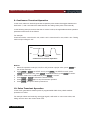
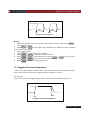
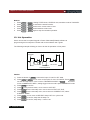
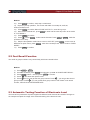
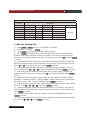
USER’S GUIDE
Programmable DC Electronic Load
Models IT 8500 series
This user manual is applicable to:
Model: IT8511/IT8512/IT8512B/IT8512C
Copyright 2010 All Rights Reserved
Ver3.0/Jan, 2010/ IT8500-401
Introduction
Chapter 1 Quick Reference
1.1 The Front Panel
1.2 The Rear Panel
1.3 Front Panel Annunciators
1.4 Key Pad
1.5 Immediate Action Keys
1.6 Menu Operation
·······················································
···························································································· 8
···························································································· 9
···························································································· 9
···························································································· 10
···························································································· 11
···························································································· 12
Chapter 2 General Information
················································ 14
2.1 Document Orientation
····························································································
2.2 Getting Started Map
····························································································
2.3 Options And Accessories
····························································································
2.4 Description
····························································································
2.5 Features And Capabilities
····························································································
2.6 Front Panel Controls
····························································································
2.7 Remote Programming
····························································································
2.8 Operating Modes
····························································································
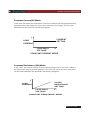
Constant Current (Cc) Mode
················································································
Constant Resistance (Cr) Mode
················································································
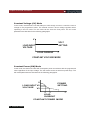
Constant Voltage (Cv) Mode
················································································
Constant Power (Cw) Mode
················································································
2.9 Transient Operation
····························································································
Continuous
················································································
Pulse
················································································
Trigger Mode
················································································
2.10 List Operation
····························································································
2.11 Triggered Operation
····························································································
2.12 Input Control
····························································································
Short On/Off
················································································
Input On/Off
················································································
Operation Range
················································································
2.13 Protection Features
····························································································
2.14 Remote Sense Function
····························································································
2.15 Saving And Recalling Settings ····························································································
2.16 Battery Testing
····························································································
2.17 Von/Voff Operation
····························································································
Chapter 3 Installation
3.1 Inspection
2
USER’S GUIDE
8
···················································
14
14
15
15
15
16
16
16
17
17
18
18
19
19
20
20
21
21
22
22
22
23
23
25
26
27
28
29
···························································································· 29
Introduction
Damage
Items Supplied
Cleaning
3.2 Location
3.3 Bench Operation
3.4 Rack Mounting
3.5 Input Connections
Power Cord
················································································
················································································
················································································
····························································································
····························································································
····························································································
····························································································
···············································································
Chapter 4 Turn-On Checkout
4.1 Introduction
4.2 Checkout Procedure
In Case of Trouble
······················································· 35
···························································································· 35
···························································································· 35
················································································ 36
Chapter 5 Front Panel Operation
·············································· 37
5.1 Example
····························································································
1. I-set (set up a constant current from 0 to Max current )
·································
2. P-set (set up a constant power from 0 to Max power)
·································
3. R-set (set up a constant resistance from 0.1Ω to 4000Ω)
·································
4. V-set (set up a constant voltage from 0.1V to Max voltage)
·································
5. Shift + Store
················································································
6. Shift + Recall
················································································
7. In On/Off input setting
················································································
8. Transition Parameter Setting
················································································
9. Continuous Transient Operation
········································································
10. Pulse Transient Operation
················································································
11. Toggled Transient Operation
················································································
12. List Operation
················································································
5.2 Fast Recall Function
················································································
5.3 Automatic Testing Function of Electronic Load
··························································
1. Edit the Testing File
················································································
2. Fast Recall the Test File
················································································
3. Automatic Testing
················································································
4. Select the Resolution between Low Range and High Range
····························
Chapter 6 Specifications
37
37
38
38
38
39
39
39
39
40
40
41
42
43
43
44
45
45
46
······················································· 47
Chapter 7 Remote Operation Mode
7.1 Communication cable
29
29
29
30
31
31
33
33
·········································· 48
···························································································· 48
USER’S GUIDE
3
Introduction
IT-E131 RS232 Communication cable
IT-E132 USB Communication cable
IT-E134 GPIB Communication Cable
7.2 Communication between electronic load and PC
4
USER’S GUIDE
···························································
···························································
···························································
···························································
48
48
49
50
Warranty Information
Certification
We certify that this product met its published specifications at time of shipment from the
factory.
Warranty
This hardware product is warranted against defects in material and workmanship for a period
of ONE year from date of delivery. IT8500 series electronic load for use with a hardware
product and when properly installed on that hardware product, are warranted not to fail to
execute their programming instructions due to defects in material and workmanship for a
period of 90 days from date of delivery. During the warranty period our company will either
repair or replace products which prove to be defective. Our company does not warranty that
the operation for the software firmware or hardware shall be uninterrupted or error free.
For warranty service, with the exception of warranty options, this product must be returned
to a service facility designated by our company. Customer shall prepay shipping charges
by (and shall pay all duty and taxes) for products returned to our place for warranty service.
Our company shall pay for return of products to Customer.
Limitation of Warranty
The foregoing warranty shall not apply to defects resulting from improper or inadequate
maintenance by the Customer, Customer-supplied software or interfacing, unauthorized
modification or misuse, operation outside of the environmental specifications for the product,
or improper site preparation and maintenance. Product number or serial number has been
altered deleted, removed or were unable to identify. Damage from the accident, including but
not limited to lightning, water, fire, abuse or negligence.
Assistance
The above statements apply only to the standard product warranty. Warranty options product
maintenance agreements and customer assistance agreements are also available.
USER’S GUIDE
5
Safety Summary
The following general safety precautions must be observed during all phases of operation
of this instrument. Failure to comply with these precautions or with specific warnings
elsewhere in this manual violates safety standards of design, manufacture, and intended
use of the instrument .We assumes no liability for the customer’s failure to comply with these
requirements.
Environmental Conditions
This instrument is intended for indoor use. Pollution degree 2 environments. It is designed to
operate at a maximum relative humidity of 95% and at altitudes of up to 2000 meters. Refer
to the specifications tables for the ac mains voltage requirements and ambient operating
temperature range.
Before Applying Power
Verify that all safety precautions are taken. Note the instrument's external markings
described under "Safety Symbols".
Ground the Instrument
This product is a Safety Class 1 instrument (provided with a protective earth terminal). To
minimize shock hazard, the instrument chassis and cover must be connected to an electrical
ground. The instrument must be connected to the ac power mains through a grounded
power cable, with the ground wire firmly connected to an electrical ground (safety ground)
at the power outlet. Note: Any interruption of the protective (grounding) conductor or
disconnection of the protective earth terminal will cause a potential shock hazard that could
result in personal injury.
DO NOT OPERATE IN AN EXPLOSIVE ATMOSPHERE
Do not operate the instrument in the presence of fumes or flammable gases.
KEEP AWAY FROM LIVE CIRCUITS
Operating personnel must not remove instrument covers except as instructed in this Guide
for installing or removing electronic load modules. Component replacement and internal
adjustments must be made only by qualified service personnel. Do not replace components
with power cable connected. Under certain conditions dangerous voltages may exist even
with the power cable removed. To avoid injuries always disconnect power, discharge circuits,
and remove external voltage sources before touching components.
6
USER’S GUIDE
DO NOT SERVICE OR ADJUST ALONE
Do not try to do some internal service or adjustment unless another person capable of
rendering first aid resuscitation is present.
Safety Symbols
Direct current
Alternating current
Both direct and alternating current
Protective earth (ground) terminal
Caution (refer to accompanying documents)
Warning: The WARNING sign denotes a hazard. It calls attention to a
procedure, practice, or the like, which, if not correctly performed or adhered
to, could result in personal injury. Do not proceed beyond a WARNING sign
until the indicated conditions are fully understood and met.
Caution: The CAUTION sign denotes a hazard. It calls attention to
an operating procedure, or the like, which, if not correctly performed
or adhered to, could result in damage to or destruction of part or
all of the product. Do not proceed beyond a CAUTION sign until the
indicated conditions are fully understood and met.
USER’S GUIDE
7
Chapter 1 Quick Reference
Chapter 1 Quick Reference
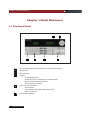
1.1 The Front Panel
2
1
6
4
5
6
1
2
3
8
5
4
3
16-character display shows voltage and current measurements.
Rotary knob
Input terminals
Keypad:
Enable/disable input.
Setup the current, resistance and voltage modes.
Set and reset protection functions.
Scroll through front panel.
Entry keys:(numeric keys)
Enter values.
nIncreasing or decreasing the setup values.
Menu commands.
Power switch ON/OFF
USER’S GUIDE
Chapter 1 Quick Reference
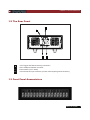
1.2 The Rear Panel
4
3
1
1
2
3
4
2
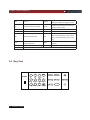
4 Pin Trigger and Remote sensing connectors.
9-Pin COM port interface connector.
Power switch (110V / 220V)
3 Pin IEC320 AC input connector. (Power code requires ground conductor).
1.3 Front Panel Annunciators
USER’S GUIDE
9
Chapter 1 Quick Reference
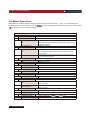
Indicates that the electronic load is
OFF
input off
Trigger
CC
Constant current (CC) mode.
Sense
CV
Constant voltage (CV) mode.
Error
A errors have occurred
CW
Constant power (CW) mode.
Link
In the communication state
waiting an initiate and trigger to occur.
Indicates that the electronic load is in
Remote sensing state
Indicates that the electronic load is in
CR
Resistance (CR) mode.
Rmt
remote state (RS-232). In the remote
state, only the active key is the Local
key.
The input channel is enabled for
Tran
transient operation.
List
List mode is initiated or running.
Unreg
The input is unregulated.
Shift
Lock
Indicates that the shift key has been
pressed.
keyboard is locked by password
1.4 Key Pad
POWER
1
2
A
B
4
5
3
ESC
I-set
V-set
0
P-set
R-set
Shift
On/Off
Tran
6
Store Recall S-Tran Menu
7
8
9
Local Battery Short Trigger
10 USER’S GUIDE
ENTER
Chapter 1 Quick Reference
0 ~ 9
0 through 9 are used for entering numeric values.
Decimal point.
Esc
The escape key. It may used to exit any working state.
l-set
Choosing CC mode and setup the input current of regulation current mode.
V-set
Choosing CV mode and setup the input voltage of regulation voltage mode.
P-set
Choosing CW mode and setup the input watt of regulation power mode.
R-set
Choosing CR mode and setup the input resistor of regulation resistance mode.
Shift
Shift keys.
Power ON/OFF
On/Off
Scrolling keys let you move through the commands in the presently
Select function menu, bring up the next command in the list. Function menus are
circular; you can return to the starting position by continuous pressing the key.
Go back to the previous command in the list .Function menus are circular; you can
return to the starting position by continuous pressing the key.
Confirmation key.
Enter
1.5 Immediate Action Keys
A
Switch to A setting value
B
Switch to B setting value
Shift
+
+
+
Tran
Start /Stop transition operation
Shift
+
Store
Press to store an existing electronic load state in non-volatile Memory.
Shift
Recall
Press to recall an existing electronic load state in non-volatile Memory.
S-Tran
Set the transition operation parameter
Shift
+
+
+
Menu
Enter operation Menu.
Shift
+
Local
Shift
Shift
+
+
Battery
Shift
+
Trigger
Shift
Shift
Shift
Short
When the load is controlled by PC, press these keys to enable the front
panel key
Battery discharge electronic operation
Turn on or turn off short circuit Test.
Causes a trigger to occur. Change the trigger source is IMMEDIATE
USER’S GUIDE 11
Chapter 1 Quick Reference
1.6 Menu Operation
Press Menu to indicate operation mode .View the menu in VFD and using ▽ and △ to scroll through the
completely menu list as following. If press Enter key, you could get the selected menu function. Press back
Esc to the previous menu selection page.
Menu
CONFIG
INITIAL CONFIG
POWER-ON RECALL
ON
OFF<DEFAULT>
INPUT RECALL
ON
OFF<DEFAULT>
KEY SOUND SET
ON<DEFAULT>
OFF
KNOB LOCK SET
ON
OFF<DEFAULT>
SHORT CUT RECALL
ON
OFF>
RANG SELECT
ON
OFF>
REMOTE SENSE
ON
OFF<DEFAULT>
ADC UPDATE RATE
HIGH
LOW<DEFAULT>
TRIGGER SOURCE
IMMEDIATE<DEF>
EXTERNAL
12 USER’S GUIDE
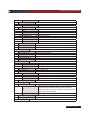
Return to the factory default setup value.
Setting Power-on state of Load.
When users turn on the electronic load; the electronic load
setup value will keep the state of last time when users turn off
the electronic load.
Disable this function.
Setup the electronic load input state as it is turned on
When users turn on the electronic load; the electronic load
input will keep the state of last time when users turn off the
electronic load.
When users turn on the electronic load, the electronic load
input state will keep the off.
Keypad sound setting.
Enable key sound.
Disable key sound.
Setup rotary knob lock state.
Lock Rotary knob.
Unlock Rotary knob.
Fast recall the data stored before
Change the measure precision of voltage and current
Setup voltage measurement Mode.
The electronic load will measure input voltage from the remote
sense connector.
The electronic load will measure input voltage from the front
panel connector.
Choosing the trigger signals source.
Shift
Trigger signals from
+ Trigger key
Trigger signals from the TRIG connector in the rear panel.
Chapter 1 Quick Reference
BUS
CONNECT MODE
MAXTIDLEXING
SEPARATE<DEF>
BAUDRATE SET
9600<DEFAULT>
9600
19200
38400
COMM. PARITY SET
Communication command trigger mode.
Setting baud rate.
Command parity setting.
NONE<DEFAULT>
EVEN
ODD
ADDRESS SET
Setting communication Flow mode
KEY LOCK SET
Setting keypad password.
EXIT
SYSTTEM SET
MAX CURRENT SET
MAX POWER SET
MAX VOLTAGE SET
VOLTAGE ONSET
VOLTAGE OFFSET
EXIT
LIST SET
MODE SET
FIXED MODE
LIST MODE
CALL LIST FILE
EDIT LIST FILE
LIST STORE MODE
8 X 120 STEPS
4 X 250 STEPS
2 X 500 STEPS
1 X 1000 STEPS
EXIT
LOAD ON TIMER
TIMER STATE
ON
Setup the maximum current.
Setup the maximum power.
Setup the maximum voltage.
Setting operation mode.
Fixed mode.
Choosing List mode.
Recall list operation file.
Edit list operation file.
Users can choose 4 kind of memory space to save the list file.
Total 8 files and each file have120 list steps.
Total 4 files and each file have250 list steps.
Total 2 files and each file have500 list steps.
Total 1 file and each file have1000 list steps.
Setting LOAD ON timer state
When users choose ON, and then turn on the electronic load
input, the LOAD ON TIMER will start working. When the
LOAD ON TIMER is reach the setup time, the electronic load
input will turn off automatically.
OFF<DEFAULT>
TIMER SET
EXIT
Setting time of LOAD ON timer.
EXIT
USER’S GUIDE 13
Chapter 2 General Information
Chapter 2 General Information
2.1 Document Orientation
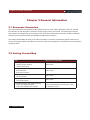
This manual describes the operation of the IT8500 electronic loads. Unless otherwise noted, all units will
be referred to by the description "electronic load" throughout this user manual. The following documents
and software are shipped with your electronic load. This User's Guide (this document), contains installation,
checkout, front panel information and detailed programming information.
The Getting Started Map will help you find the information you need to complete the specific task that you
want to accomplish. Refer to the table of contents or index of each guide for a complete list of the information
contained within.
2.2 Getting Started Map
Task
Where to find information
Checking out the unit
Verifying proper operation
User’s Guide
Using the front panel
Using the front panel
Front panel keys
User’s Guide
Front panel examples
Using the programming interface
RS-232 interface
Remote operation mode
Protocol information
Controller Program and Software driver:
User’s Guide
User’s Guide
CD-ROM
Power View PV8500 software
(If you’ve purchased the communication cable,
Active driver PD8500 OCX software
you will get it for free)
14 USER’S GUIDE
Chapter 2 General Information
2.3 Options and Accessories
Options
IT-E151 Rack mounts kit: for install one or two IT8500 series load on the 19 inch rack.
IT-E131 isolated communication cable: This cable converts the electronic load’s
serial port (TTL 5V level) to PC RS232 interface.
IT-E132 isolated communication cable: This cable converts the electronic load’s
serial port (TTL 5V level) to PC USB interface.
IT-E134 isolated communication cable: This cable converts the electronic load’s
serial port (TTL 5V level) to PC GPIB interface.
Accessories
Power cord
User manual
Software CD-Rom (if you buy the communication cable, you’ll get it for free)
Calibration testing report
2.4 Description
The IT8500 series electronic load is used for design, manufacturing, and evaluation of DC power supplies,
batteries, and power components and so on. The electronic load contains a processor, serial port connector,
front-panel keypad and VFD, and other circuits common to the other entire load module.
IT8500 series electronic load could work in constant current (CC) mode, constant voltage (CV) mode, or
constant resistance (CR) mode and constant power (CW) mode.
2.5 Features and Capabilities
• High accuracy and high resolution
• Capable to work with constant current (CC), constant voltage (CV), constant resistance
(CR) mode and constant power (CW) operation.
• Serial port-DB9-RS232 port.
• Triggered input and measurement functions.
• Controlled by the keypad on the front panel.
USER’S GUIDE 15
Chapter 2 General Information
•
•
•
•
•
•
Built-in pulse generator for continuous, pulsed, and toggled transient mode operation.
Over voltage, over current, over power, and over temperature protection.
Fan speed controlled by temperature.
VFD display
Short circuit test
Battery testing function.
2.6 Front Panel Controls
The front panel has keyboard controls for setting the input voltage, current and resistance. The panel
display provides digital readouts of a number of functions including the inputs. Annunciators display
the operating status of the electronic load.
2.7 Remote Programming
The electronic load can be remotely programmed from the computer via the isolated communication
cable like IT-E131 and so on.
2.8 Operating Modes
The four modes of operation are:
1: Constant current (CC).
2: Constant voltage (CV).
3: Constant resistance (CR).
4: Constant power (CW)
16 USER’S GUIDE
Chapter 2 General Information
Constant Current(CC)Mode
In this mode, the electronic load will sink a current in accordance with the programmed value
regardless of the input voltage. CC mode can be set with front panel keys. The CC mode
parameters are discussed in the following paragraphs.
I
CURRENT
SETTING
LOAD
CURRENT
LOAD INPUT
VOLTAGE
V
CONSTANTCURRENT MODE
Constant Resistance (CR) Mode
In this mode, the module will sink a current linearly proportional to the input voltage in
accordance with the programmed resistance. The CR mode can be set at the front panel.
The CR mode parameters are described in the following paragraph.
I
SLOPE
RESISTANCE
SETTING
LOAD
CURRENT
LOAD INPUT
VOLTAGE
V
CONSTANT RESISTANCE MODE
USER’S GUIDE 17
Chapter 2 General Information
Constant Voltage (CV) Mode
In this mode, the electronic load will attempt to sink enough current to control the source
voltage to the programmed value. The module acts as a shunt voltage regulator when
operating in the CV mode. The CV mode can be set at the front panel. The CV mode
parameters are described in the following paragraphs.
V
VOLT
SETTING
LOAD INPUT
VOLTAGE
LOAD CURRENT
I
CONSTANT VOLTAGE MODE
Constant Power (CW) Mode
In this mode, the electronic loads will consumption power accordance with the programmed
value regardless of the input voltage. The CW mode can be set with front panel keys. The
CW mode parameters are discussed in the following paragraphs.
V
LOAD INPUT V2
VOLTAGE
V3
POWER
SETTING
I
I2 I3
LOAD
CURRENT
CONSTANT POWER MODE
18 USER’S GUIDE
Chapter 2 General Information
2.9 Transient Operation
Transient operation enables the electronic load to periodically switch between two load levels, as might
be required for testing power supplies. A power supply's regulation and transient characteristics can be
evaluated by monitoring the supply's output voltage under varying combinations of load levels, frequency,
and duty cycle.
Transient operation can be turned on and off at the front panel or PC via the IT-E131 isolated communication
cable. Before you turn on transient operation, you should set the desired mode of operation as well as all of
the parameters associated with transient operation. Transient operation may be used in the CC, CR, or CV
or CW modes and can be setup in continuous, pulsed, or toggled operation mode.
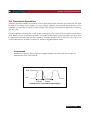
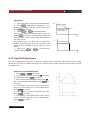
Continuous
Generates a repetitive pulse stream the toggles between two load levels and change the
state between value A and value B.
10A
5A
2.0ms
3.0ms
Continuous Transient Operation
USER’S GUIDE 19
Chapter 2 General Information
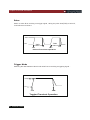
Pulse
Switch to value B as receiving one trigger signal , taking the pulse time(TWD) of value B ,
Load will return to Value A.
10A
5A
TWD
10ms
TWD
10ms
TRIG
TRIG
Pulsed Transient Operation
Trigger Mode
Switching the state between value A and value B once receiving a triggering signal. .
10A
5A
TRG
TRG
Toggled Transient Operation
20 USER’S GUIDE
Chapter 2 General Information
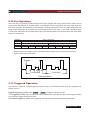
2.10 List Operation
List mode lets you generate complex sequences of input changes with rapid, precise timing, which may be
synchronized with internal or external signals. List operation can be changed by edit every step value and
time in list operation. The parameter of list operation include the group file name, input step setting (the max
steps is 1000 steps),time of one step(1mS~1h)and setting value of one step. In CC mode, dwell time range
is 1mS to 6S, which also have an associated value. Note that lists data can only be saved in total 1000 steps
memory of 4 situations.
GROUP
1
2
4
8
Total = 1000 steps
1000 steps
500 steps
500 steps
250 steps
250 steps
250 steps
250 steps
120 steps 120 steps 120 steps 120 steps 120 steps 120steps 120 steps 120 steps
When receiving one trigger signal, it will start the list operation until receiving another trigger
signal or finish the List operation.
Trigger
0
1
2
3 4
5
List count=1
List count=2
List sequence
2.11 Triggered Operation
The electronic load has various triggering modes to allow synchronization with other test equipment or
events. Such as:
Keypad triggering mode: Press Shift + Trigger to trigger the electronic load.
TTL triggering mode: Send a high pulse with a constant time more than 5m Sec to the trigger terminals
in rear panel to trigger the electronic load.
Command triggering mode: Send triggering command to the electronic load via the serial port.
USER’S GUIDE 21
Chapter 2 General Information
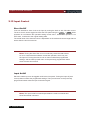
2.12 Input Control
Short On/Off
Load can simulate a short circuit at its input by turning the load on with full-scale current.
The short circuit can be toggled on/off at the front panel using the Shift + Short .Short
operation is not influence the operation setting current value , When short operation is on
OFF state , Load back to the original setting state.
The actual value of the electronic short is dependent on the mode and current range that are
active when the short is turned on.
Note: Turning the Short Test on in CV mode may cause the load to draw
so much current that the software current limit operates, which may turn
the input off. Turning the short circuit on does not affect the programmed
settings, and the load input will return to the previously programmed values
when the short is turned off.
Input On/Off
Electronic load's input can be toggled on/off at the front panel. Turning the input off (zero
current) does not affect the programmed settings. The input will return to the previously
programmed values when the input is turned on again.
Note: The Input On/Off command supersedes the mode commands and
Short Test On/Off command.
22 USER’S GUIDE
Chapter 2 General Information
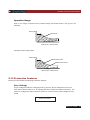
Operation Range
Work in the range of Rated Current, Rated voltage and Rated Power, The figure is as
following:
Rated voltage
INPUT VOLTAGE V
Rated power
Input current I Rated current
Operation mode change state
Rated voltage
INPUT VOLTAGE V
C
Software Power Limit
Software Current Limit
A
Input current I Rated current
2.13 Protection Features
Electronic load includes the following protection features:
Over Voltage
If input voltage exceeds the voltage limit set by the user, the DC load will turn the input
OFF and the buzzer will turn on. The display will show OVER VOLTAGE as following. The
maximum voltage limit value is equal to 100%+5% of the maximum rated voltage for each
model.
OVER VOLTAGE
USER’S GUIDE 23
Chapter 2 General Information
Over Current
When operating in CR, CC or CP mode, the load current will be limited by a current limit
value set by the user. The maximum current limit value is equal to the maximum rated
current for each model. Once the maximum current limit is reached, the DC Load will enter
the over current protection state. If the DC load previously operated CR or CP mode, the
DC load will automatically revert to CC mode and the VFD display will indicate CC. When
the DC load operates in a combined CV / transition mode or CV / List mode, the buzzer
will sound if the input current exceeds the current limit and the display will show a flashing
current value.
Over Power
If the input power exceeds the power limit in the normal operation mode, Load will work in
the over power protection state. VFD displays the information as CW.
When work in transition mode and list mode, if the input power exceeds the power limit.
Buzzer is mooing, VFD display the flashing current value and voltage value.
Reverse Voltage
This feature protects the load module in case the input DC voltage lines are connected with
wrong polarity, if a reverse voltage condition is detected, Buzzer is mooing. VFD display as
following:
REVERSE VOLTAGE
Over Temperature
If internal power components ‘s temperature exceeds safe limits (80℃), Over temperature
protection is on work . Load will turn off the input and Buzzer is mooing, VFD display as
following:
OVER HEAT
24 USER’S GUIDE
Chapter 2 General Information
2.14 Remote Sense Function
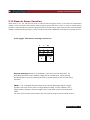
When work in CC, CV, CR and CP mode, if load consumes biggish current, it will cause one depressed
voltage in the connection line between tested machine and terminals of Load. In order to assure testing
precision, Load provides one remote testing terminals in the rear panel, Users could test the output terminals
voltage of tested machine through it. Users should set the Load in REMOTE mode before using this function.
4 Pin trigger and remote sensing connectors:
+
–
Sense
A
IN
Trigger
B
Remote Sensing: SENSE (+) and SENSE (–) are the remote sensing inputs. By
eliminating the effect of the inevitable voltage drop in the load leads, remote sensing
provides greater accuracy by allowing the load to regulate directly at the source's output
terminals.
TRIG: A TTL-compatible input that responds to external edge trigger signal. A trigger
applied to this input can be used to change settings (voltage, current, resistance, etc.),
toggle between settings in transient-toggle mode, or generate a pulse in transient-pulse
mode.
You must set the remote sense mode in the menu before using the remote sense function.
USER’S GUIDE 25
Chapter 2 General Information
Action:
(1) Press
Shift
+
key to go to the menu
Menu
(2)
VFD displays >CONFIG, press
(3)
Press
(4)
Press
/
to choose>ON, press
sense function has been set.
Enter
key to confirm
key to choose>REMOTE SENSE, press
Enter
Enter
key to confirm
key to confirm. And the remote
Wiring diagram for remote sense
Input port in front panel
+
-
+
UUT
Sence port in rear panel
+
-
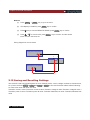
2.15 Saving and Recalling Settings
The electronic load has internal registers in which settings (mode, current, voltage, resistance, transient level,
etc.).Users could use Shift + Store and Shift + Recall to save and recall the relative data as following:
CC value /CW value /CR value /CV value
Transition current A value /Transition current B value /Transition voltage A value /Transition voltage B value /
Transition power A value /Transition power B value /Transition Resistance A value /Transition Resistance B
value
26 USER’S GUIDE
Chapter 2 General Information
Current A pulse width time/ Current B pulse width time/Voltage A pulse width time/ Voltage B pulse width time
/Power A pulse width time/Power B pulse width time /Resistance A pulse width time /Resistance B width time
Transition current testing mode/Transition voltage testing mode/Transition power testing mode /Transition
resistance testing mode /Max current value / Max voltage value / Max power value
Action
1) Press
l-set
, set a value of current or voltage, press
2)
Press
Shift
+
3)
Press Shift + Recall , set the store code that you set before, press
then you can get the number stored.
Store
Enter
set a store code at random, press
to confirm.
Enter
to confirm.
Enter
to confirm,
2.16 Battery Testing
Experiment proves the test with load is the best method to ensure the battery whether work well or not. Only
with the correct load testing, the battery can be confirmed if it was being the expectant life curve location.
The electronic loads can be used to test any type of the battery nowadays.
As the accumulator is used by any sheltered equipment or the uninterrupted service system, it is necessary
to use the load testing. Because the battery nearly is the lowest reliability component, so it must use the load
testing periodic ensure the security of the battery.
Capability test
Electronic load uses CC mode to do the capability test. Make a program to set the voltage
in off state. The accumulator have too low voltage, electronic load intermits test if system
checks the accumulator which is near to one rating or in insecurity state. In testing
procedure, you could see the accumulator voltage, discharge current, electronic load power
and spare capability of accumulator. If connecting with PC software, discharge curve could
be displayed in window. This test can reflect the reliability and using time of accumulator. So,
it’s necessary to do the test before you change another new accumulator.
USER’S GUIDE 27
Chapter 2 General Information
Operation:
1. Turn off the load, connect with the tested battery.
2. Press l-set , VFD display CURRENT= *****A.
Setting the discharge current of the battery, then
press Enter to confirm.
3. Press Shift + Battery , VFD display MIN
VOLT= ****V, Setting the voltage when turned off,
Press Enter to start the capacity testing. When the
battery voltage is same as the voltage without power,
the load turns off.
During the testing, use ▼and ▲ to change the
voltage , actual discharge current ,the electronic load
power and the released discharge capacity of the
battery .
4. Then press Shift + Battery , exit the battery
capacity testing mode.
V
Battery Voltage
Min voltage
t
I
Load Sink Current
t
2.17 Von/Voff Operation
You can set voltage value Von/Voff to control the input state on/off for electronic load. When the input voltage
reaches the Von value, the load’s input state is on. When the input voltage reaches the Voff value, the load’s
input state is off.
Action for set Von/Voff value:
1. Press Shift + Menu into menu.
2. VFD displays >CONFIG, press key
to choose
>SYSTEM SET, press Enter to confirm.
3. VFD displays >MAX CURRENT SET, press
key to choose>VOLTAGE ON SET, press Enter key
to confirm.
4. VFD displays >VOLT.ON=0.00V, press numeric
keys to set Von value (0.1V to max voltage value),
press Enter to confirm.
5. Press
key to choose >VOLTAGE OFF SET,
press Enter to confirm.
6. VFD displays >VOLT.OFF=0.00V, press numeric
keys to set Voff value (0V to max voltage value),
press Enter to confirm.
28 USER’S GUIDE
Chapter 3 Installation
Chapter 3 Installation
3.1 Inspection
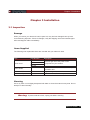
Damage
When you receive your electronic load, inspect it for any obvious damage that may have
occurred during shipment. If there is damage, notify the shipping carrier and nearest Agent
office and Support Office immediately.
Items Supplied
The following user replaceable items are included with your electronic load.
Item
Power Cord
User's Guide
Software CD-Rom
Calibration Report
Part Number
IT-E171
IT-E172
IT-E173
IT-E174
Description
Users will get one of the power cords
appropriate for your location.
Contains installation, checkout, and front panel
information and
Programming information
The Instrument calibration report.
Cleaning
Use a dry cloth or one slightly dampened with water to clean the external case parts. Do not
attempt to clean internally.
Warning: To prevent electric shock, unplug unit before cleaning.
USER’S GUIDE 29
Chapter 3 Installation
3.2 Location
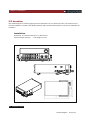
The outline diagram in following figure gives the dimensions of your electronic load. The electronic load
must be installed in a location that allows sufficient space at the sides and back of the unit for adequate air
circulation.
Installation
255.7
214.5
Dimension :214.5mmW x 88.2mm H x 254.6mm D
Terminal length: 29.4mm
Feet height:17.5mm
359
30 USER’S GUIDE
Outline Diagram
Unit (mm)
Chapter 3 Installation
Carrying Handle
3.3 Bench Operation
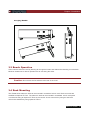
A fan cools the electronic load by drawing air through the button and sides and exhausting it out the back.
Minimum clearances for bench operation are 25 mm along the sides.
Caution: Do not block the fan exhaust at the rear of the Load.
3.4 Rack Mounting
The IT8500 series electronic load can be mounted in a standard 19-inch rack. Rack mount kits are
available as Optional IT-E151. The electronic load can be mounted in a standard 19-inch rack panel
or enclosures using an Optional IT-E151 rack mount kit. A rack mount kit for joining two half-rack
units is also available by using Optional IT-E151.
USER’S GUIDE 31
Chapter 3 Installation
Rack Installation
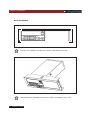
Elevation for Installation one electronic load in a standard 19-inch rack
Side elevation for Installation one electronic load in a standard 19-inch rack
32 USER’S GUIDE
Chapter 3 Installation
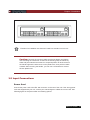
Elevation for Installation two electronic loads in a standard 19-inch rack
Caution: Remove the carrying handle and the two plastic ears before
rack-mounting the instrument. To remove the handle, grasp the handle by
sides and pull outwards and rotate it to a special position to let the arrow on
the handle oppose the other arrow on the plastic ears, then pull the handle
outward. After removing the handle, you can use a screwdriver to remove
the two plastic ears.
3.5 Input Connections
Power Cord
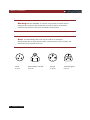
Connect the power cord to the IEC 320 connector on the rear of the unit. If the wrong power
cord was shipped with your unit, contact your nearest Agent to obtain the correct cord. See
following figure for the part number and ordering options.
USER’S GUIDE 33
Chapter 3 Installation
Warning: SHOCK HAZARD: the power cord provides a chassis ground
through a third conductor. Be certain that your power outlet is of the threeconductor type with the correct pin connected to earth ground.
Note: The detachable power cord may be used as an emergency
disconnecting device. Removing the power cord from the ac input connector will
disconnect ac input power to the unit.
E
E
N
L
China
IT-E171
34 USER’S GUIDE
L
E
E
N
United States, Canada
IT-E172
N
L
Europe
IT-E173
L
N
United Kingdom
IT-E174
Chapter 4 Turn-On Checkout
Chapter 4 Turn-On Checkout
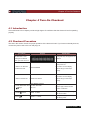
4.1 Introduction
Successful tests in this chapter provide a high degree of confidence that the electronic load is operating
properly.
4.2 Checkout Procedure
The test in this section checks for proper operation of the electronic load. If you have not already done so,
connect the power cord to the unit and plug it in.
Procedure
Display
1. Turn the unit on.
Explanation
The electronic Load
During self test, all segments are
undergoes a self-test
briefly lit
when you First turn it on.
EEPROM damage or Lost data
of last power off
2. Wait for 1s after turn
on electronic load.
EPROM ERROR
Run well if no such display,
system will go to the step 3
directly.
EEPROM Lost calibration data
Run well if no such display,
3. Wait for another 2S.
ERROR CAL.DATA
system will go to the step 4
directly.
LOAD MODEL:IT85XX
4. Press Shift button and SN: XXX-XXX-XXX
keys .
5. Press
6.Press
Esc
button
VER x.xx
0.000V 0.000A
0.000W I: 0.000A
Display the information of the
product Type, series number
version of software.
Display the actual input voltage
and current value.
Display the actual power value
and setting value.
USER’S GUIDE 35
Chapter 4 Turn-On Checkout
In Case of Trouble
Electronic load failure to run during power-on operation. The test of following in this section
help you to solve the possible problem when you turn on the power of electronic load.
1.
Make sure if you have connected the power cord to the unit and plug it in. Power
switch have been pressed.
2.
Check the power voltage setting.
Work voltage of load have two type 110V or 220V , Please make sure it is right
voltage accordance to the voltage in your area. You could change the voltage
setting through dial the switch in the rear panel.
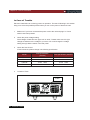
3.
Check the fuse of load.
If fuse is blowout, please change it as following specification.
Model
4.
Fuse specification
(110VAC)
Fuse specification (220VAC)
IT8511
T0.5A
250V
T0.3A
250V
IT8512
T0.5A
250V
T0.3A
250V
IT8512B
T0.5A
250V
T0.3A
250V
IT8512C
T0.5A
250V
T0.3A
250V
Location of Fuse
FUSE
36 USER’S GUIDE
Chapter 5 Front Panel Operation
Chapter 5 Front Panel Operation
5.1 Example
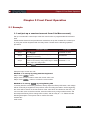
1. I-set (set up a constant current from 0 to Max current )
Set up a constant DC current input is the first main function of programmable DC electronic
load,
IT8500 series electronic load provides two methods to set up the constant DC current input
by using the number keyboard and the rotary button. Please see the following operation
procedure.
Procedure
Step 1
Step 2
Operation details
Press
VFD display
CURRENT=0.000A
l-set
Enter the password or jump the step 4 if your
password for reentering
PASSWORD:
Enter the original value which displayed in the LCD
Step 3
or enter a new value by using number keys or Rotary CURRENT=*.***A
knob to adjust the voltage value
Step 4
Press
Enter
to confirm
0.00V
0.000A
Setup the input current at 4.33A.
Method 1: To set up by using number keyboard
Step1. Press
button.
l-set
Step2. Press numeric button to enter the current value 4.33.
Step3. Press Enter
button to confirm the current value.
Method 2: To set up
by using Rotary SW
l-set
If the key board is unlocked by password, directly adjust the Rotary SW button, and voltage
will be continually changed from the previews value according the rotation. At the beginning,
the cursor will be shown on the last number of the value which is indicated on the VFD, you
can move the cursor to the first number, second number etc by using number buttons, and
then adjust the Rotary SW to change each number, and let it stay at *.** A. Please see the
following description. Then press I-set to confirm the value.
0.00A 0.00V
0.0W 4.33A
USER’S GUIDE 37
Chapter 5 Front Panel Operation
Procedure:
l-set
Step1. Press
button,
Step2. Adjust the Rotary knob to change the value, the operation is as the same as item (1)
Step5. Press Enter button to confirm the current value.
2. P-set (set up a constant power from 0 to Max power)
IT8500 series electronic load can be set up for a constant power.
Constant power setup procedure is as following:
Procedure
Operation details
VFD display
Step 1
Press
POWER =0.0W
Step 2
Enter a new value by using numeric keys or POWER=*.***W
Rotary knob to adjust the voltage value
Step 3
Press
P-set
Enter
to confirm.
0.000W P:*.000W
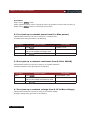
3. R-set (set up a constant resistance from 0.1Ω to 4000Ω)
IT8500 series electronic load can be setup for a constant resistance.
Constant resistance setup procedure is as following:
Procedure
Operation details
VFD display
Step 1
Press
Step 2
enter a new value by using numeric keys or
Rotary knob to adjust the resistance value
RESISTANCE =0.0R
RESISTANCE=*****R
Step 3
Press
0.000W
R-set
Enter
to confirm.
R:0000R
4. V-set (set up a constant voltage from 0.1V to Max voltage)
IT8500 series electronic load can be setup for a constant voltage.
Constant voltage setup procedure is as following:
38 USER’S GUIDE
Chapter 5 Front Panel Operation
Procedure
Operation details
VFD display
Step 1
Press
VOLTAGE=1.500V
Step 2
enter a new value by using numeric keys or
Rotary knob to adjust the resistance value
VOLTAGE=*.***V
Step 3
Press
0.000W
V-set
Enter
to confirm.
V:3.000V
5. Shift + Store
Procedure
Operation details
Step 1
Press
Shift
and
Step 2
Press
Enter
to confirm.
Store
VFD display
VOLTAGE=1.500V
VOLTAGE=*.***V
6. Shift + Recall
Procedure
Operation details
Step 1
Press
Shift
Step 2
Press
Enter
and
to confirm.
Recall
VFD display
RECALL 1
Recall the saving data
7. In On/Off input setting
Use
Out On/Off
to change the input state of electronic load. Switch on to off state by press
Out On/Off
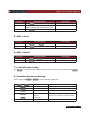
8. Transition Parameter Setting
Users could press
Shift
Shift
+
S-Tran
to set the transition parameter.
LEVEL A =0.000A
Setup value A
Enter
WIDTH A = 0.5mS
Setup time width of value A
Enter
LEVEL B=0.000A
Setup value B
Enter
WIDTH B= 0.5mS
Setup time width of value B
+
S-Tran
Enter
>CONTINUOUS
Enter
>TOGGLED
>PULSE
Choose one of the three transition modes
Finish transition setting
USER’S GUIDE 39
Chapter 5 Front Panel Operation
9. Continuous Transient Operation
In this mode, electronic load will generates a repetitive pulse stream that toggles between two
load levels. ; Load could switch the state between two setting value (value A and value B).
In this following example, assume that the CC mode is active; the applicable transient operation
parameters have been set as follows.
For example:
Continuous mode, current level A =5A, width = 2mS. Current level B =10A, width = 3ms. Testing
machine input voltage is 12V.
10A
5A
2.0ms
3.0ms
Continuous Transient Operation
Action
1. Select the operation mode (CC,CV,CR or CP), and set a proper value, press On/Off to
turn off the load input.
2. Press Shift + S-Tran , set LEVEL A=5A, press Enter , set WIDTH A=3mS, press
Enter set LEVER B=10A, press
Enter , set WIDTH B=2mS, press
Enter to confirm.
3. Transition mode now is CONTINOUS, press Enter to confirm.
4. Press Shift + Tran to activate the transient mode.
5. Press Shift + Tran again to stop the transient operation.
6. Press On/Off , the input of load is powered on.
10. Pulse Transient Operation
In this mode, generates a transient pulse of programmable width when pulsed transient
operation is in effect.
For example: When load receiving one trigger signal, it will switch to 10A current value, and
taking 10mS to return the current value of 5A.
40 USER’S GUIDE
Chapter 5 Front Panel Operation
10A
5A
TWD
10ms
TWD
10ms
TRIG
TRIG
Pulsed Transient Operation
Action
1. Select the operation mode (CC,CV,CR or CP), and set a proper value, press On/Off to
turn off the load input.
2. Press Shift + S-Tran , set LEVER A=5A, LEVER B=10A, WIDTH B=10mS. Transition
mode now is CONTINOUS.
3. Press ▼ till >PULSE.
4. Press Enter , set transient mode is PULSE.
5. Press Shift + Tran to activate the transient mode.
6. Press Shift + Trigger to start another pulse. Press Shift + Trigger , get more pulse.
7. Press Shift + Tran again to stop the transient operation.
8. Press On/Off , the input of load is powered on.
11. Toggled Transient Operation
In this mode, after transition operation start, Load could change the input between the main
level and the transient level when toggled transient operation is in effect.
For example:
When Load receives one trigger signal, Load current will switch between 5A and 10A.
10A
5A
TRG
TRG
Toggled Transient Operation
USER’S GUIDE 41
Chapter 5 Front Panel Operation
Action
1. Press
2. Press
3. Press
4. Press
5. Press
Shift
Shift
Shift
Shift
Shift
+
+
+
+
+
S-Tran
Tran
Trigger
Trigger
Tran
, Setting LEVER A=5A, LEVER B=10A, transition mode is TOGGLED.
to activate the transient mode.
switch to the current value of 10A.
switch between 5A and 10A.
again to stop the transient operation.
12. List Operation
Users can use the front panel keypad or Power View 8500(PV8500) software to
programming the list sequence. Please refer to the software user’s guide.
The following example will help you how to do the list operation in front panel.
Trigger
0
1
2
3 4
5
List count=1
List count=2
List sequence
Action
1)
2)
3)
4)
5)
6)
7)
8)
9)
Press the button of On/Off , execute the input of Load I in OFF state.
Press Shift + Menu , move cursor to the option of menu of CONFIG, Press Enter
Enter
into the next step menu, move cursor to TRIGGER SOURCE. Press
and move
cursor to IMMEDIATE <DEF>, setting trigger source mode is panel IMMEDIATE mode.
Press Enter to confirm.
Press Esc to the previous menu, move cursor to LIST SET.
Press Enter into the next step menu .move cursor to EDIT LIST FILE.
Press Enter into the next step menu, move cursor to CURRENT LIST, select
CURRENT MODE.
Press Enter , move cursor to REPEAT. Setup LIST is in cycle mode.
Press Enter to confirm, setup the list steps = 5.
Press Enter to confirm, setup step 1 current =3A.
42 USER’S GUIDE
Chapter 5 Front Panel Operation
Action
10) Press Enter to confirm, setup step 1 width=6mS.
11) Repeat 7) and 8) operation , set current and width of one step 0A, 5mS;2A,
4mS;6A,2mS;0A,5mS.
12) Press Enter to confirm, Menu STORE LIST FILE 1, save file in group1.
13) Move cursor to Mode Set , press Enter to enter into the next step menu to set mode
is <LIST MODE >
14) Press Enter to confirm
15) Press Esc , Press On/Off , make Load in ON state. Press Shift + Trigger , make list
operation run or stop.
16) Stop the list operation mode. Move cursor to LIST SET, press Enter , move cursor to
Mode Set in option menu, press Enter , enter into next step menu. Select mode is <FIXED
MODE>.
17) Press Enter to confirm.
5.2 Fast Recall Function
You recall 10 groups numbers very conveniently which were stored before.
Action
1) Press Shift + Menu
2) Press▼to CONFIG, press Enter into submenu, press▼ to SHORTCURT RECALL
3) Press Enter , select >ON and press Enter to confirm.
4) Press Esc two times and quit the menu.
5) Press 1 and you can get the first group number. Press 2 , you can get the second
group number. Press 0 , you can get the tenth group number. And if there is not stored
number, VFD will show NO EEPROM DATA.
5.3 Automatic Testing Function of Electronic Load
You test various parameters of power supplies at different loads. Now we take a kind of charger as
an example to explain the usage of the automatic testing of the electronic load.
USER’S GUIDE 43
Chapter 5 Front Panel Operation
The test proceeding of R35 charger
process
Test Method
Mode
Voltage(V)
Current(mA)
Power(W)
1st step
CC
5.8~6.15
210
≤4(input175VAC)
2nd step
None
5.9~6.4
0
≤1.2(input175VAC)
3rd step
CC
5
205~245
4th step
CV
3
205~245
5th step
CV
2
205~245
6th step
Short circuit
0
≤245
Ripple counter
≤50mVpp
1. Edit the Testing File
1) Press Shift + Menu into menu, VFD displays >CONFIG
2) Press▼ to >LIST SET.
Enter
3) Press Enter into submenu, press▼ to>EDIT LIST FILE.
4) Press Enter and begin to edit the automatic testing file, VFD shows MAX CURR=
20.000A, which means setting the maximum of voltage. The maximum is bigger than 3A,
which means CC mode is in high range, here, the maximum is 3A. Press 3 and press Enter
to confirm.
5) VFD displays MAX VOLT=120.00V, which means setting the maximum of voltage, the
maximum is bigger than 18V, which means CV is in high range, here ,the maximum is 18V.
Press 1 + 8 to set MAX VOLT=18V, press Enter to confirm.
6) VFD displays MAX POWER=200.00W, which means setting the maximum of power,
here, it is150W, Press 1 + 5 + 0 to set MAX POWER=150W, press Enter to confirm.
7) VFD displays TEST COUNT=2, which means setting steps of testing, 20 steps are
permitted at most, here, they are 6 steps. Press 6 to set TEST COUNT=6, press Enter to
confirm.
8) Setting the mode of current procedure, press ▲、▼to choose one mode in CONST
CURRENT、CONST VOLTAGE、CONST POWER、CONST RESIS. Here, the first step is
CC mode, press ▲、▼to >CONST CURRENT, press Enter to confirm.
9) VFD shows SET 1=20.000A, which means setting the current procedure. Here, the first
sis 0.21A, press 0 +
+ 2 + 1 , then press Enter to confirm.
10) Setting whether the current procedure is short circuit or not, press ▲、▼to choose
one in SHORT ON or SHORT OFF. Here the first step is SHORT OFF. Press SHORT OFF,
press Enter to confirm.
11) Select the test number of this step, press▲、▼ to choose >READBACK V, Press
Enter
to confirm.
12) VFD displays MIN 1=120.00V, which means setting the lower limit. Here, the first step
is 5.8V. Press 5 +
+ 8 , press Enter to confirm.
44 USER’S GUIDE
Chapter 5 Front Panel Operation
13) VFD displays MAX 1=120.00V, which requests setting the upper limit. Here, the first
step is 6.15V, press 6 +
+ 1 + 5 ,then press Enter to confirm.
14) VFD shows DELAY 1= 1.0〈S〉, which means setting the prolong time, that is how
long we can read the testing value after inputting the value we settled. To wait for testing
after the input stable, the range of prolong time is 0~25.5 seconds, when the setting is 25.5
seconds, automatic testing will be pause, only the user press Shift + Trigger ,the testing
will continue. Here, the first step is 1 second, press 1 and then press Enter to confirm.
15) Repeat 9)~14), and set the other process step by step as follows:
A. CONST CURRENT,0A,SHORT OFF, READ BACK V, 5.9V, 6.4V,1S
B. CONST VOLTAGE, 5V, SHORT OFF,READ BACK A, 0.205A, 0.245A,1S
C. CONST VOLTAGE, 3V, SHORT OFF, READ BACK A, 0.205A,0.245A,1S
D. CONST VOLTAGE, 2V,SHORT OFF, READ BACK A, 0.205A,0.245A, 1S
E. CONST CURRENT, 0A, SHORT ON, READ BACK A,0A,0.245A, 1S
16) VFD displays SHORT TEST FILE*, which requests saving the files edited to EEPROM,
automatically testing files and LIST files use a common memory area, and the area can
contain 8 groups of automatic testing files for next usage. Here, the testing file could be
saved in the first group, press 1 and press Enter to confirm.
17) When the edition of automatic testing file is finished, press Enter two times to back
the menu.
2. Fast Recall the Test File
1)
2)
3)
4)
5)
Press Shift + Menu to enter into menu, VFD displays>CONFIG
Press▼ and move the menu to>LIST SET
Press Enter to enter into submenu, VFD displays>MODE SET
Press▼ and move the menu to>CALL TEST FILE
Press Enter and recall the file edited
3. Automatic Testing
After editing the automatic testing file, the automatic testing could be carried out by the
below steps.
1) Press Shift + l-set to enter into automatic testing, VFD displays the name of current
file: NAME: TEST FILE1
2) Press Enter to observe the voltage and current we inputted, and also can observe the
step number of testing.
3) Press Shift + Trigger and begin to operate, when the automatic testing is pause (the
current prolong time of one step is 25.5S), press Shift + Trigger also can make the testing
continue.
USER’S GUIDE 45
Chapter 5 Front Panel Operation
1) When the automatic testing is finished, the buzzer will hint by tweet (buzzer), VFD reads
the result of testing. If the testing passed, VFD reads PASS, or reads FAULT. Press▲、▼
also to observe the numerical value and result of every step.
5) Press Esc to back the automatic testing.
4. Select the Resolution between Low Range and High Range
1)
2)
3)
4)
5)
6)
Press Shift + Menu to enter into menu, VFD displays>CONFIG
Press Enter into the submenu, VFD displays>INITIAL CONFIG
Press▼to make VFD display RANGE SELECT
Press Enter to confirm, and press▼to choose ON
Press Enter to confirm
Press Esc to exit menu
Then you can press Shift +▲ to change the voltage range (maximum voltage). If the former
maximum voltage value is 120V and the resoulution is 10mV, it will become 18V when you
press Shift +▲ , and you will get 3 decimal points (xx.xxx) compared to 2 decimal points
before. Wheras if the former maximum voltage is 18V, you can press Shift +▼ to make it
become 120V, also the resolution will become as 10mV.
On the other hand, you can press Shift
+▼ to change the currnet range (maximum
current). If the former maximum current value is 12A and the resolution is 1mA, it will
become 120A when you press Shift +▼, and you will get 2 decimal points (xx.xx) compared
to 3 decimal points before. wheras if the fromer maximum current is 120A, you can press
Shift
+▼ to make it become 12A, and the resolution will become as 1mA.
46 USER’S GUIDE
Chapter 6 Specifications
Chapter 6 Specifications
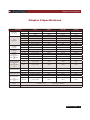
Parameter
Input rating
( 0 ~ 40 ℃)
Load
Regulation
CV Mode
Regulation
CC Mode
Regulation
CR Mode
Regulation
Input current ≥FS
10%
Input Voltage≥FS
10%
CW Mode Regulation
Input current ≥FS
10%
Input Voltage≥FS
10%
Current Measurement
Voltage Measurement
Power Measurement
Input current ≥FS
10%
Input Voltage ≥FS
10%
Battery testing
function
Transition Mode
IT8511
IT8512
IT8512B
Voltage
0 to 120V
0 to 120V
0 to 500V
IT8512C
0-120V
Current
1mA to 30A
1mA to 30A
1mA to 15A
1mA to 60A
Power
150 W
300 W
300 W
300 W
Range
Accuracy
Resolution
Resolution
Resolution
0-18V
±(0.05%+0.02%FS)
1mV
1mV
1mV
0-120V / 500V
±(0.05%+0.025%FS)
10mV
10mV
10mV
0.2mA
0-3A/6A
±(0.1%+0.1%FS)
0.1mA
0.1mA
0-30A/15A/60A
±(0.1%+0.1%FS)
1mA
1mA
2mA
0.1-18V
±(0.05%+0.02%FS)
1mV
1mV
1mV
0.1-120V/500V
±(0.05%+0.025%FS)
10mV
10mV
10mV
0-3A/6A
±(0.05%+0.1%FS)
0.1mA
0.1mA
0.1mA
0-30A /15A/60A
±(0.1%+0.1%FS)
1mA
1mA
1mA
0.1-10Ω
±(1%+0.3%FS)
0.001Ω
0.001Ω
0.001Ω
10-99Ω
±(1%+0.3%FS)
0.01Ω
0.01Ω
0.01Ω
100-999Ω
±(1%+0.3%FS)
0. 1Ω
0. 1Ω
0. 1Ω
1K-4KΩ
±(1%+0.8%FS)
1Ω
1Ω
1Ω
0-100W
±(1%+0.1%FS)
1mW
1mW
1mW
100-3
±(1%+0.1%FS)
10mW
10mW
10mW
0-3A/6A
±(0.1% + 0.1%FS)
0.1mA
0.1mA
0.2mA
0-30A /15A/60A
±(0.2%+0.15%FS)
1mA
1mA
2mA
0-18V
±(0.02% + 0.02%FS)
1mV
1mV
1mV
0-120V/500V
±(0.02%+0.025%FS)
10mV
10mV
10mV
0-100W
±(1%+0.1%FS)
1mW
1mW
1mW
100-300W
±(1%+0.1%FS)
10mW
10mW
10mW
Input=0.1-120V
Resolution =10mA
Max measurement capacity= 999AH
Timer range=1~60000sec
Range of Frequency 0.1Hz-1kHz Frequency error rate<0.5%
USER’S GUIDE 47
Chapter 7 Remote Operation Mode
Chapter 7 Remote Operation Mode
DB9 in the rear panel of electronic load could connect with RS-232 through on TTL connector. The following
information may help you to know how to control the output of electronic load through PC.
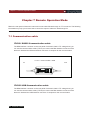
7.1 Communication cable
IT-E131 RS232 Communication cable
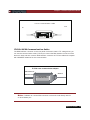
The DB9 interface connector on the rear panel of electronic load is TTL voltage level; you
can use the communication cable (IT-E131) to connect the DB9 interface connector of the
electronic load and the RS-232 interface connector of computer for the communication.
IT-E131 communication cable
Load
COMPUTER
IT
RS232
IT-E131 ISOLATED
COMMUNICATION CABLE
ISOLATION
859666668889942311
TTL(5V)
RX
TX
INSTRUMENT
PC
IT-E132 USB Communication cable
The DB9 interface connector on the rear panel of electronic load is TTL voltage level; you
can use the communication cable (IT-E132) to connect the DB9 interface connector of the
electronic load and the USB interface connector of computer for the communication.
48 USER’S GUIDE
Chapter 7 Remote Operation Mode
IT-E132 communication cable
Load
COMPUTER
IT
RS232
IT-E131 ISOLATED
COMMUNICATION CABLE
ISOLATION
859666668889942311
TTL(5V)
RX
TX
INSTRUMENT
PC
IT-E134 GPIB Communication Cable
The DB9 interface connector on the rear panel of electronic load is TTL voltage level; you
can use the communication cable (IT-E134) to connect the DB9 interface connector of the
electronic load, and then connect GPIB interface connector of IT-E134 cable and computer
with GPIB/IEEE 4888 line for the communication.
IT-E134 outer communication adapter
COM interface of
GPIB line
Electronic load
IT-E134 ISOLATED
Serial /IEEE 488 Controller
Note: Forbidden to connect DB9 connector in electronic load directly with PC
or other RS232 port.
USER’S GUIDE 49
Chapter 7 Remote Operation Mode
7.2 Communication between electronic load and PC
Before using the remote operation mode, please make sure that the baud rate and communication address
in electronic load are the same as in the computer software, otherwise, the communication will fail, you can
change the baud rate and communication address from the front panel or from computer.
1.
2.
3.
4.
5.
Address: the range is from 0 to 254, default setting is 0
Baud rate: 4800,9600,19200 and 38400 are selectable, default setting is 4800
Data bit: 8 bit
Stop bit: 1
Parity: None
Parity=None
Start Bit
8 Data Bits
Stop Bit
DB9 Interface Details
1 2 3 4 5
6 7 8 9
DB9 in the rear panel of electronic load is TTL level signal .it can be connecting with
standard PC interface through the IT-E131 isolated communication cable.
50 USER’S GUIDE
ITECH Electronic Co.,Ltd
China
Tel : 025-52415098
Fax: 025-52415268
310# Ning Nan Da Dao,
NanJing City, 210012, Jiangsu
Province,China
Europe
Tel : 477-590101
Fax: 477-572323
32, rue Edouard Martel
42100 - St Etienne France
USA
Tel : 714-9219095
Fax: 714-9216422
22820 Savi Ranch Parkway
Yorba Linda, CA 92887 U.S.A.
South Korea
Tel : 285-20680
Fax: 285-20684
#153-783,Rm601,ByuckSan,
GaSan-Dong, Seoul, Korea