1
3-2
Operator’s Guide
Key Concepts
M-Trend Main Window
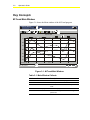
Figure 3-1 shows the Main window of the M-Trend program.
1
Office.htv - M-Trend
File Edit View
Query
2
Help
3
15:52, 67.4
Office Temps
April 13, 1998
130.Paul's Office.Value
132.Secretary Office.Value
4
131.Brad's Office.Value
133.Carole's Office.Value
70.0
DegF DegF DegF
69.5
69.0
68.5
68.0
67.5
67.0
13:00
15 Wed Apr 98
13:30
14:00
5
For Help, press F1
Time
14:30
15:00
15:30
NUM
MT_main
Figure 3-1: M-Trend Main Window
Table 3-1: Main Window Callouts
Callout
Name
Description
1
Title Bar
Shows name of file and program.
2
Main Menu Bar
Shows top level of available menu selections.
3
Toolbar
Provides button access to commonly used
tools.
4
Data Display Area
Area where graphs and tables are viewed.
5
Status Bar
Provides messages about actions being
performed.