1
3-4
Operator’s Guide
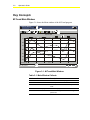
M-Trend Main Window Toolbar
Table 3-3 describes the M-Trend toolbar buttons.
Table 3-3: M-Trend Toolbar Buttons
Button
Name
Description
New
Creates a new blank Trend document.
Open
Opens the Open File document to allow the selection and opening of
a saved Trend document.
Save
Saves the current document. If the document has been saved
previously, it overwrites it; otherwise, the Save As dialog box
appears.
Copy
Copies selected text to the clipboard in View Text mode.
Print
Prints the current graph or table.
About
Opens the M-Trend information box to display version and copyright.
Graphic View
Displays data in a graphic format.
Text View
Displays data as text in a table.
Refresh Data
Starts or restarts the current query.
Cancel Query
Cancels any query in progress.
Edit View
Opens the M-Trend Definition dialog box.
Point Symbols
Adds unique symbols to each point on the graph.
Data Points
Marks each data point on the graph with a small dot.
Grid Lines
Toggles the horizontal grid lines on or off in Text View.
Auto Scroll
If automatically updating data and in Text View, selecting this button
keeps the table scrolled to the latest entry.