1
VersiStart i III
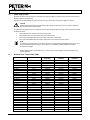
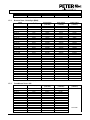
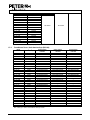
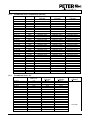
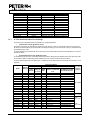
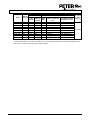
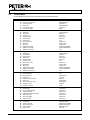
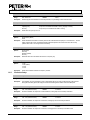
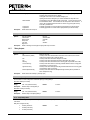
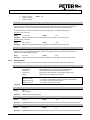
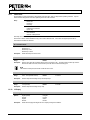
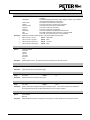
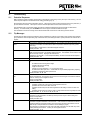
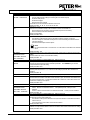
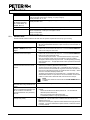
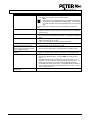
Symptom
Motor does not reach full speed.
Erratic motor operation.
Erratic and noisy motor operation.
Soft stop ends too quickly.
Adaptive Control, brake, jog and
PowerThrough functions not working.
After selecting Adaptive Control the motor
used an ordinary start and/or the second
start was different to the first.
PowerThrough does not operate when
selected.
Parameter settings cannot be stored.
Remote keypad shows message
"awaiting data"
68
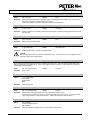
Probable Cause
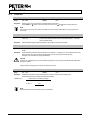
•
If the start current is too low, the motor will not produce enough torque to accelerate
to full speed. The soft starter may trip on excess start time.
NOTE
Make sure the motor starting parameters are appropriate for the application
and that you are using the intended motor starting profile. If parameter 6D is
set to Motor Set Select, check that the corresponding input is in the expected
state.
The load may be jammed. Check the load for severe overloading or a locked rotor
situation.
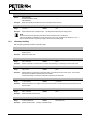
•
The SCRs in the VersiStart i III require at least 5 A of current to latch. If you are
testing the soft starter on a motor with full load current less than 5 A, the SCRs may
not latch correctly.
•
If the soft starter is connected to the motor using inside delta configuration, the soft
starter may not be correctly detecting the connection. Contact your local supplier for
advice.
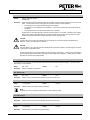
•
The soft stop settings may not be appropriate for the motor and load. Review the
settings of parameters 2H, 2I, 3H and 3I.
•
If the motor is very lightly loaded, soft stop will have limited effect.
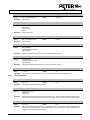
•
These features are only available with in-line installation. If the VersiStart i III is
installed inside delta, these features will not operate.
•
The first Adaptive Control start is actually 'Constant Current' so that the starter can
learn from the motor characteristics. Subsequent starts use Adaptive Control.
The starter will trip on Lx-Tx Shorted on the first start attempt after control power is
applied. PowerThrough will not operate if control power is cycled between starts.
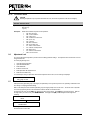
•
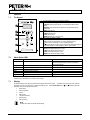
Make sure you are saving the new value by pressing the MENU/ENTER button
after adjusting a parameter setting. If you press EXIT, the change will not be
saved.
•
Check that the adjustment lock (parameter 15B) is set to Read & Write. If the
adjustment lock is set to Read Only, settings can be viewed but not changed. You
need to know the security access code to change the adjustment lock setting.
•
The EEPROM may be faulty on the keypad. A faulty EEPROM will also trip the soft
starter, and the keypad will display the message Parameter out of range. Contact
your local supplier for advice.
The keypad is not receiving data from the control PCB. Check the cable connection.
•