1
oJs^irb=rëÉêÛë=dìáÇÉ=
5.2 Exporting Charts or Summaries to .WMF Files
R-VALUE charts and data summaries may also be exported to .WMF (Windows
MetaFile) files – these files are easily imported into word processors and drawing programs. To
do this, select either R-VALUE >Data Summary or R-VALUE > Chart. Either selection displays
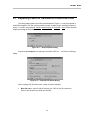
the dialog shown in Figure 5.1.1. Drop down the Output to: box and select “Windows Metafiles”.
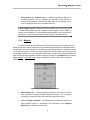
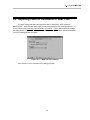
You’ll see a dialog like the one below:
Figure 5.2.1 -- .WMF File Export Dialog
See Section 5.1 for a discussion of the dialog’s prompts.
NT=