1
To enter the cPad Config Menu:
When you see the progress bar upon boot-up, enter a “Z Code” – touching a finger on each
corner of the touchscreen in a “Z” pattern – top left, top right, bottom left, bottom right.
This will prompt you to enter a password
The password is: 2-3-4-6-8
Network set-up:
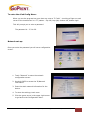
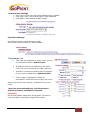
Once you enter the password you will see a configuration
screen.
1. Touch “Network” to enter the network
configuration screen.
2. Uncheck DHCP to access the IP/Network
information.
3. Enter the static network information for the
device.
4. To store the settings, touch save.
5. Click the green arrow in the upper right corner
to go back to the Configuration Menu.
© 2014 GoPrint Systems, Inc. All rights reserved.
| cPad User Manual
4