1
www.action-electronics.co.uk
Can I hear the sounds before I decide to buy a P100?
No.
If you come to see us at one of the shows which we attend then we'll have several units
on demonstration. Please don’t ring us up and ask to hear them over the phone, though!
R/C ELECTRONICS
Why do some sound-sets not include start-up and shut-down sequences for the engine?
Because we don't currently have any recordings of these. If you do find some and successfully convert them into
useable sounds then you will be able to upload them onto the website for the benefit of other users. We hope this 'filesharing' will become an important feature of the P100 website.
How does P100 differ from the present ACTion sounds?
The present sound units are only simulators. The sound is generated and modulated by the on-board components
and really only gives the impression of real engines, horns etc although the pitch, rate and volume are generally
adjustable. In contrast, P100 uses digital sampling technology to replay and modulate the sounds from real-life
recordings.
Can I use P100 with my existing ACTion sound units?
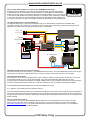
Yes. You will need either a P97 or P101 Audio Mixer/Amplifier installed. P100 then connects to one of the four audio
input terminals in the same way as any of the other ACTion units do. Up to four separate units (including P100) can
be connected to one mixer/amp.
Why do I need an amplifier?
The obvious answer is that you won't get any sound unless you have one! We designed P100 with more than just
model use in mind, so it has the facility to feed into practically any standard audio amplifier e.g. a public address
system. In practice, we would anticipate that most modellers will prefer to use either our P97 or P101 amplifiers, both
of which are perfectly compatible with P100.
How do I “play” the other sounds on P100 when it’s in Throttle Mode?
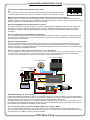
We have produced a special little switch, P104, which fits over the eight sets of pins on P100 and plugs into a spare
receiver channel. Sound selection is then done by simply “blipping” the transmitter stick/switch the appropriate
number of times. Full details are elsewhere on the website, under Products>Switches.
P101 15W Mixer/Amplifier
8Ω x 10W speaker
P92 Power Distribution Board
Power Spkr
In
To Rx Battery
input socket
+ - - +
ON/OFF
Power Audio Mixer
Inputs
Out
- + A B C D
No connections
5
To Rx Throttle
output socket
25
15
+ve
P100 Noisy Thing
Ground 0v
-ve
12v BATTERY
P80 Condor 20A ESC
Motor
Will P100 work with a 6v motor supply?
P100 has an absolute working limit of 6.2v so you must not use either a 6v lead-acid battery or a 5-cell rechargeable
pack to power the receiver directly. However connecting the receiver to a 6v battery via a regulated 5v 'BEC' such as
fitted to our P92, P19 or P99 - or via a non-ACTion speed controller with BEC - will be fine.
As regards powering the amplifiers, P101 and P97 really are marginal for volume output if you connect them to a 6v
power supply; we recommend at least 9v for these units. If your model uses a 6v battery for its motor(s) then you're
best advised to fit a separate 9v-12v battery for the amplifier.
Can I use my 'XYZ' speed controller with Battery Eliminator Circuitry ('BEC')?
Yes. If your ESC has this facility then you can just connect it to the socket fly-lead of P100 and the power for the
receiver will pass through the 3-wire leads and the receiver plug. You must not also connect a separate power supply
into the receiver “Power/Batt” socket if your ESC uses BEC.
P100 Noisy Thing