1
Getting Started
Installation
Page Title
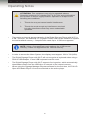
The Digital Signage Player with Wi-Fi can be connected directly to a network using an
Ethernet cable or using Wi-Fi.
1.
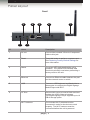
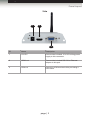
Connect the included Wi-Fi antenna to the Digital Signage Player.
2.
Connect an HDMI cable between the display and the HDMI connector on the Digital
Signage Player with Wi-Fi.
3.
If Wi-Fi will not be used to connect the Digital Signage Player with Wi-Fi, then connect
the included Ethernet cable from the Ethernet jack on the Digital Signage Player with
Wi-Fi to the network.
4.
Connect a keyboard to the USB port on the back panel of the Digital Signage Player.
5.
Connect the included 12 V DC power supply to the unit and connect the AC power
cord to an available electrical outlet.
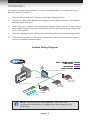
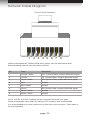
Sample Wiring Diagram
CAT-5 / ETHERNET CABLE
VIDEO OUTPUT
USB INTERFACE
CONTACT CLOSURES
Supports Wired or Wireless Connection
Wireless Router
Digital Signage
Player w/Wi-Fi
Signage Manager Software
Digital Signage
Player w/Wi-Fi
GPIO
Digital Signage
Player w/Wi-Fi
Microswitches
EXT-HD-DSWFN Configuration #1
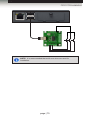
NOTE: The GPIO PCB is sold separately. See GPIO PCB
Installation for information on installing and connecting the GPIO
PCB board.
page | 4