1
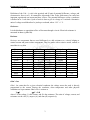
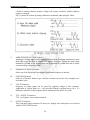
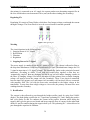
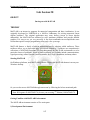
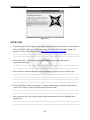
Engineering Workshop Lab Session 28 NED University of Engineering & Technology – Department of Computer & Information Systems Engineering <map name="heads"> Now the user needs to type an <area> tag for each region of the image. This tag can have attributes like: Shape=”rect” indicates that the region is rectangular. See next section for other shapes. coords="x1,y1,x2,y2" gives the top-left (x1,y1) and bottom-right (x2,y2) corner coordinates for the rectangular region. href="URL of the page" specifies the page that clicking on the region will link to. Any address or filename that can be used in an ordinary <a href> link tag can be placed here. After the <AREA> tags, insert a closing </MAP> tag. To place the actual image map on the page, use an ordinary <img> tag, and add a “usemap” attribute. Use the name put in the <map> tag preceded by a # symbol. For example, <img src="rushmore.gif" usemap="#heads"> Image Maps with Non-rectangular Regions Some images don't lend themselves to being broken up into neat rectangular regions. Fortunately, HTML image maps let the user create other shapes as well. To make polygonal regions, use shape="poly" in the <area> tag, and put each of the corner points in the coords attribute. For circular regions, use shape="circle" and put the center point and radius (in pixels) in the coords attribute. Consider the following code, <html><head><title>The Medieval Elements</title></head> <body background=”gradient.jpg”> <map name=”elements”> <area shape=”poly” coords=”217,215,185,84,109,159” href=”earth.htm”> <area shape=”poly” coords=”5,218,139,185,64,108” href=”water.htm”> <area shape=”poly” coords=”5,7,33,141,112,61” href=”air.htm”> <area shape=”poly” coords=”216,5,86,39,161,109” href=”fire.htm”> <area shape=”circle” coords=”111,111,30” href=”ether.htm”> </map> <img src=”ewaf.gif” width=220 height=220 border=0 align=”right” usemap=”#elements” > <h2>The Midieval Elements</h2> Scientific knowledge has progressed far beyond the four “elements” of earth, water, air and fire as an explanation of objective physical phenomena.<p> However, many people still view these four qualities as essential elements of our subjective inner experience of the world. Click on one of the elements to the right to read more about it. </body></html> Say, the following figure shows how the image map in the above code appears to a reader about to click on the "AIR" link: 161