1
USBPP52 – Power Pack 52000 - (WHITE)
Model Number: USBPP52-RO
User Manual
Please read this manual thoroughly before using your Ross Power Pack and then retain for future reference
1.1 Important Safety Instructions:
• Please read these instructions carefully and retain for future reference. If you sell, or give this Power Pack away be sure to pass on the instructions.
• There are no user serviceable parts inside this unit. DO NOT open there are dangerous voltages inside. Electric shock hazard.
• This unit operates on a 5200mAh capacity
• During use, this device may become warm, this is normal.
• DO NOT place naked flames (such as candles) on this equipment.
• DO NOT operate close to heaters or other heat sources.
• DO NOT stand on soft furnishings
• DO NOT operate this unit in damp conditions or allow water or other fluids to enter the enclosure. If this happens, switch off IMMEDIATELY
and refer the device to the Ross helpline.
• DO NOT clean this device using solvent based products. Use only a soft dry cloth.
• DO NOT leave this product in a hot or humid environment.
1.2 General Information
• Thank you for choosing the Ross Power Pack 52000 (White). Treated with care and used in accordance with the contents of this manual
it will provide many years of reliable service
•
This symbol indicates that, at the end of its useful life, this product must not be disposed of with normal domestic waste. To prevent
possible harm to the environment or human health from uncontrolled waste disposal, please recycle it responsibly.
•
This product conforms to all applicable EU legislation for this type of product. Further information can be obtained
from Ross if required.
2.0 In the Box:
Please open your box carefully and check the contents which
should be as the list below: If anything is missing please contact
the Ross helpline or return the product to the point of purchase.
• Ross Power Pack
• USB to Micro USB cable 15cm or 6 inches
• User manual
3.0 Product Specifications
Please find the detailed specifications for the Ross Power Pack below:
•
•
•
•
•
•
•
•
•
Real Capacity: 5200mAh
Input: 5V / 1A
Output: 5V / 1A
Battery: Lithium Polymer Battery
Weight: 115g
Dimensions (L*W*H) 90*44*23mm
Charging Time: 6 Hours
Static Power Consumption: ≤20µA
Cycle Life: > 500 Times
4.0 Product Features
Please find details of the Ross Power Pack below:
•
•
•
•
•
•
•
An excellent choice for instant portable power, simply connect your portable device via the USB socket & press the button for instant charging
Light-weight, compact and robust design
Long service life, more than 500 charging/discharging
LED Power indicator to show the charge status
Includes 6" (15cm) Micro USB to USB charge cable
The use of advanced intelligent protection chip, overcharge, discharge, short circuit and leakage protection
Built in LED flash light
5.0 Product Instructions
The product will require charging upon purchase. The cable provided will charge the power bank with power and depending on the connector
type of your device (Cable is Micro USB) you can also use the cable to charge your device.
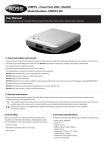
5.1 Product Details
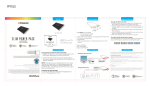
① 4 level indicator light
② 2 Power Indicator Light button/Torch on off (if pressed twice)
③ LED Flashlight
④ USB 1.0A output interface
⑤ Micro USB input interface
5.2 Charging the Power Bank
Using the provided cable, connect the Micro USB via the Micro USB input interface, (5) connect the USB end of the cable to an appropriate charging
port (Examples include a USB plug or a USB input interface on a laptop). The orange LED indicator lights will start to flash. Charging should take
approx. 6 hours, however when fully charged the LED indicator lights with all be continuously on. Once fully charged disconnect the cables.
5.3 Charging a device
To charge a device with a Micro USB connector, use the cable provided. Place the USB end into (4) USB 1.0A output Interface, then plug the Micro
USB into your device. Press the power indicator light. The charge icon on your device should now indicate your device is charging.
To charge a device with another connector type other than Micro USB (iPhone for example), use the cable provided with the device as long as it
has a USB. Place the USB end of the cable into (4) USB 1.0A output interface, then place the connector on the other end into your device. Press
the power indicator light. The charge icon on your device should now indicate your device is charging.
Your device will charge in various speeds depending on the voltage of the device, for larger devices which require larger outputs the Power
Pack 5200 will offer an extension to the life of the battery charge may not fully re-charge the device.
To start charging the device click the on/off button once, for the torch click the on/off button twice.
5.4 LED Indicators
The LED lights are a direct indication of how much charge is in the device. You can check this at any time by pressing the power indicator button.
4 LED Lights: 75- 100% Power Capacity
3 LED Lights: 50-75% Power Capacity
2 LED Lights: 25-50% Power Capacity
1 LED light: 0-25% Power Capacity
6.0 Additional Notes & Tips
• The product can become warm when in use this is normal.
• For first time charge the product may need 8-10 hours to become fully charged.
• The product will lose charge if left for a long period of time without use.
• Please ensure you keep the USB ports on the device clean, if they require cleaning use a dry cloth.
• To operate the torch press the power button twice
Technical Support UK: 0845 194 7584 • Email: [email protected]