1
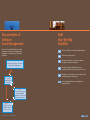
 New Software Check-In
Software Use Policy
To ensure new software is added to your company’s software
inventory, develop a series of steps that employees should
follow when the new software arrives.
The Software Use Policy should cover your company’s rules
for downloading, installing, and using software titles.
The steps should cover:
• Storing original documentation including the bill of
landing
• Storing the original packaging and media
• Updating the software inventory report or database
The software check-in process is often overlooked but is the
easiest way to make sure your software inventory remains
accurate. You will help prevent your company from wasting
money by acquiring software you already own.
www.microsoft.com/canada/sam
Some points you may want to include are:
• Review the terms and conditions for each license to
ensure proper usage
• The process for authorizing software installations (i.e.
assign one person to either install software or record
software installations)
• Monitor all Internet and downloading activities
• Keep terms and conditions in an easily accessible
location for all employees
It is important that all employees receive the Software Use
Policy and understand what they can and cannot do with the
company’s software and hardware. You will help keep your
systems free from viruses, reduce the number of support calls,
and keep your software inventory up-to-date.