1
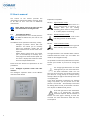
Below, the various menus of the deluxe operating
panel will be explained step by step.
once. Press
your settings.
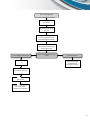
Main menu:
Press
to enter the main menu. The main
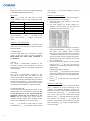
menu provides access to the submenus listed
below:
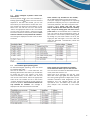
Submenu
Description
1.Operating mode
Operation of the unit
2.Clock program
Set clock program
3.Data time
Set date and time
4.Filter reset
Resetten filter timer
5.Special function
Settings for installer
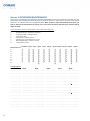
Submenu 2 - Clock program
The control panel has a seven-day clock program.
The clock program is set as follows:
1. Select the menu clock program in the main
menu and press
.
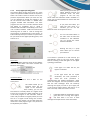
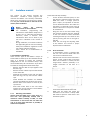
2. The clock program for Sunday appears, an
example is shown below. You can select the
various fields in this menu, with
.
Use the buttons
menu. Then use the
menu.
and
to select a subbutton to enter the
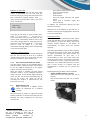
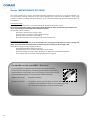
Submenu 1 - Operating mode
In this menu you can choose the operating mode
of the unit. You can choose from the four options
described below.
1. Holiday speed
Use this mode when you are away for a longer
period. It will only assure minimal ventilation.
Never enable this mode when somebody is
in the house.
2. Winter
This mode is automatically enabled at the
transition to winter time. The bypass can not be
opened now and the air always goes through the
heat exchanger.
3. Summer
This mode is automatically enabled at the
transition to summer time. The bypass can now
open if the conditions mentioned in section 4.2.3
are met. It is therefore important that you indicate
the desired temperature in the summer to your
installer. This desired temperature does not affect
the operation of the HRUC-E in the winter mode.
4. Summer exitair only
In this mode only the exhaust fan works, so the
contaminated air is removed from the home. You
do not get fresh air in your home through the
ventilation system and your supply air is not
filtered! Use this mode only if you want to
ventilate through enough open windows and/or
doors. In this mode there is no heat recovery.
Press
to activate a mode, after you have
selected it with
. The selected mode will blink
8
to exit the submenu and save
3. If you have selected the field that you want to
adjust, use the buttons
and
to change
the value. The program offers six time
intervals. For each time interval you can choose
a ventilation mode (LS). You can choose from
the three modes and the holiday (0) position.
Outside the preset time intervals, the unit will
turn in position two.
4. As soon as the clock program is set for one day
and you press
after the last field (LS
Interval f ), the following line appears at the top
of the screen:
Copy [present] day> [next] day
If you press
, the program of the present
day will be copied to the next day. If you want
to set another program for the following day,
press
.
5. Press
to exit the menu and save your
settings.
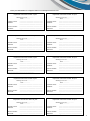
Submenu 3 - Data Time
In this menu you can set the current time and date.
This is important for proper functioning of the
program and switching between summer and
winter time. Once you have selected the submenu
from the main menu press
. You will see the
start screen and the hour of the time display
flashes. Press
to change the value. Then go to
the minutes by pressing
. Repeat the
previous steps for the day of the week and the
date. Finish with
or cycle trough all fields to
save the changes.