1
Chapter 3: Logger operation
Once connected, use the Remote Site Manager software to launch, read out, or check the status. See the
following sections for general information on launching and reading out. Refer to the Remote Site
Manager User’s Guide for detailed information about the software, the Radio Modem Operation Manual
for details on configuring the Radio Modem, and the Remote Modem User’s Guide for information about
configuring the Remote Modem.
Launching
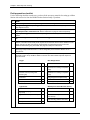
There are several parameters you can enter when launching the Micro Station with the logger software.
The following table describes the launch parameters you can set. Note: If you are launching the logger
with HandCar on a Palm handheld, the logger will be launched with the parameters you last entered in the
logger software.
Launch parameter
Description
Description
Battery type
Enter a description of the launch.
Make sure the appropriate battery type is selected, otherwise the battery gauge
will not be accurate when checking the logger status.
Set how often the logger will record data (for example every 30 minutes, hour,
etc). The minimum logging interval is 1 second and the maximum is 18 hours.
Keep in mind that the faster the logging interval, the more quickly the
batteries will be depleted. See the Estimating Battery Life section on page 16
for more details.
For use with sensors that support software-selectable measurement averaging.
The sampling interval sets how often sensors will take measurements between
logging intervals. Check the sensor’s data sheet or manual to determine if your
sensor supports measurement averaging. When a sampling interval is used
during launch, all the sampled measurements for the sensor are averaged
together and the average is then recorded as one data point at each logging
interval. The individual data points that comprise the average are not saved; only
the final, averaged data point is saved.
Set the sampling interval to one of the predefined settings from 1 second to 4
minutes. The sampling interval must be less than or equal to the logging interval.
Sampling rates shorter than 1 minute will reduce the logger’s battery life.
Important: If you do not have any sensors that support measurement averaging,
set the sampling interval to “Off” as there will be no benefit and it will reduce
battery consumption.
Choose one of the following start modes for the logger:
Logging interval
Sampling interval
When to start logging
•
Start logging now. The logger will start recording measurements as
soon as you are finished configuring the launch.
•
Delayed start. The launch is postponed until the exact date and time
you specify. You can add sensors to the logger any time before the
specified start time.
•
Button start. This allows you to configure the launch settings, but start
the actual launch when you want by pressing a button on the logger. You
can add sensors any time before pressing the button on the logger.
•
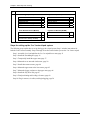
Wrap around when full
Edit sensor locations
Deployment notes
14
Save settings for a later launch. Select this option when you want to
save the current launch settings for a future launch, but not start the
launch now (for example, prior to heading into the field).
When this box is checked, new data will overwrite the oldest data in the logger
sequentially one sample at a time when the memory is full. The logger will
continue logging indefinitely until either the logger is read out and stopped or the
battery fails. If this box is not checked, the logger will stop logging when the
memory is full and preserve acquired data.
Give each sensor a name of up to 30 characters.
Add up to 2000 characters of notes about the launch.
HOBO Micro Station User’s Manual