1
Chapter 5: Troubleshooting
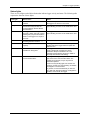
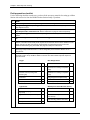
Problem
Resolution
Batteries die prematurely
•
Check for excessive moisture in the logger enclosure. Severe and/or
repeated condensation in the logger enclosure can lead to short circuits
and battery failure. It may be necessary to add additional sealing and/or
desiccant to the logger enclosure to prevent condensation.
•
Check to make sure that both the logging and sampling intervals are set for
at least 1 minute or greater. Sampling/Logging intervals faster than 1
minute will rapidly deplete the battery. See the section on Estimating
battery life on page 16 for more details.
•
Check for damaged wiring and/or sensors. Damaged cables or connectors
can result in complete or partial sort circuits that will rapidly drain batteries.
•
The lights are very faint. In direct sunlight, shield the sun and check again.
•
Make sure the batteries are not dead. Batteries should have at least 1 volt
per cell.
•
The memory may be full. Read out (offload) data from the logger and relaunch.
•
The logger may not have been launched. Check the status with the logger
software.
No status lights are
flashing
OK status light is not
flashing
Make sure the logger is launched. If you configured the logger to launch with a
delayed start, check the date and time you selected and make sure the Delay
Start light is flashing. If you configured the logger to launch with a button start,
press and hold the button on the logger for a second until all the lights flash.
Data file contains errors
If you are missing data for a particular sensor, check that the sensor was
properly installed. Remove and re-insert the sensor, and check that it can take
current readings. If you find that it is not communicating, it may be a bad
sensor. Contact your Onset dealer or Onset Computer Corporation.
Data file can’t be opened
The data file may have become corrupted. In rare circumstances, the data file
may have errors. Offload the logger again and try opening the file again. If that
does not work, contact your Onset dealer or Onset Computer Corporation.
Logger is not found
•
Check and replace the batteries.
•
Check communications cable connections.
54
HOBO Micro Station User’s Manual