1
Chapter 1: Introduction
Chapter 1
Introduction
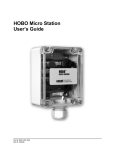
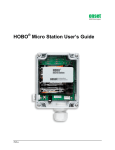
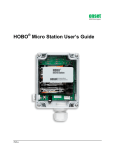
The HOBO® Micro Station is a four-sensor data logger
designed for applications requiring multi-channel monitoring
of microclimates in one or more locations. Part of the HOBO
Weather Station family, the Micro Station uses a network of
smart sensors for taking measurements. Key features of the
smart sensors include:
•
Automatic detection. No extensive programming,
wiring, or calibrating is required to set up sensors.
•
Easy expansion. Because the logger is not preconfigured, up to four sensors of any type or
combination can be added simply by plugging them
in before logging begins.
•
Digital network. The connections between the smart
sensors and the logger are digital, ensuring accurate,
reliable data collection and storage.
•
Weatherproof. A silicone gasket around the edge of
the case keeps out moisture, while a Gore™ Vent
allows the case to breath.
Specifications
HOBO Micro Station
Operating Range
Sensor Inputs
Communication
Dimensions
Weight
Memory
Memory Modes
Operational Indicators
Logging Interval
Battery Life
Battery Type
Time Accuracy
Data Type
-20° to 50°C (-4° to 122°F) with alkaline batteries,
-40° to 70°C (-40° to 158°F) with lithium batteries
Up to four smart sensors (including multiple-parameter sensors)
3.5 mm serial port
8.9 cm H x 11.4 cm D x 5.4 cm W (3.5 x 4.5 x 2.125 inches)
0.36 kg (0.8 lb)
512K nonvolatile flash data storage
Stop when full, wrap around when full
Seven lights provide logging and sensor network status
1 second to 18 hours, user-specified interval
1 year typical use (up to 4 sensors with 1 minute or longer logging
interval)
Four standard AA alkaline batteries included (for operating
conditions -20° to 50°C [-4° to 122°F]); optional AA lithium batteries
available for operating conditions of -40° to 70°C (-40° to 158°F)
0 to 2 seconds for the first data point and ±5 seconds per week at
25°C (77°F)
Supports measurement averaging based on availability of
supporting data from sensor
HOBO Micro Station User’s Guide
1