1
Kramer Electronics, Ltd.
Preliminary
USER MANUAL
Model:
VS-162AVM
16x16 Audio-Video Router with Preview Monitor
Contents
Contents
1
2
2.1
3
4
4.1
5
6
7
7.1
7.2
7.3
8
8.1
8.2
8.3
8.4
9
9.1
Introduction
Getting Started
Quick Start
Overview
Your Audio-Video Router
Using the IR Transmitter
Installing the VS-162AVM in a Rack
Installing and Operating a Single VS-162AVM
Configuring the VS-162AVM
Configuring a Standalone Switcher
Connecting the Balanced/Unbalanced Stereo Audio Input/Output
Assembling a System of Interconnected Switchers
Understanding Addressing and System Modes
Setting the DIP-Switches
Setting the MACHINE #
Understanding the SYSTEM Mode
Understanding the SLAVE Mode
Connecting a Control Interface
Connecting the RS-232 Control Interface
1
1
2
4
5
8
9
10
11
11
12
13
14
14
15
16
16
17
17
9.2
9.3
9.4
10
10.1
10.2
10.3
10.4
10.5
10.6
Connecting the RS-485 Control Interface
Configuring the Sync
Connecting the KEYBOARD EXTENSION
Operating Your VS-162AVM
Startup Display
Preview Display
Using the Front Panel Buttons
Choosing the Audio-Follow-Video or Breakaway Mode
Confirming Settings
Switching
19
21
22
23
23
23
24
24
25
26
10.7
Clearing
29
9.1.1
9.1.2
9.1.3
9.1.4
Connecting Two Units with a Null-Modem Adapter
Connecting Two Units without a Null-Modem Adapter
Connecting to a 9-pin PC COM Port with a Null-Modem Adapter
Connecting to a 9-pin PC COM Port without a Null-Modem Adapter
10.6.1 Switching one Input to one Output
10.6.2 Switching Several Inputs to Several Outputs
10.6.3 Switching One Input to All Outputs
10.7.1 Clearing an Output
18
19
19
19
26
27
28
29
i
Contents
10.7.2 Clearing Several Outputs
10.7.3 Clearing All Outputs
30
31
10.8
Storing and Recalling Setups
32
11
11.1
11.2
11.3
MENU Commands
Locking and Unlocking the Front Panel
Choosing the Follow or Breakaway Mode
Choosing the SWITCHING METHOD Setting
34
35
36
38
11.4
11.5
11.6
11.7
11.8
11.9
11.10
11.11
12
12.1
12.2
13
14
Choosing the Extended Keyboard Setting
Setting the STORE/RECALL KEYBOARD Mode
Choosing What to INDICATE
Choosing the COMMUNICATION Setting
Setting the IR REMOTE Control
Choosing the AUTO STORE Current SETUP
Identifying the MACHINE
Choosing the Initial RESET
Flash Memory Upgrade
Connecting the PC to the RS-232 Port
Upgrading the Firmware
Technical Specifications
Communication Protocol
40
40
41
42
43
43
44
45
46
46
46
49
49
10.8.1 Storing Setups
10.8.2 Recalling Setups
32
33
11.3.1 Understanding the SWITCHING METHOD Settings
11.3.2 Configuring a SWITCHING METHOD
ii
38
39
KRAMER: SIMPLE CREATIVE TECHNOLOGY
Contents
Figures
Figure 1: VS-162AVM 16x16 Audio-Video Router with Preview Monitor
Figure 2: Default DIP-Switch Setup on a Single Machine
Figure 3: Configuring the VS-162AVM as a Standalone Switcher
Figure 4: Connecting the Balanced Stereo Audio Input/Output
Figure 5: Connecting the Unbalanced Stereo Audio Input
Figure 6: Connecting an Unbalanced Stereo Audio Output
Figure 7: Assembling a System of Interconnected Switchers
Figure 8: Rear Panel DIP-switches
Figure 9: Connecting a PC to Four Units
Figure 10: RS-485 Connector PINOUT
Figure 11: Connecting the RS-485 Connectors
Figure 12: An RS-485 Control Interface Setup
Figure 13: Keyboard Extension (EXT. KEYS) Connector
Figure 14: Default Startup Status Display Sequence
Figure 15: Display Menu
Figure 16: Sequence of MENU Commands
Figure 17: Choosing the MTX (SYNC from Matrix) Setting
Figure 18: Choosing what to INDICATE
Figure 19: Machine Identification
6
10
12
12
12
12
13
14
18
19
20
21
22
23
24
34
39
41
44
Tables
Table 1: Front Panel Features
Table 2: Rear Panel Features
Table 3: Quick Reference Operating Guide for a Single Machine
Table 4: DIP-Switch Definitions
Table 5: Machine # DIP-switch Settings
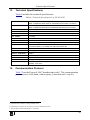
Table 6: Technical Specifications of VS-162AVM
Table 7: Hex Table for the VS-162AVM
7
7
11
15
15
49
50
iii
Introduction
1
Introduction
Welcome to Kramer Electronics! Since 1981, Kramer Electronics has been
providing a world of unique, creative, and affordable solutions to the vast range
of problems that confront the video, audio, presentation, and broadcasting
professional on a daily basis. In recent years, we have redesigned and upgraded
most of our line, making the best even better! Our 1,000-plus different models
now appear in 11 groups 1 that are clearly defined by function.
Thank you for purchasing the VS-162AVM 16x16 Audio-Video Router with
Preview Monitor that is ideal for the following typical applications:
• Any professional system requiring outstanding value in a 16x16
matrix
• Production and duplication facilities
• Rental/staging applications, security, CCTV, and home theater
systems
The package includes the following items:
• VS-162AVM 16x16 Audio-Video Router with Preview Monitor
• Power cord 2 and rack “ears”
• Windows®-based Kramer control software
• This user manual 3
• Kramer RC-IR3 Infrared Remote Control Transmitter (including the
required battery and a separate user manual)
2
Getting Started
We recommend that you:
• Unpack the equipment carefully and save the original box and
packaging materials for possible future shipment
• Review the contents of this user manual
• Use Kramer high-performance high-resolution cables 4
1 GROUP 1: Distribution Amplifiers; GROUP 2: Switchers and Matrix Switchers; GROUP 3: Control Systems;
GROUP 4: Format/Standards Converters; GROUP 5: Range Extenders and Repeaters; GROUP 6: Specialty AV Products;
GROUP 7: Scan Converters and Scalers; GROUP 8: Cables and Connectors; GROUP 9: Room Connectivity;
GROUP 10: Accessories and Rack Adapters; GROUP 11: Sierra Products
2 We recommend that you use only the power cord supplied with this device
3 Download up-to-date Kramer user manuals from our Web site at http://www.kramerelectronics.com
4 The complete list of Kramer cables is on our Web site at http://www.kramerelectronics.com
1
Getting Started
2.1
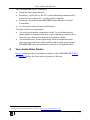
Quick Start
This quick start chart summarizes the basic setup and operation steps.
2
KRAMER: SIMPLE CREATIVE TECHNOLOGY
Getting Started
3
Overview
3
Overview
The VS-162AVM is a high-performance 16x16 vertical interval matrix
switcher for composite video signals on BNC connectors, and balanced stereo
audio signals on detachable terminal block connectors.
The VS-162AVM forms part of the series of 16x16 matrix switchers that
includes, but is not limited to, the VS-1616A (a 16x16 analog balanced
stereo audio matrix switcher), and VS-162V (a 16x16 video matrix
switcher).
In particular, the VS-162AVM features:
• A built-in high-quality 3.5-inch LCD display and audio
headphone output with volume control to conveniently monitor
the video and audio of any channel before and after switching
• Excellent video performance, which ensures that it remains
transparent in almost any video application
• Broadcast-quality specifications for audio bandwidth and levels,
and video bandwidth extends to well over 90MHz making the unit
suitable for all video and audio applications
• Multiple SYNC options that make it appropriate for a wide range
of applications with glitch-free transitions. It produces glitch-free
transitions, when sources share a common reference sync 1
In addition the VS-162AVM:
• Can be configured into a Kramer multi-signal switcher system
including digital and analog video, digital and analog audio, and
RS-422 control switchers
• When integrated in a system, all units switch in true audio-followvideo mode
• Both audio-follow-video and breakaway modes are available
• Recalls up to 60 configuration setups via the non-volatile memory
and provides for an unlimited quantity of setups when using the
Kramer control software on your PC
• Includes an alphameric LCD display to clearly view the switching
status and operate the menus and setup
• With its FLASH memory, lets you upgrade to the latest Kramer
firmware version via Internet download
1 As it switches during the vertical interval
4
KRAMER: SIMPLE CREATIVE TECHNOLOGY
Your Audio-Video Router
The VS-162AVM can be controlled:
• Using the front panel buttons
• Remotely, by RS-485 or RS-232 serial commands transmitted by
a touch screen system, PC, or other serial controller
• Remotely, from the Kramer RC-IR3 Infrared Remote Control
Transmitter
• Via external contact closure push buttons
To achieve the best performance:
• Use only good quality connection cables 1 to avoid interference,
deterioration in signal quality due to poor matching, and elevated
noise levels (often associated with low quality cables).
• Avoid interference from neighboring electrical appliances that
may adversely influence signal quality and position your Kramer
VS-162AVM away from moisture, excessive sunlight and dust
4
Your Audio-Video Router
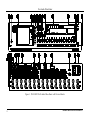
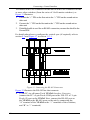
Figure 1 illustrates the front and rear panels of the VS-162AVM. Table 1
and Table 2 define the front and rear panels of the unit.
1 Available from Kramer Electronics on our Web site at http://www.kramerelectronics.com
5
Your Audio-Video Router
Figure 1: VS-162AVM 16x16 Audio-Video Router with Preview Monitor
6
KRAMER: SIMPLE CREATIVE TECHNOLOGY
Your Audio-Video Router
Table 1: Front Panel Features
Feature
IR Receiver LED
2
3
4
IR Receiver
Preview Monitor
MENU Button
5
6
7
8
9
LCD
CONTROL
#
1
+ Button
– Button
POWER Button
VOLUME Knob
PHONES ¼” Connector
ALL Button
VIDEO Button
OFF Button
10 AUDIO Button
11 STO Button
12 AFV Button
13 RCL Button
14 LCD MATRIX Display 3
15 LCD STATUS Display 3
16 OUT Buttons
17 IN Buttons
18 MENU Button
19 TAKE Button
Function
The red LED illuminates when receiving signals from the Kramer infrared
remote control transmitter
Receives signals from the Kramer infrared remote control transmitter
Displays the video routed to output 16
Press once to display the last LCD settings (brightness, contrast, saturation,
and sharpness), each additional press scrolls through the menu items
Increases the selected setting
Decreases the last setting
Turns the LCD display on and off
Adjusts the audio level of the headphones
Jack for connecting the headphones to audio 16 output
Pressing ALL followed by an INPUT button, connects that input to all outputs
1
When selected actions relate to video independently from audio
An OFF-OUT combination disconnects that output from the inputs; an OFFALL combination disconnects all the outputs
2
When selected actions relate to audio independently from video
Stores the current setting in the non-volatile memory
When selected actions relate to video and audio channels. Audio channels
follow the video channels, and the AFV button is illuminated
Recalls a setup from the non-volatile memory
Displays the selected input(s) switched to the output(s) (above or below the
corresponding OUTPUT label) and user interface messages
Displays the matrix status
Select the output to which the input is switched (1 to 15)
Preview/16 connects the input to the preview monitor
Select the input to switch to the output (1 to 16)
Recall and navigate the menu points for matrix setting
Used to confirm and complete setup and switching
Table 2: Rear Panel Features
Feature
IN BNC Connectors
OUT BNC Connectors
IN Terminal Blocks
OUT Terminal Blocks
IN BNC Connector
SYNC
#
20
21
22
23
24
25
LOOP BNC Connector
26 TERM Button
27 EXT. (extension) KEYS Terminal
Block Connectors
Function
Connect to the video sources
Connect to the video acceptors
Connect to the audio sources
Connect to the audio acceptors
Connect to the external video sync source
Connect to the SYNC IN connector on the next unit
Press to terminate at 75Ω or release for looping (push in to
terminate the sync line. Release when the sync line extends to
another unit)
Connect to an external keyboard (remote unit)
1 The VIDEO button is illuminated when the video breakaway mode is selected
2 The AUDIO button is illuminated when the audio breakaway mode is selected
3 In sections 10 and 11, the word “Displays” refers to the LCD MATRIX and STATUS displays
7
Your Audio-Video Router
#
Feature
28 RS-485 Detachable Terminal
Block Port
29 RS-232 IN 9-pin D-sub (F) Port
30 RS-232 OUT 9-pin D-sub (M) Port
31 SETUP DIP-switches
32 REMOTE IR 3.5mm Mini Jack
33 Power Connector with Fuse
34 Power Switch
4.1
Function
PINS # 1 and # 2 are for vertical sync and Ground connection, and
PINS # 3 and # 4 are for RS 485
Connect to the PC or the Remote Controller 1
Connect to the RS-232 IN 9-pin D-sub (F) port of the next unit in
the daisy-chain connection
DIP-switches for setup of the unit
Connect to an external IR receiver unit for controlling the machine via
an IR remote controller (instead of using the front panel IR receiver) 2
AC connector enabling power supply to the unit
Illuminated switch supplying power to the unit
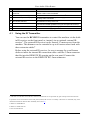
Using the IR Transmitter
You can use the RC-IR3 IR transmitter to control the machine via the builtin IR receiver on the front panel or, instead, via an optional external IR
receiver 3. The external IR receiver can be located 15 meters away from the
machine. This distance can be extended to up to 60 meters when used with
three extension cables 4
Before using the external IR receiver, be sure to arrange for your Kramer
dealer to insert the internal IR connection cable 5 with the 3.5mm connector
that fits into the REMOTE IR opening on the rear panel. Connect the
external IR receiver to the REMOTE IR 3.5mm connector.
13F
1 If the unit is not the first unit in the line, connects to the RS-232 OUT 9-pin D-sub (F) port of the previous unit in the line
2 Optional. Can be used instead of the front panel (built-in) IR receiver to remotely control the VS-162AVM (only if the
internal IR connection cable has been installed) (See section 4.1)
3 Model: C-A35M/IRR-50
4 Model: C-A35M/A35F-50
5 P/N: 505-70434010-S
8
KRAMER: SIMPLE CREATIVE TECHNOLOGY
Installing the VS-162AVM in a Rack
5
Installing the VS-162AVM in a Rack
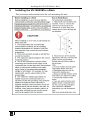
This section provides instructions for rack mounting the unit.
.
9
Installing and Operating a Single VS-162AVM
6
Installing and Operating a Single VS-162AVM
To install the VS-162AVM, connect the following 1 to the rear panel, as
required:
• Video input and output cables
• Audio input and output cables
• Control interface cables between switcher units, or PC (or other
controller), as section 9 describes
• Set the DIP-switches, as section 8.1 describes
• Power cord
• Set the system variables using the MENU function, as section 11
describes
By default, the VS-162AVM is setup for use as a single machine. This
means that it is:
• A 16x16 composite video switcher and a 16x16 balanced stereo
audio switcher are set to function by default, in the audio-followvideo mode
• Switched during the vertical interval of the external reference
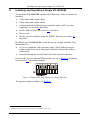
In particular, be sure that the DIP-switches are set as Figure 2 illustrates
(see section 8.1 for further details):
Figure 2: Default DIP-Switch Setup on a Single Machine
To operate a single machine, see Table 3.
1 Switch OFF the power on each device before connecting it to your unit
10
KRAMER: SIMPLE CREATIVE TECHNOLOGY
Configuring the VS-162AVM
Table 3: Quick Reference Operating Guide for a Single Machine
To perform this command:
Press:
Set breakaway mode
1
VIDEO
Set breakaway mode
2
AUDIO
Set audio-follow-video mode 3
AFV
Connect an input with an output
OUT #; IN #
Clear (disconnect) a specific output
Clear (disconnect) all outputs
OUT #; OFF
ALL; OFF
Connect all outputs to a specific input ALL; IN #
Store a setup
STO; OUT #; TAKE
Recall a setup
RCL; OUT #; TAKE
Lock front panel
MENU; TAKE
Unlock front panel
TAKE; TAKE
Change default setup
Press the Menu button several times until you reach the
appropriate Menu setup command and follow the instructions
7
Configuring the VS-162AVM
Using the VS-162AVM unit and/or other 16x16 matrix switchers in the
series 4, you can assemble the following kinds of systems:
• A standalone switcher (see section 7.1)
• A system of interconnected switchers (see section 7.2)
Note: When configuring multiple units, each unit must have an address. For
an explanation on addressing and system modes, see section 8.
7.1
Configuring a Standalone Switcher
By default, a single VS-162AVM unit is configured for:
• Composite video with 16 inputs and 16 outputs on BNC
connectors, and
• Balanced stereo audio with 16 inputs and 16 outputs on
detachable terminal block connectors, as shown in Figure 4 (to
configure for unbalanced 5 stereo audio, see Figure 5 and Figure 6)
1 All operations and the LCD MATRIX display relate to the video channel (independently from audio)
2 All operations and the LCD MATRIX display relate to the audio channel (independently from video)
3 All operations and the LCD MATRIX display relate to both the video and the audio channels. Audio channels follow the
video channels
4 Including the VS-1616A (a 16x16 analog balanced stereo audio matrix switcher)
5 However, for an unbalanced stereo audio input, the output is always half of the input signal. For example, if the input is
6dB, the output is 0dB
11
Configuring the VS-162AVM
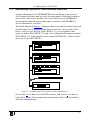
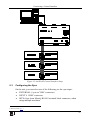
Configure your VS-162AVM unit as a standalone switcher, as Figure 3
illustrates:
Figure 3: Configuring the VS-162AVM as a Standalone Switcher
7.2
Connecting the Balanced/Unbalanced Stereo Audio
Input/Output
This section illustrates how to connect:
• A balanced stereo audio input/output connection, see Figure 4
• An unbalanced stereo audio input connection, see Figure 5
• An unbalanced stereo audio output connection, see Figure 6
Figure 4: Connecting the
Balanced Stereo Audio
Input/Output
12
Figure 5: Connecting the
Unbalanced Stereo
Audio Input
Figure 6: Connecting an
Unbalanced Stereo
Audio Output
KRAMER: SIMPLE CREATIVE TECHNOLOGY
Configuring the VS-162AVM
7.3
Assembling a System of Interconnected Switchers
A major advantage of the VS-162AVM is that it belongs to the series of
16x16 matrix switchers and, as such, can interconnect with other switchers
in the series. This series includes, but is not limited to, the VS-1616A (a
16x16 analog balanced stereo audio matrix switcher), and VS-162V (a
16x16 video matrix switcher).
The block diagram in Figure 7 illustrates how to assemble an interconnected
varied-format 16x16 series switcher that consists of a 16x16 Audio-Video
Router with Preview Monitor (MACHINE # 1), a 16x16 digital video
matrix switcher (MACHINE # 2), and a 16x16 digital audio matrix switcher
(MACHINE # 3). Each switcher has a unique MACHINE #. Control of the
system is via the MACHINE #.
Figure 7: Assembling a System of Interconnected Switchers
See section 8.1 for how to set the DIP-switches, and section 9 for how to
control this group of interconnected varied-format 16x16 series switchers,
and other configurations.
13
Understanding Addressing and System Modes
8
Understanding Addressing and System Modes
To control multiple machines, the VS-162AVM uses a system of addressing
that includes hardware DIP-switches and menu commands. The DIPswitches are used to set the MACHINE#, and menu commands are used to
set the MACHINE ADDRESS #. Note the following:
• A standalone machine is always set to MACHINE# 1
• When configuring multiple VS-162AVM units or a matrix of
VS-162AVM machines, the array is viewed as one large unit and
the DIP-switches of all machines are set to the same MACHINE#.
However, each machine is set to a unique MACHINE ADDRESS
# with a menu command on its display panel according to the
addressing rule shown in 8.1
• When configuring a mix of different model machines, each group
of models receives a different MACHINE# and each machine is
set to a unique MACHINE ADDRESS # (see section 8.2).
8.1
Setting the DIP-Switches
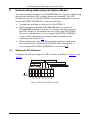
Configure the unit by setting the 8 DIP-switches as defined in Figure 8 and
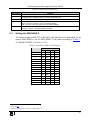
Table 4:
SYSTEM MODE SLAVE MODE
RS-232 NULL-MODEM
}
MACHINE #
RS-485 TERMINATION
ON
1 2 3 4 5 6 7 8
Figure 8: Rear Panel DIP-switches
14
KRAMER: SIMPLE CREATIVE TECHNOLOGY
Understanding Addressing and System Modes
Table 4: DIP-Switch Definitions
DIP-switch #
1-4
5
6
7
8
8.2
Function:
Set the MACHINE # (see Table 5 in section 8.2)
Enables (ON) or disables (OFF) the Follow-SYSTEM mode
Enables (ON) or disables (OFF) the SLAVE mode in a multi-channel configuration
1
Disables use of a null modem adapter with RS-232
OFF = RS-232 connection via a null modem adapter
ON = RS-232 connection without a null modem adapter
RS-485 termination for first and last machine = ON (RS-485 line terminates with
110Ω); for others = OFF (RS-485 line is open)
Setting the MACHINE #
To control a unit via RS-232 or RS-485, each unit has to be identified via its
unique MACHINE #. Set the MACHINE # 2 on a unit according to Table 5.
A valid MACHINE # is from 1 to 15.
Table 5: Machine # DIP-switch Settings
MACHINE #
1
DIP-SWITCH
2
3
4
1
ON
OFF
OFF
OFF
2
OFF
ON
OFF
OFF
3
ON
ON
OFF
OFF
4
OFF
OFF
ON
OFF
5
ON
OFF
ON
OFF
6
OFF
ON
ON
OFF
7
ON
ON
ON
OFF
8
9
OFF
ON
OFF
OFF
OFF
OFF
ON
ON
10
OFF
ON
OFF
ON
11
ON
ON
OFF
ON
12
OFF
OFF
ON
ON
13
ON
OFF
ON
ON
14
OFF
ON
ON
ON
15
ON
ON
ON
ON
1 See section 9.1
2 When using a single unit, set the unit to MACHINE # 1
15
Understanding Addressing and System Modes
8.3
Understanding the SYSTEM Mode
The terms audio-follow-video 1 and audio breakaway 2 are well known.
Sometimes signals other than audio signals need to switch simultaneously
and at other times, need to switch independently. For example:
• Non-linear editing systems, that sometimes combine video with
analog audio and at other times combine video with digital audio
• Duplication systems, that make Master tapes from programs with
different formats: composite analog, component analog and
component digital
DIP 5 defines whether the unit communicates with other switchers via a
common control line.
You can set DIP 5 OFF to disable the Follow-SYSTEM mode in standalone
switcher applications 3.
You must set DIP 5 ON to enable the Follow-SYSTEM mode in an
interconnected varied-format switcher application 4.
Refer to section 11.2 for a description of the MENU’s Follow-SYSTEM and
Breakaway-from- SYSTEM modes.
8.4
Understanding the SLAVE Mode
The SLAVE mode is only used for the multi-channel video switcher
configuration, for example, when joining together two units. Two units
could be configured as a 16x16 s-Video (Y/C) with 4-channel stereo audio.
One unit is used as the Master, and the other unit is the Slave. The Slave
always follows the Master. In the example the first unit is the Master (with
DIP 6 set OFF disabling the Slave mode) and the second unit is the Slave
(with DIP 6 set ON enabling the Slave mode).
On the Slave unit, the MATRIX and STATUS displays do not illuminate and
the STATUS display shows this message:
Keyboard LOCKED
1 Video and the audio channels switch simultaneously in the same way
2 Audio channels switch independently from the video channels
3 See section 7.1
4 See section 7.2
16
KRAMER: SIMPLE CREATIVE TECHNOLOGY
Connecting a Control Interface
However, the STATUS display on the Slave unit dynamically shows 1 all
changes made from the Master unit (which are implemented also on the
Slave unit).
Front panel control is via the Master unit, on which the front panel buttons
are unlocked and both the MATRIX and STATUS displays illuminate.
9
Connecting a Control Interface
Connect a control interface (RS-232 or RS-485) unless operating a unit as a
standalone unit without any control device (that is, with control from the front
panel or IR port, and not via a remote controller or a PC).
The control interface must be identical on each switcher in the series of
16x16 matrix switchers; either RS-232 or RS-485. One control interface
suffices. Do not use both RS-232 and RS-485 control interfaces in the same
configuration. For example, in an interconnected varied-format 16x16
switcher application 2, if the switcher that connects to the PC connects via
the RS-232 control interface, each switcher must interconnect via the
RS-232 control interface and not via the RS-485 control interface.
To operate the switcher at a range of up to 25 meters with a point-to-point
connection, use the RS-232 control interface.
To operate the switcher at a range of up to 1000 meters, use the RS-485
control interface.
9.1
Connecting the RS-232 Control Interface
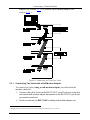
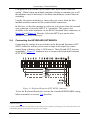
Connect several switchers (from the series of 16x16 matrix switchers) and
the control unit in an RS-232 daisy chain arrangement, with or without
using a null-modem adapter, as Figure 9 illustrates.
The RS-232 daisy chain switcher arrangement is transparent. This lets you
arrange the switchers (from the series of 16x16 matrix switchers) according
to your requirements, and not according to a fixed sequence dependent on
the MACHINE # and/or MACHINE ADDRESS #.
You can connect any of the following:
• Two units, with a null-modem adapter (see section 9.1.1) or
without a null-modem adapter (see section 9.1.2)
• The 9-pin D-sub COM port of the PC to a unit with a null-modem
1 Albeit with an LCD Display that does not illuminate
2 See section 7.2
17
Connecting a Control Interface
adapter (see section 9.1.3) or without a null-modem adapter (see
section 9.1.4 )
Figure 9: Connecting a PC to Four Units
9.1.1 Connecting Two Units with a Null-Modem Adapter
To connect two units, using a null-modem adapter provided with the
machine (default):
1. Connect a flat cable1 between the RS-232 OUT 9-pin D-sub port on the first
unit and the null-modem adapter that attaches to the RS-232 IN 9-pin D-sub
port on the second unit.
2. On the second unit, set DIP 7 OFF (enabling null-modem adapter use).
1 Straight one-to-one uncrossed connections with at least the 3 wires pins # 2, # 3 and # 5
18
KRAMER: SIMPLE CREATIVE TECHNOLOGY
Connecting a Control Interface
9.1.2 Connecting Two Units without a Null-Modem Adapter
To connect two units, without using a null-modem adapter:
1. Connect a flat cable1 between the RS-232 OUT 9-pin D-sub port on the first
unit and the RS-232 IN 9-pin D-sub port on the second unit.
2. On the second unit, set DIP 7 ON (disabling null-modem adapter use1).
9.1.3 Connecting to a 9-pin PC COM Port with a Null-Modem Adapter
To connect the 9-pin D-sub COM port of a PC to a unit, using a nullmodem adapter:
1. Connect a flat cable1 between the 9-pin D-sub COM port of a PC and the
null-modem adapter that attaches to the RS-232 IN 9-pin D-sub port on the
unit.
2. Set DIP 7 OFF (enabling null-modem adapter use1) on the unit.
9.1.4 Connecting to a 9-pin PC COM Port without a Null-Modem
Adapter
To connect the 9-pin D-sub COM port of a PC to a unit, without using a
null-modem adapter:
1. Connect a flat cable1 between the 9-pin D-sub COM port of a PC and the
RS-232 IN 9-pin D-sub port on the unit.
2. Set DIP 7 ON (disabling null-modem adapter use1) on the unit.
9.2
Connecting the RS-485 Control Interface
Figure 10 defines the RS-485 connector PINOUT for external RS-485
control. The RS-485 connector is also used (if required) for vertical sync:
Figure 10: RS-485 Connector PINOUT
1 See section 8.1
19
Connecting a Control Interface
To connect an RS-485 connector on one unit to an RS-485 connector on one
or more other switchers (from the series of 16x16 matrix switchers), as
Figure 11 illustrates:
1. Connect the “+” PIN on the first unit to the “+” PIN on the second unit or
other unit
2. Connect the “-” PIN on the first unit to the “-” PIN on the second unit or
other unit
3. If shielded cable is used for an RS-485 connection, connect the shield to the
Ground PIN.
For details about how to configure the vertical sync (if required), refer to
section 9.3 and Figure 17 in section 11.3.1.
Figure 11: Connecting the RS-485 Connectors
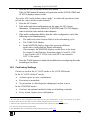
Figure 12 illustrates the RS-485 line that connects:
• To the PC via a Kramer Tools VP-43xl Interface Converter
(connect the PC’s 9-pin D-sub COM port to the “RS-232 in” 9-pin
D-sub (F) port on the VP-43xl. Next, connect the RS-485 port on
the VP-43xl to the RS-485 ports on the unit by connecting the
“A” terminal of the VP-43xl to the “+” terminals of the switchers,
and “B” to “-” terminals)
20
KRAMER: SIMPLE CREATIVE TECHNOLOGY
Connecting a Control Interface
Figure 12: An RS-485 Control Interface Setup
9.3
Configuring the Sync
On the unit, you can select one of the following, as the sync input:
• EXTERNAL (“sync in” BNC connector)
• INPUT # 1 BNC connector
• MTX (Sync from Matrix) RS-485 terminal block connector, when
using multiple machines 1
1 Refer to section 11.3.1
21
Connecting a Control Interface
Configure the sync via the SWITCHING METHOD Menu command
setting 1. When setting up multiple machines, linking a common sync to all
the machines may be necessary to facilitate simultaneous vertical interval
switching.
Usually, the easiest method is to choose the sync source from the first
machine and then connect all the terminal block connectors.
In this case, set the first machine to select the sync source from the external
sync connector or from the INPUT # 1 connector. This sync is now
available to the other machines via the RS-485 terminal block connector, as
Figure 10 and Figure 11 illustrate. Select the MTX sync on the other
machines that receive that sync.
9.4
Connecting the KEYBOARD EXTENSION
Connecting the contact closure switches to the Keyboard Extension (EXT.
KEYS) connector enables you to route an input to an output by remote
control from a distance of up to 1000 meters. These IN and OUT keys are
expandable 2. Figure 13 illustrates how to connect the Keyboard Extension
(EXT. KEYS):
Figure 13: Keyboard Extension (EXT. KEYS) Connector
To use the Keyboard Extension, activate the extended KEYBOARD setting
Menu command, as section 11.4 describes.
1 Refer to section 11.3
2 Add an unlimited number of push buttons to the existing keys (in parallel) by attaching one end of the push button to the
corresponding number and the other end to the IN or OUT terminal
22
KRAMER: SIMPLE CREATIVE TECHNOLOGY
Operating Your VS-162AVM
10
Operating Your VS-162AVM
Operate your VS-162AVM via:
• The front panel buttons (as this section describes)
• RS-232 or RS-485 serial commands transmitted by a touch screen
system, PC, or other serial controller (see section 14)
• Kramer RC-IR3 Infrared Remote Control Transmitter
• Contact closure switches connected to the keyboard extension
• An external IR receiver unit for controlling the machine via an IR
remote controller
10.1 Startup Display
After switching on the power, the MATRIX and STATUS 1 displays show the
following screen:
Figure 14: Default Startup Status Display Sequence
After a few seconds the MATRIX display shows the current OUT and IN
connections. The contents of the STATUS display depend on the current
switcher setup. To choose what to indicate on the status display, see section
11.6.
10.2 Preview Display
The preview display with its headphone output lets you see and hear the
contents of any video or audio input that is currently connected to output 16.
Output 16 is also available for regular output with the same specs as all the
other outputs. The regular video output and the preview display switch in
parallel as well as the audio output.
The Preview/16 output is manually controlled (it does not switch
automatically) and switches the same way as all the other outputs. This
includes remote operations.
1 Version 1.5 is shown in the Status Display as an example; text in the matrix display may vary (according to machine
settings)
23
Operating Your VS-162AVM
Depending on environmental light conditions, the preview display can be
adjusted with the small black pushbuttons on right of the display. Each
press of the MENU button highlights the BRIGHTNESS, CONTRAST,
SATURATION and SHARPNESS settings (see Figure 15). The "+" and "-"
buttons adjust each setting. The preview display can be turned ON or OFF
with the POWER pushbutton.
The display headphone volume is adjusted with the VOLUME knob.
Figure 15: Display Menu
10.3 Using the Front Panel Buttons
You can use the front panel buttons to operate the following functions:
• Switch video/audio signals in the BREAKAWAY or
AUDIO-FOLLOW-VIDEO modes (see section 10.4)
• Choose the AT ONCE or CONFIRM modes (see section 10.5).
You can switch (see section 10.6) and clear (see section 10.7):
• One input to one output
• Several inputs to several outputs
• One input to all outputs
10.4 Choosing the Audio-Follow-Video or Breakaway Mode
You can switch video/audio signals in one of two ways, either
BREAKAWAY or AVF.
To set the BREAKAWAY mode, in which video and audio channels switch
independently, either:
1. Press the VIDEO (for video control only) button.
If the VIDEO button illuminates, all operations and the LCD MATRIX and
STATUS displays relate to video; or
24
KRAMER: SIMPLE CREATIVE TECHNOLOGY
Operating Your VS-162AVM
2. Press the AUDIO (for audio control only) button.
If the AUDIO button illuminates, all operations and the LCD MATRIX and
STATUS displays relate to audio.
To set the AFV (audio-follow-video) mode 1, in which all operations relate
to both the video and the audio channels 2:
1. Press the AFV button.
2. If the audio and video configurations are the same, the AFV button
illuminates. All operations and the LCD MATRIX and STATUS displays
relate to both the video and the audio channels.
3. If the audio configuration differs from the video configuration, each of the
following occurs simultaneously:
• The audio and video buttons flash in a fast alternating cycle
• The TAKE LED flashes
• In the MATRIX display, digits that represent different
audio/video configurations flashes alternately
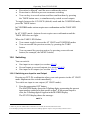
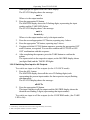
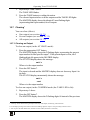
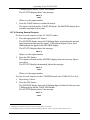
(For example, the MATRIX display would show as the input
for output 10, the flashing, alternating digits 01 and 02, if IN
1 was routed to OUT 10 for video, and IN 2 was routed to
OUT 10 for audio)
4. Press the TAKE button to confirm the modification (reconfiguring the audio
according to the video).
10.5 Confirming Settings
Choose to work in the AT ONCE mode or the CONFIRM mode:
In the AT ONCE (default 3) mode:
• Actions require no user confirmation
• Execution is immediate
• No protection is offered against changing an action in error
In the CONFIRM mode 4:
• You have an optional method to help avoid making a mistake
• Every action requires user confirmation
1 Be aware that all audio configurations that differ from the video configurations are lost when returning to the audio
breakaway mode after the AFV mode. To store an audio configuration setup, see section 10.8.1
2 Audio and video connections are the same and switch at the same moment at the beginning of the sync
3 For all actions except storing/recalling setups
4 The CONFIRM mode is the default for storing/recalling setups (see section 11.5)
25
Operating Your VS-162AVM
•
•
•
Execution is delayed 1 until the user confirms the action
Protection is offered to prevent erroneous switching
You can key-in several actions and then confirm them by pressing
the TAKE button once, to simultaneously switch several outputs
To toggle between the AT ONCE (default) mode and the CONFIRM mode,
press the TAKE button.
In CONFIRM mode: actions require user confirmation and the TAKE LED
lights.
In AT ONCE mode: Actions do not require user confirmation and the
TAKE LED does not light.
When the TAKE LED flashes:
• You cannot toggle between the AT ONCE and CONFIRM modes
• You can execute the previous action, by pressing the TAKE
button
• You can cancel the previous action, by pressing a non-relevant
button (for example, the MENU button)
10.6 Switching
You can switch:
• One input to one output (see section 10.6.1)
• Several inputs to several outputs (see section 10.6.2)
• One input to all outputs (see section 10.6.3)
10.6.1 Switching one Input to one Output
Pressing an OUT-IN combination when your unit operates in the AT ONCE
mode implements the switch immediately.
To switch one input to one output (AT ONCE mode):
1. Press the appropriate OUT button.
The MATRIX display shows the 2 flashing digits, representing the present
input number connected to that specific output2. If the present output is
clear, the 2 flashing digits 00 appear in the MATRIX display.
The STATUS display shows the message:
out # x
1 Failure to press the TAKE button within about 30 seconds (the Timeout) aborts the action
2 For example, pressing OUT button 9 shows the blinking digits 01 if input 1 was previously routed to OUT 9
26
KRAMER: SIMPLE CREATIVE TECHNOLOGY
Operating Your VS-162AVM
Where x is the output number
2. Press the appropriate IN button.
The output switches to the input and the MATRIX display shows the Input
# instead of the flashing digits.
The STATUS display momentarily shows the message:
out # x
from in # y
Where x is the output number and y is the input number
Pressing an OUT-IN combination when your unit operates in the
CONFIRM mode (and the TAKE LED is lit), requires user confirmation.
To switch one input to one output (CONFIRM mode):
1. Repeat step 1 above.
2. Press the appropriate IN button.
The MATRIX display shows the 2 flashing digits, representing the input
number and the TAKE LED flashes.
The STATUS display shows1 the message:
out # x
from in # y
Where x is the output number and y is the input number
3. Press the TAKE button to confirm the action.
The output switches to the input and the TAKE LED lights.
10.6.2 Switching Several Inputs to Several Outputs
In the AT ONCE mode, you need to execute each OUT-IN combination
separately (see section 10.6.1). When switching many inputs to many
outputs it is recommended to toggle to the CONFIRM mode.
In the CONFIRM mode you can key-in several actions and then confirm
them by pressing the TAKE button once (simultaneously switching several
inputs to several outputs).
To switch several inputs to several outputs in the CONFIRM mode (the
TAKE LED is lit), do the following:
1. Press the appropriate OUT button.
The MATRIX display shows the 2 flashing digits, representing the previous
input number for that specific output2. If the previous input is clear, the 2
1 Continuously, within the limit of the timeout (approximately 30 seconds)
2 For example, pressing OUT button 9 shows the blinking digits 01 if input 1 was previously routed to OUT 9
27
Operating Your VS-162AVM
flashing digits 00 appear in the MATRIX display.
The STATUS display shows the message:
out # x
Where x is the output number
2. Press the appropriate IN button.
The MATRIX display shows the 2 flashing digits, representing the input
number and the TAKE LED flashes.
The STATUS display shows 1 the message:
out # x
from in # y
Where x is the output number and y is the input number
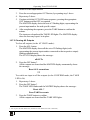
3. Press the second appropriate OUT button, repeating step 1 above.
4. Press the appropriate 2 IN button, repeating step 2 above.
5. Continue with this OUT-IN button sequence, pressing the appropriate OUT
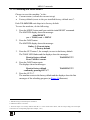
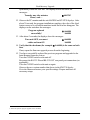
and IN buttons, as required. You can also combine an OUT-OFF or OFFOUT combination with this sequence.
6. After completing the sequence, press the TAKE button to confirm the
actions.
The inputs switch to the respective outputs, as the MATRIX display shows
(no digits flash) and the TAKE LED lights.
10.6.3 Switching One Input to All Outputs
To switch one input to all the outputs (in the AT ONCE mode):
1. Press the ALL button.
The MATRIX display shows all the sets of 2 flashing digits (each
representing the present input number for that respective output) flashing
simultaneously.
The STATUS display shows the message:
all OUTs
2. Press the appropriate IN button.
This input switches to all the outputs and the MATRIX display shows the
identical non-flashing 2 digits (representing that input number).
To switch one input to all the outputs (in the CONFIRM mode, (the TAKE
LED is lit)):
1 Continuously, within the limit of the timeout (approximately 30 seconds)
2 That corresponds with the second OUT button
28
KRAMER: SIMPLE CREATIVE TECHNOLOGY
Operating Your VS-162AVM
1. Repeat steps 1 and 2 above.
The TAKE LED flashes.
2. Press the TAKE button to confirm the action.
The selected input switches to all the outputs and the TAKE LED lights.
The MATRIX display shows the identical 2 non-flashing digits
(representing that input number) for all outputs.
10.7 Clearing
1
You can clear (delete):
• One output (see section 10.7.1)
• Several outputs (see section 10.7.2)
• All outputs (see section 10.7.3)
10.7.1 Clearing an Output
To clear an output (in the AT ONCE mode):
1. Press the appropriate OUT button.
The MATRIX display shows the 2 flashing digits, representing the present
input number for that specific output2. If the present input is clear, the 2
flashing digits 00 appear in the MATRIX display.
The STATUS display shows the message:
out # x
Where x is the output number
2. Press the OFF button3.
The input is cleared and the MATRIX display does not show any Input # in
its place.
The STATUS display momentarily shows the message:
out # x
reset
Where x is the output number
To clear an output (in the CONFIRM mode (the TAKE LED is lit)):
1. Repeat step 1 above.
2. Press the OFF button3.
The MATRIX display shows the 2 flashing digits 00 instead of the previous
1 “Clearing” means disconnecting the output from any of the inputs, and leaving it disconnected
2 For example, pressing OUT button 9 shows the blinking digits 01 if input 1 was previously routed to OUT 9
3 You can press the OFF button first, and then an OUT button (the order is irrelevant)
29
Operating Your VS-162AVM
2 flashing digits and the TAKE LED flashes.
The STATUS display shows 1 the message:
out # x
reset
Where x is the output number
3. Press the TAKE button to confirm the action.
The input is cleared and the TAKE LED lights. The MATRIX display does
not show any Input # in its place.
10.7.2 Clearing Several Outputs
To clear several outputs (in the AT ONCE mode):
1. Press the appropriate OUT button.
The MATRIX display shows the 2 flashing digits, representing the present
input number for that specific output2. If the present output is clear, the 2
flashing digits 00 appear in the MATRIX display.
The STATUS display shows the message:
out # x
Where x is the output number
2. Press the OFF button.
The output is cleared and the MATRIX display does not show any Input #
in its place.
The STATUS display momentarily shows the message:
out # x
reset
Where x is the output number
To clear several outputs (in the CONFIRM mode (the TAKE LED is lit)):
1. Repeat step 1 above.
2. Press the OFF button.
The MATRIX display shows the 2 flashing digits 00 instead of the previous
2 flashing digits and the TAKE LED flashes.
The STATUS display shows1 the message:
out # x
reset
1 Continuously, within the limit of the timeout (approximately 30 seconds)
2 For example, pressing OUT button 9 shows the blinking digits 01 if input 1 was previously routed to OUT 9
30
KRAMER: SIMPLE CREATIVE TECHNOLOGY
Operating Your VS-162AVM
Where x is the output number
3. Press the second appropriate OUT button, by repeating step 1 above.
4. Repeat step 2 above.
5. Continue with this OUT-OFF button sequence, pressing the appropriate
OUT buttons and the OFF, as required.
The MATRIX display shows the sets of 2 flashing digits, representing the
present input number for each specific output.
6. After completing the sequence, press the TAKE button to confirm the
actions.
The inputs are cleared and the TAKE LED lights. The MATRIX display
does not show any Input # in its place.
10.7.3 Clearing All Outputs
To clear all outputs (in the AT ONCE mode):
1. Press the ALL button.
The MATRIX display shows all the sets of 2 flashing digits (each
representing the present input number connected to that respective output)
flashing simultaneously.
The STATUS display shows the message:
all OUTs
2. Press the OFF button1.
All the outputs are cleared and the MATRIX display momentarily shows
the message:
Reset ALL connections
!!!!
To switch one input to all the outputs (in the CONFIRM mode, the TAKE
LED is lit):
1. Repeat step 1 above.
2. Press the OFF button1.
The TAKE LED flashes and the MATRIX display shows the message:
Reset ALL ?
Press TAKE to execute
3. Press the TAKE button to confirm.
All the outputs are cleared and the TAKE LED lights.
1 You can press the OFF button first, and then the ALL button (the order is irrelevant)
31
Operating Your VS-162AVM
10.8 Storing and Recalling Setups
You can store up to 60 settings in the non-volatile memory with the ability
to recall each of those settings. Whenever a setup is stored (and in whatever
mode), the following information is saved as an integral part of that stored
setup:
• Video status
• Audio status
• Mode (AUDIO-FOLLOW-VIDEO or BREAKAWAY)
10.8.1 Storing Setups
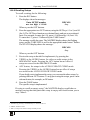
To store a setting, do the following:
1. Press the STO button.
The displays show the messages:
Enter SETUP number
use two digit # 01-60
Store
# xy
Where xy are the OUT buttons.
2. Press two OUT buttons, using the OUTkeys # 1 to 9, and 10 (for 0).
The OUTkeys function on a decimal-basis, and not on a positional-basis.
For example, to enter the # 14, press # 1 followed by # 4 (not # 14). To enter
the # 3, press # 3 followed by the TAKE button1.
The setups shown in the displays flash. In addition, the TAKE LED and the
appropriate mode button2 also flash.
The displays show the messages:
STORE this SETUP ?
YES -> TAKE
Store
# xy
3. Press the TAKE button.
The memory stores the setup and the MATRIX display shows the message:
Setup # xy stored
Note, saving a setup to a pre-allocated setup #, prompts the message in the
MATRIX display:
Setup already exists
Press TAKE to overwrite
Pressing the TAKE button replaces the stored setup with the current setup.
Alternatively, press a different OUT button to change the setup #.
1 Alternatively, pressing # 10 followed by # 3 also enters the # 3
2 VIDEO, AUDIO or AFV
32
KRAMER: SIMPLE CREATIVE TECHNOLOGY
Operating Your VS-162AVM
10.8.2 Recalling Setups
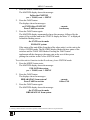
To recall a setting, do the following:
1. Press the RCL button.
The displays show the messages:
Enter SETUP number
use two digit # 01-60
RECALL
# xy
Where xy are the OUT buttons.
2. Press the appropriate two OUT buttons, using the OUTkeys # 1 to 9, and 10
(for 0). The OUTkeys function on a decimal-basis, and not on a positionalbasis. For example, to enter the # 14, press # 1 followed by # 4 (not # 14).
To enter the # 3, press # 3 followed by the TAKE button1.
The memory recalls the setup. The MATRIX display shows the flashing
setup, and the TAKE LED as well as the appropriate mode button2 flashes.
The STATUS display shows the message:
RECALL
# xy
Where xy are the OUT buttons.
3. Preview the setup to decide if to implement it, by pressing the:
• VIDEO or the AUDIO button, for video or audio setups in the
BREAKAWAY mode. Pressing the AFV button has no effect if
setups are stored in the BREAKAWAY mode
• AFV button, for setups in the AUDIO-FOLLOW-VIDEO mode.
Pressing the VIDEO or the AUDIO button has no effect if setups
are stored in the AUDIO-FOLLOW-VIDEO mode
If you decide not to implement the setup, you can scan the other setups, by
pressing different OUT buttons. To stop previewing the setups, press a nonrelevant button, for example, an IN button.
4. Press the TAKE button.
The specific setup is implemented.
If trying to recall an empty setup 3, the MATRIX display would show a
message saying that that particular setup is empty and would return you to
step 1 above.
1 Alternatively, pressing # 10 followed by # 3 also enters the # 3
2 VIDEO, AUDIO or AFV
3 That is, a setup # for which no setup is actually stored
33
MENU Commands
11
MENU Commands
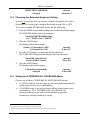
You can press the MENU button up to 11 times in straight sequence to scan
the range of commands.
LOCK front panel ?
yes -> TAKE, next -> MENU
Follow the SYSTEM
yes -> TAKE, next -> MENU
Operational Control
Change the current state by
pressing the TAKE button
SWITCHING METHOD setting
yes -> TAKE, next -> MENU
extended KEYBOARD setting
yes -> TAKE, next -> MENU
STORE/RECALL setting
yes -> TAKE, next -> MENU
what to INDICATE
yes -> TAKE, next -> MENU
COMMUNICATION setting
yes -> TAKE, next -> MENU
IR REMOTE setting
yes -> TAKE, next -> MENU
Setup Commands
Review the current setup by
pressing the TAKE button
several times (as required).
Pressing the TAKE button
lets you see how a command
is setup without changing it
AUTO store current SETUP
yes -> TAKE, next -> MENU
identify MACHINE
yes -> TAKE, next -> MENU
initial RESET
yes -> TAKE, next -> MENU
Figure 16: Sequence of MENU Commands
You can stop changing a setup at any time by pressing any IN button.
34
KRAMER: SIMPLE CREATIVE TECHNOLOGY
MENU Commands
11.1 Locking and Unlocking the Front Panel
To prevent changing the settings accidentally or tampering with the unit via
the front panel buttons, lock 1 your unit. Unlocking releases the protection
mechanism.
To lock the unit:
1. Press the MENU button once.
The MATRIX display shows the message:
LOCK front panel?
yes -> TAKE, next -> MENU
2. Press the TAKE button.
The front panel locks and the displays momentarily show the messages:
Front panel LOCKED
to unlock- press MENU2
Keyboard LOCKED3
Pressing a front panel button has no effect4 but remote RS-232 and RS-485
commands function and show on the MATRIX display.
To unlock the VS-162AVM:
Either:
1. Press the MENU button.
The MATRIX display shows the message:
to UNLOCK front panel
press TAKE
The TAKE LED flashes.
2. Press the TAKE button.
The front panel unlocks 5 and the MATRIX display momentarily2 shows the
message:
Front panel
UNLOCKED
Or:
1 Nevertheless, even though the front panel is locked you can still operate via RS-232 or RS-485 serial (remote controller or PC)
2 After a few seconds, the status of the unit replaces this message
3 This message appears continuously in the STATUS display, until the front panel is unlocked
4 IR and Keyboard Extension (EXT. KEYS) commands are also blocked
5 Switching the power off and on again also unlocks the front panel
35
MENU Commands
1. Press the TAKE button twice.
The front panel unlocks and the same messages show as in steps 1 and 2
above.
11.2 Choosing the Follow or Breakaway Mode
The terms audio-follow-video 1 and audio breakaway 2 are well known.
Sometimes signals other than audio signals need to switch simultaneously
and at other times, need to switch independently. For example:
• Non-linear editing systems, that sometimes combine video with
analog audio and at other times combine video with digital audio
• Duplication systems, that make Master tapes from programs with
different formats: composite analog, component analog and
component digital
When the Follow-SYSTEM command is selected, the unit automatically
switches in the AUDIO-FOLLOW-VIDEO (AFV) mode and the AFV
button illuminates.
When the BREAKAWAY from video command is selected (the Video
or the Audio button illuminates), the unit automatically switches in the
Breakaway-From-SYSTEM mode.
When the unit functions in the:
• Follow-SYSTEM mode, the unit switches with other 16x16 matrix
switchers 3, implementing the same action simultaneously
• Breakaway-from-SYSTEM mode, the unit 4 functions
independently, implementing an action independently of the
others
The unit functions 5 in the Follow-SYSTEM mode if at least one other unit 6
is set to the Follow-SYSTEM mode and these units interconnect via an
RS-232 and/or RS-485 communication line.
To set the unit to function in the Follow SYSTEM mode:
1 Video and the audio channels switch simultaneously in the same way
2 Audio channels switch independently from the video channels
3 16x16 matrix switchers in the same series that include, for example, the VS-1616A (a 16x16 analog balanced stereo audio
matrix switcher) units and/or the VS-162V (a 16x16 video matrix switcher)
4 Also applies to a VS-1616A unit
5 The unit changes its status immediately and goes to the Follow-system mode
6 Or VS-1616A unit (as well as other 16x16 matrix switchers in the same series)
36
KRAMER: SIMPLE CREATIVE TECHNOLOGY
MENU Commands
1. Press the MENU button twice.
The MATRIX display shows the message:
Follow the SYSTEM
yes -> TAKE, next -> MENU
2. Press the TAKE button.
The displays show the messages:
set UNIT follow SYSTEM?
Press TAKE to execute
current:
breakaway
3. Press the TAKE button again.
The MATRIX display momentarily shows this message, followed by the
status of the switcher and in the STATUS display the letter “S” is displayed
behind the flashing cursor:
the UNIT is set in mode
FOLLOW system
If the status of the unit differs from that of the other unit(s), set the unit to the
Follow-SYSTEM mode. The MATRIX display flashes the new status of the
switcher and the TAKE LED flashes. Pressing the TAKE button1
implements all the changes to the same state as the rest of the system
placing the switcher in the Follow-SYSTEM mode.
To set the unit to function in the Breakaway-from-SYSTEM mode:
1. Press the MENU button twice.
The MATRIX display shows the message:
FOLLOW the system
yes -> TAKE, next -> MENU
2. Press the TAKE button.
The displays show the messages:
BREAKAWAY from system?
Press TAKE to execute
current:
follow SYS
3. Press the TAKE button again.
The MATRIX display shows the message:
the UNIT is set in mode
BREAKAWAY from system
1 Pressing a different button cancels the operation and the switcher remains in its previous state
37
MENU Commands
11.3 Choosing the SWITCHING METHOD Setting
Section 11.3.1 describes the SWITCHING METHOD settings for
standalone units and large matrices. Section 11.3.2 describes how to
configure a SWITCHING METHOD.
11.3.1 Understanding the SWITCHING METHOD Settings
Setting the unit as a Stand-Alone UNIT provides a choice of three
SWITCHING METHOD settings:
• NoVIS - switching occurs immediately after completion of front
panel or dry-contact operation or immediately after receiving an
RS-232 or RS-485 command, or an IR command. The switching
is independent of the vertical reference
• EXT (external sync) - switching occurs during the vertical
interval of the video reference signal connected to the IN SYNC 1
connector (this signal should be properly terminated via the
TERM button 2)
• INT# 1 (internal sync) - switching occurs during the vertical
interval of the video reference signal connected to IN # 1
Setting the unit as a Large Matrix (instead of as a Stand-Alone UNIT) provides
a choice of 4 SWITCHING METHOD settings:
• NoVIS, EXT or INT# 1 (as described above)
• MTX (SYNC from Matrix) - the vertical interval of the video
reference (selected on one unit in the Large Matrix system) is
present on the “SYNC” RS-485 terminal block connector 3. This
reference signal applies to all switchers in the multi-switcher
system and facilitates switching all VS-162/VS-1616 series units
simultaneously
To choose the MTX (SYNC from Matrix) setting 4 as the example in Figure
17 illustrates:
• Connect the RS-485 terminal block connectors 5 between each
switcher in the multi-switcher system
• Connect and set the video reference signal on one of the video
units to EXT (external sync) or INT# 1 (internal sync)
1 Item 1 in Figure 1
2 Item 3 in Figure 1
3 Item 5 in Figure 1
4 This sets the matrix sync configuration from another (Master) machine
5 Via a straight connection of all 4 PINS
38
KRAMER: SIMPLE CREATIVE TECHNOLOGY
MENU Commands
•
Set the video reference on the other video units to the MTX
(SYNC from Matrix) setting
Video Reference
EXT (external sync)
IN
G+
Choose OUTkey 2 to configure EXT
SWITCHING METHOD setting
IN
RS-485
G+
Choose OUTkey 4 to configure
MTX SWITCHING METHOD setting
IN
-
RS-485
G+
Choose OUTkey 4 to configure
MTX SWITCHING METHOD setting
-
-
RS-485
Figure 17: Choosing the MTX (SYNC from Matrix) Setting
11.3.2 Configuring a SWITCHING METHOD
To choose a SWITCHING METHOD setting, do the following:
1. Press the MENU button until you reach the SWITCHING METHOD
setting.
The MATRIX display shows the message:
SWITCHING METHOD setting
yes -> TAKE, next -> MENU
2. Press the TAKE button.
The displays show the messages:
Use OUTkey to configure
1: noVIS 2: EXT 3: INT#1 4:MTX
Current
External1
3. Press an OUT button from 1, 2, 3 or 4. For example, OUT button # 3 to set
the internal sync configuration.
The TAKE LED flashes and the MATRIX display shows the message:
Press TAKE to configure
from INTERNAL (Input #1)
4. Press the TAKE button.
The displays show the messages:
1 Indicating that the machine is currently set to the external switching method setting
39
MENU Commands
SWITCHING METHOD
changed
current:
From In #1
11.4 Choosing the Extended Keyboard Setting
Section 9.4 describes how to connect a remote keyboard. Activate or
deactivate it by setting the extended Keyboard setting ON or OFF.
To set the extended KEYBOARD mode, do the following:
1. Press the MENU button until reaching the extended Keyboard setting.
The MATRIX display shows the message:
Extended KEYBOARD setting
yes -> TAKE, next -> MENU
2. Press the TAKE button.
The displays show the messages:
Outkey 1: External keys OFF
2: External keys ON
current:
X-key ON1
3. Press the OUT button 1 to deactivate the External keys.
The TAKE LED flashes and the displays show the messages:
Turn OFF external keys?
Press TAKE to execute
current:
X-key ON
4. Press the TAKE button.
The displays show the messages:
External Keyboard mode
changed
current:
X-key OFF
11.5 Setting the STORE/RECALL KEYBOARD Mode
Choose one of these STORE/RECALL KEYBOARD modes:
• At ONCE mode in which setups are stored/recalled immediately
without the need for user confirmation
• CONFIRM mode in which storing/recalling setups require user
confirmation. The CONFIRM mode is the default 2 for
storing/recalling setups and is recommended to prevent
erroneously storing/recalling of setups
1 Indicating that the external keys are currently activated
2 The AT ONCE mode is the default for all actions except storing/recalling setups
40
KRAMER: SIMPLE CREATIVE TECHNOLOGY
MENU Commands
To set the STORE/RECALL KEYBOARD mode to the AT ONCE mode,
instead of the CONFIRM (default) mode, do the following:
1. Press the MENU button until reaching the STORE/RECALL setting.
The MATRIX display shows the message:
STORE/RECALL setting
yes -> TAKE, next -> MENU
2. Press the TAKE button and choose the appropriate Outkey 1 for the AT
ONCE mode (Outkey 2 is for the CONFIRM mode).
The displays show the messages:
STO/RCL mode
changed
current:
At once
11.6 Choosing What to INDICATE
SYNC
Scrolling the Switcher Setup
SYSTEM
Alone _
AUDIO
FollowV _
STATUS
AUDIO
followV _
When the AFV
button illuminates
AUDIO mode
STATUS
AUDIO mode
Choose what is displayed during regular operation: between scrolling the
switcher setup as Figure 18 illustrates, and showing the AUDIO mode.
STATUS
AUDIO
Break _
When the VIDEO
or AUDIO
button illuminates
IRremote
Ext Key
Auto Save
ON _
Machine
# 01 _
Firmware
Figure 18: Choosing what to INDICATE
To scroll the switcher setup (instead of showing the AUDIO mode), do the
following:
41
MENU Commands
1. Press the MENU button until you reach the “What to INDICATE”
command.
The MATRIX display shows the message:
what to INDICATE
yes -> TAKE, next -> MENU
2. Press the TAKE button.
The displays show the messages:
Use OUTkey to configure
1: scroll SETUP 2: AUDIO mode
Current:
AUDIO
3. Press the OUT button 1.
The TAKE LED flashes and the displays show the messages:
Scroll switcher setup?
Press TAKE to execute
Current:
AUDIO
4. Press the TAKE button.
The displays show the messages:
display mode
changed
Current:
SETUP
11.7 Choosing the COMMUNICATION Setting
Choose the response option (reply or no reply).
To choose the No Reply response option, for example, do the following:
1. Press the MENU button until you reach the COMMUNICATION setting.
The MATRIX display shows the message:
COMMUNICATION setting
yes -> TAKE, next -> MENU
2. Press the TAKE button.
The MATRIX display shows the message:
Use OUTkey to configure
1: REPLY
2: No Reply
3. Press the OUT button 2.
The TAKE LED flashes and the displays show the messages:
Set serial port NO reply
Press TAKE to execute
Current:
Reply
4. Press the TAKE button again.
The displays show the messages:
SWITCHER RESPONSE
changed
42
Current:
No reply
KRAMER: SIMPLE CREATIVE TECHNOLOGY
MENU Commands
11.8 Setting the IR REMOTE Control
Set the IR REMOTE control to enable remote control of the 16x16 AudioVideo Router with Preview Monitor, using the Kramer Infrared Remote
Control Device 1. Refer to the Infrared Remote Control Device user manual 2,
for full details.
To set the MACHINE#, press keys # + 1. This sets MACHINE#1.
To enable IR REMOTE control (when set OFF), do the following:
1. Press the MENU button until reaching the IR REMOTE setting.
The MATRIX display shows the message:
IR REMOTE setting
yes -> TAKE, next -> MENU
2. Press the TAKE button.
The displays show the messages:
Outkey 1: InfraredREMOTE OFF
2: InfraredREMOTE ON
current:
remote OFF
3. Press the OUT button 2.
The TAKE LED flashes and the displays show the messages:
Turn ON infrared REMOTE ?
Current:
Press TAKE to execute
remote OFF
4. Press the TAKE button again.
The displays show the messages:
Infrared REMOTE mode
changed
Current:
remote ON
11.9 Choosing the AUTO STORE Current SETUP
Choose whether or not to save the current setup automatically, that is,
whether to save the machine’s status on power down, so that it returns to the
same status after cycling power.
To save the current setup automatically (when set OFF), do the following:
1 After enabling the IR REMOTE control command, remotely control the unit via the RC-IR3 remote control transmitter
pointed at the remote receiver on the machine’s front panel (item 1 in Figure 1)
2 You can download the RC-IR3 user manual at http://www.kramerelectronics.com
43
MENU Commands
1. Press the MENU button until you reach the AUTO Store Current SETUP
command.
The MATRIX display shows the message:
AUTO store current SETUP
yes -> TAKE, next -> MENU
2. Press the TAKE button.
The displays show the messages:
OUTkey 1: no AutoSave
2: AutoSave CURRENT setup
current:
NO save
3. Press the OUT button 2.
The TAKE LED flashes and the displays show the messages:
Auto store CURRENT setup ?
Press TAKE to execute
Current:
NO save
4. Press the TAKE button again.
The displays show the messages:
AUTOSAVE mode
changed
Current:
AutoSave
11.10 Identifying the MACHINE
Display essential information (the product name and version number) to
identify your machine, for example, for technical support purposes.
To identify your machine, do the following:
1. Press the MENU button until you reach the Identifying the MACHINE
command.
The MATRIX display shows the message:
identify MACHINE
yes -> TAKE, next -> MENU
2. Press the TAKE button.
The MATRIX display (as Figure 19 illustrates) shows the message:
Figure 19: Machine Identification
44
KRAMER: SIMPLE CREATIVE TECHNOLOGY
MENU Commands
11.11 Choosing the Initial RESET
Choose to reset the machine 1 to the:
• Current status 2 (reloads the current setup)
• Factory default (resets to the pre-installed factory default state 3)
Each VS-162AVM unit ships in its factory default
To reset the machine, do the following:
1. Press the MENU button until you reach the initial RESET command.
The MATRIX display shows the message:
initial RESET
yes -> TAKE, next -> MENU
2. Press the TAKE button.
The MATRIX display shows the message:
Outkey 1: Current status
2: Factory default
3. Press the OUT button 2, for example, to reset to the factory default.
The TAKE LED flashes and the displays show the messages:
Reset to factory default
Press TAKE to execute
WARNING!!!!!
4. Press the TAKE button again.
The displays show the messages:
Reset to factory default
confirm by pressing OUT # 7
WARNING!!!!!
5. Press the OUT # 7.
The machine resets to the factory default and the displays show the first
messages of the reloading progress (as Figure 19 illustrates).
1 Without having to switch the power off and on
2 Sometimes called a “soft reset”
3 Each unit ships in its factory default state that is a 16x16 audio-video matrix, with all setups empty and each input
connected to its corresponding output (for example, 1-to-1)
45
Flash Memory Upgrade
12
Flash Memory Upgrade
The main part of the unit firmware is located in FLASH 1 memory, which
lets you upgrade to the latest Kramer firmware version in minutes!
Download the up-to-date file from the Internet or obtain it from your dealer.
The following example shows how to install a file named (for example)
“162-15.hex” to the FLASH memory 2.
The current unit software version shows in the STATUS display as Figure 14
illustrates in section 10.1.
12.1 Connecting the PC to the RS-232 Port
Before installing the latest Kramer firmware version on a unit, connect:
• The COM port on your PC to the RS-232 IN port on the unit
When simultaneously upgrading the firmware on several units:
• Connect the COM port on your PC to the RS-232 IN port on the
first unit
• Connect the RS-232 OUT port on the first unit to the RS-232 IN
port on the second unit or another 16x16 unit
• Connect all 16x16 units that you want to upgrade, in this way,
linking them in a daisy chain connection
• Set DIP 7 according to whether or not a null-modem connection is
being used 3
12.2 Upgrading the Firmware
1. Install and run the K-Sender program on your PC.
2. Open the K-Sender program.
The File COM Port Sender window opens.
3. Choose the appropriate COM port.
Be sure that “9600 Baud rate” is chosen.
Click the File button.
4. Locate the file “162-15.hex” and click the Open button.
The filename appears in the lower part of the window (in bold script).
1 Electrically programmable and erasable
2 The number “15” in the file name indicates the version number “1.5”. Be sure you receive the latest version, and that it is a
“.hex” file
3 Refer to section 8.1 for full details
46
KRAMER: SIMPLE CREATIVE TECHNOLOGY
Flash Memory Upgrade
5. Press and hold the TAKE button while simultaneously turning on the
POWER switch on the unit.
After a few seconds, following the initial machine identification message,
the MATRIX display shows the following message:
Please,
release key TAKE
6. Release the TAKE button.
The TAKE LED flashes and the MATRIX display shows the following
message:
Update program?
Please confirm < TAKE >
7. Press the TAKE button.
The MATRIX display shows the following message:
YOU will lose current SETUP1
Confirm < TAKE >
8. Press the TAKE button again.
The MATRIX display shows the following message:
Are you ABSOLUTELY sure?
Press TAKE to execute
At this stage, and at any time previously, you can cancel the operation by
pressing any button, other than the TAKE button.
9. Press the TAKE button once again.
The program starts working and the TAKE LED turns off.
The MATRIX display shows the following message:
ERASE flash MEMORY
Please, wait…
10. After a few seconds the FLASH memory is erased and the MATRIX
display shows the following message:
Ready for receiving
Start transmission from PC
Note: If upgrading the firmware on more than one unit, be sure to
perform the above steps, 5 to 9, on each unit before continuing.
11. From your PC’s K-Sender program, click the Send button.
The color of the Send button changes to red and numbers appear
1 Upgrading firmware resets your unit to the factory default. This includes erasing all setups
47
Flash Memory Upgrade
dynamically inside the blue line. The displays on the unit show the
messages:
Transfer may take minutes
Please, wait…
Σ=0807561
12. Observe the PC monitor and the unit MATRIX and STATUS displays. After
about 30 seconds, the program installation completes, the color of the Send
button ceases to be red and the numbers inside the blue line disappear. The
displays on the unit show the messages:
Program replaced
successfully!
Σ=16608D
16608D
13. After about 3 seconds, the displays show the messages:
Turn unit OFF, reconnect
cables and turn ON
Σ=16608D
16608D
14. Verify that the checksum (for example, Σ=16608D) is the same on both
lines.
If not, repeat the firmware upgrade process from the beginning.
15. You have successfully replaced the previous program and upgraded to the
latest Kramer firmware version.
Turn the POWER switch on the unit off.
Reconnect the RS-232 IN and RS-232 OUT rear panel port connections (as
applicable).
Turn the POWER switch on the unit on again.
Observe the new version number that shows in the STATUS display.
Go to the Menu and restore your specific settings. Prepare and store all
necessary setups.
1 Shows the dynamic progress upgrade of the checksum
48
KRAMER: SIMPLE CREATIVE TECHNOLOGY
Technical Specifications
13
Technical Specifications
Table 6 includes the technical specifications:
1
Table 6: Technical Specifications of VS-162AVM
INPUTS:
Video: 16 composite video 1 Vpp/75Ω on BNC connectors
Audio: 16 balanced audio 10kΩ on detachable terminal block connectors
OUTPUTS:
Video: 16 composite video 1 Vpp/75Ω on BNC connectors
Audio: 16 balanced audio 50Ω on detachable terminal block connectors
MAX. OUTPUT LEVEL:
Video: 2.2 Vpp; Audio: 20dBm
BANDWIDTH (-3dB):
Video: 90 MHz; Audio: >100 kHz
DIFF. GAIN:
<0.18%
DIFF. PHASE:
± 0.4 Deg.
K-FACTOR:
<0.05%
S/N RATIO:
Video: 76dB; Audio: 82dB, unweighted
CROSSTALK (all hostile): Video: <-46dB @ 5MHz; Audio: -80dB @ 1kHz
CONTROLS:
41 selector switches; RS-232, RS-485, IR remote, dry keyboard extension, 3.5"
LCD preview display, 1/4" headphone output with volume dial
COUPLING:
Video: DC; Audio: AC
AUDIO THD + NOISE:
0.04% @ 1kHz
AUDIO 2nd HARMONIC:
0.002%
POWER:
100-240V AC, 50/ 60Hz, Imax=400mA, 31VA
DIMENSIONS:
19” x 7” x 2U W, D, H rack-mountable
WEIGHT:
3.7 kg (8.2 lbs) approx.
ACCESSORIES:
Power cord, null-modem adapter, Windows -based Kramer control
software, rack “ears”
14
®
Communication Protocol
Table 7 lists the Protocol 2000 2 hexadecimal codes 3. The communication
parameters are: 9600 baud, with no parity, 8 data bits and 1 stop bit.
1 Specifications are subject to change without notice
2 Full details are available on our Web site: www.kramerelectronics.com
3 This example assumes MACHINE # 1, and node 0
49
Communication Protocol
Table 7: Hex Table for the VS-162AVM
IN
1
IN
2
IN
3
IN
4
IN
5
IN
6
IN
7
IN
8
IN
9
IN
10
IN
11
IN
12
IN
13
IN
14
IN
15
IN
16
50
OUT
1
01
81
81
81
01
82
81
81
01
83
81
81
01
84
81
81
01
85
81
81
01
86
81
81
01
87
81
81
01
88
81
81
01
89
81
81
01
8A
81
81
01
8B
81
81
01
8C
81
81
01
8D
81
81
01
8E
81
81
01
8F
81
81
01
90
81
81
OUT
2
01
81
82
81
01
82
82
81
01
83
82
81
01
84
82
81
01
85
82
81
01
86
82
81
01
87
82
81
01
88
82
81
01
89
82
81
01
8A
82
81
01
8B
82
81
01
8C
82
81
01
8D
82
81
01
8E
82
81
01
8F
82
81
01
90
82
81
OUT
3
01
81
83
81
01
82
83
81
01
83
83
81
01
84
83
81
01
85
83
81
01
86
83
81
01
87
83
81
01
88
83
81
01
89
83
81
01
8A
83
81
01
8B
83
81
01
8C
83
81
01
8D
83
81
01
8E
83
81
01
8F
83
81
01
90
83
81
OUT
4
01
81
84
81
01
82
84
81
01
83
84
81
01
84
84
81
01
85
84
81
01
86
84
81
01
87
84
81
01
88
84
81
01
89
84
81
01
8A
84
81
01
8B
84
81
01
8C
84
81
01
8D
84
81
01
8E
84
81
01
8F
84
81
01
90
84
81
OUT
5
01
81
85
81
01
82
85
81
01
83
85
81
01
84
85
81
01
85
85
81
01
86
85
81
01
87
85
81
01
88
85
81
01
89
85
81
01
8A
85
81
01
8B
85
81
01
8C
85
81
01
8D
85
81
01
8E
85
81
01
8F
85
81
01
90
85
81
OUT
6
01
81
86
81
01
82
86
81
01
83
86
81
01
84
86
81
01
85
86
81
01
86
86
81
01
87
86
81
01
88
86
81
01
89
86
81
01
8A
86
81
01
8B
86
81
01
8C
86
81
01
8D
86
81
01
8E
86
81
01
8F
86
81
01
90
86
81
OUT
7
01
81
87
81
01
82
87
81
01
83
87
81
01
84
87
81
01
85
87
81
01
86
87
81
01
87
87
81
01
88
87
81
01
89
87
81
01
8A
87
81
01
8B
87
81
01
8C
87
81
01
8D
87
81
01
8E
87
81
01
8F
87
81
01
90
87
81
OUT
8
01
81
88
81
01
82
88
81
01
83
88
81
01
84
88
81
01
85
88
81
01
86
88
81
01
87
88
81
01
88
88
81
01
89
88
81
01
8A
88
81
01
8B
88
81
01
8C
88
81
01
8D
88
81
01
8E
88
81
01
8F
88
81
01
90
88
81
OUT
9
01
81
89
81
01
82
89
81
01
83
89
81
01
84
89
81
01
85
89
81
01
86
89
81
01
87
89
81
01
88
89
81
01
89
89
81
01
8A
89
81
01
8B
89
81
01
8C
89
81
01
8D
89
81
01
8E
89
81
01
8F
89
81
01
90
89
81
OUT
10
01
81
8A
81
01
82
8A
81
01
83
8A
81
01
84
8A
81
01
85
8A
81
01
86
8A
81
01
87
8A
81
01
88
8A
81
01
89
8A
81
01
8A
8A
81
01
8B
8A
81
01
8C
8A
81
01
8D
8A
81
01
8E
8A
81
01
8F
8A
81
01
90
8A
81
OUT
11
01
81
8B
81
01
82
8B
81
01
83
8B
81
01
84
8B
81
01
85
8B
81
01
86
8B
81
01
87
8B
81
01
88
8B
81
01
89
8B
81
01
8A
8B
81
01
8B
8B
81
01
8C
8B
81
01
8D
8B
81
01
8E
8B
81
01
8F
8B
81
01
90
8B
81
OUT
12
01
81
8C
81
01
82
8C
81
01
83
8C
81
01
84
8C
81
01
85
8C
81
01
86
8C
81
01
87
8C
81
01
88
8C
81
01
89
8C
81
01
8A
8C
81
01
8B
8C
81
01
8C
8C
81
01
8D
8C
81
01
8E
8C
81
01
8F
8C
81
01
90
8C
81
OUT
13
01
81
8D
81
01
82
8D
81
01
83
8D
81
01
84
8D
81
01
85
8D
81
01
86
8D
81
01
87
8D
81
01
88
8D
81
01
89
8D
81
01
8A
8D
81
01
8B
8D
81
01
8C
8D
81
01
8D
8D
81
01
8E
8D
81
01
8F
8D
81
01
90
8D
81
OUT
14
01
81
8E
81
01
82
8E
81
01
83
8E
81
01
84
8E
81
01
85
8E
81
01
86
8E
81
01
87
8E
81
01
88
8E
81
01
89
8E
81
01
8A
8E
81
01
8B
8E
81
01
8C
8E
81
01
8D
8E
81
01
8E
8E
81
01
8F
8E
81
01
90
8E
81
OUT
15
01
81
8F
81
01
82
8F
81
01
83
8F
81
01
84
8F
81
01
85
8F
81
01
86
8F
81
01
87
8F
81
01
88
8F
81
01
89
8F
81
01
8A
8F
81
01
8B
8F
81
01
8C
8F
81
01
8D
8F
81
01
8E
8F
81
01
8F
8F
81
01
90
8F
81
OUT
16
01
81
90
81
01
82
90
81
01
83
90
81
01
84
90
81
01
85
90
81
01
86
90
81
01
87
90
81
01
88
90
81
01
89
90
81
01
8A
90
81
01
8B
90
81
01
8C
90
81
01
8D
90
81
01
8E
90
81
01
8F
90
81
01
90
90
81
KRAMER: SIMPLE CREATIVE TECHNOLOGY
LIMITED WARRANTY
Kramer Electronics (hereafter Kramer) warrants this product free from defects in material and workmanship under the
following terms.
HOW LONG IS THE WARRANTY
Labor and parts are warranted for seven years from the date of the first customer purchase.
WHO IS PROTECTED?
Only the first purchase customer may enforce this warranty.
WHAT IS COVERED AND WHAT IS NOT COVERED
Except as below, this warranty covers all defects in material or workmanship in this product. The following are not covered
by the warranty:
1. Any product which is not distributed by Kramer, or which is not purchased from an authorized Kramer dealer. If you are
uncertain as to whether a dealer is authorized, please contact Kramer at one of the agents listed in the Web site
www.kramerelectronics.com.
2. Any product, on which the serial number has been defaced, modified or removed, or on which the WARRANTY VOID
IF TAMPERED sticker has been torn, reattached, removed or otherwise interfered with.
3. Damage, deterioration or malfunction resulting from:
i) Accident, misuse, abuse, neglect, fire, water, lightning or other acts of nature
ii) Product modification, or failure to follow instructions supplied with the product
iii) Repair or attempted repair by anyone not authorized by Kramer
iv) Any shipment of the product (claims must be presented to the carrier)
v) Removal or installation of the product
vi) Any other cause, which does not relate to a product defect
vii) Cartons, equipment enclosures, cables or accessories used in conjunction with the product
WHAT WE WILL PAY FOR AND WHAT WE WILL NOT PAY FOR
We will pay labor and material expenses for covered items. We will not pay for the following:
1. Removal or installations charges.
2. Costs of initial technical adjustments (set-up), including adjustment of user controls or programming. These costs are the
responsibility of the Kramer dealer from whom the product was purchased.
3. Shipping charges.
HOW YOU CAN GET WARRANTY SERVICE
1. To obtain service on you product, you must take or ship it prepaid to any authorized Kramer service center.
2. Whenever warranty service is required, the original dated invoice (or a copy) must be presented as proof of warranty
coverage, and should be included in any shipment of the product. Please also include in any mailing a contact name,
company, address, and a description of the problem(s).
3. For the name of the nearest Kramer authorized service center, consult your authorized dealer.
LIMITATION OF IMPLIED WARRANTIES
All implied warranties, including warranties of merchantability and fitness for a particular purpose, are limited in duration to
the length of this warranty.
EXCLUSION OF DAMAGES
The liability of Kramer for any effective products is limited to the repair or replacement of the product at our option. Kramer shall
not be liable for:
1. Damage to other property caused by defects in this product, damages based upon inconvenience, loss of use of the product, loss
of time, commercial loss; or:
2. Any other damages, whether incidental, consequential or otherwise. Some countries may not allow limitations on how long an
implied warranty lasts and/or do not allow the exclusion or limitation of incidental or consequential damages, so the above
limitations and exclusions may not apply to you.
This warranty gives you specific legal rights, and you may also have other rights, which vary from place to place.
NOTE: All products returned to Kramer for service must have prior approval. This may be obtained from your dealer.
This equipment has been tested to determine compliance with the requirements of:
EN-50081:
EN-50082:
CFR-47:
"Electromagnetic compatibility (EMC);
generic emission standard.
Part 1: Residential, commercial and light industry"
"Electromagnetic compatibility (EMC) generic immunity standard.
Part 1: Residential, commercial and light industry environment".
FCC* Rules and Regulations:
Part 15: “Radio frequency devices
Subpart B Unintentional radiators”
CAUTION!
Servicing the machines can only be done by an authorized Kramer technician. Any user who makes changes or
modifications to the unit without the expressed approval of the manufacturer will void user authority to operate the
equipment.
Use the supplied DC power supply to feed power to the machine.
Please use recommended interconnection cables to connect the machine to other components.
* FCC and CE approved using STP cable (for twisted pair products)
51
For the latest information on our products and a list of Kramer
distributors, visit our Web site: www.kramerelectronics.com,
where updates to this user manual may be found.
We welcome your questions, comments and feedback.
Safety Warning:
Disconnect the unit from the power supply before
opening/servicing.
Caution
Kramer Electronics, Ltd.
Web site: www.kramerelectronics.com
E-mail: [email protected]
P/N: 2900-000629 REV 2