1
Commissioning / Installation
5.2 CANopen interface
The CAN-Bus-Interface is defined by the international norm ISO/DIS 11898 and
specifies the two lowest layers of the ISO/DIS CAN Reference Model.
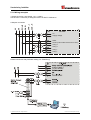
The CAN-BUS-Interface with the BUS-Driver PCA82C251 is galvanic isolated of the
laser electronic and becomes the power over internal DC/DC-converter. There is no
external power supply necessary for the CAN-BUS-Driver.
The conversion of the laser information to the CAN message format (CAN 2.0A) is
done by the CAN-controller SJA1000. The function of the CAN-controller is controlled
by a watchdog .
The CANopen Communication Profile (CIA standard DS 301) is a subset of CAN
Application Layer ( CAL ) and describes, how the services are used by devices. The
CANopen Profile allows the definition of device profiles for decentralized I/O.
The laser with CANopen-protocol support the Device Profile for Encoder ( CIA Draft
Standard Proposal 406, Version 2.0 ). The encoders support the extended functions
in Class C2 .
The communication functionality and objects, which are used in the laser profile, are
described in a EDS-File ( Electronic Data Sheet ).
When using a CANopen Configuration Tool ( e.g.:CANSETTER ), the user can read
the objects of the laser (SDOs) and program the functionality.
The selection of transmission rate and node number is done by hardware (switches).
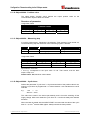
5.2.1 Bus status
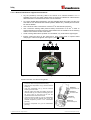
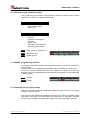
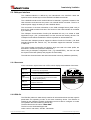
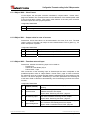
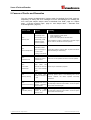
At the connection cap the laser has 3 LEDs, which display the bus status of the laser:
LEDs Off
Laser is not on-line
- Device may not be powered
RUN, green
On-line, with connections in the established state
- Device is allocated to a master
RUN,
green flashing
Recoverable fault
- e.g. I/O-connections are in the time-out state
(Node-Guarding active)
ERR, red
- Turn off system, after that turn on system
- Replace laser device
ERR,
red flashing
- Off-Line
OK, green
Laser hardware ok
ERR OK
RUN
5.2.2 EDS-file
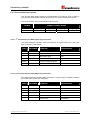
The EDS-file (electronic data sheet) contains all informations about the laser specific
parameters and operating modes of the laser measuring device. The EDS-file is
needed by the CANopen network configuration tool to be able to configure or to take
into operation the laser measuring device duly.
The EDS-file has the file name "LE200.EDS"
The file is on the Software/Support CD:
Order number: 490-01001, Soft-No.: 490-00408.
© TR-Electronic GmbH 2007, All Rights Reserved
Printed in the Federal Republic of Germany
18.12.2007
TR - ELE - BA - GB - 0010 - 03
Page 21 of 48